
Following its emergence in February 2026, EvilTokens quickly became one of the most widely used phishing-as-a-service (PhaaS) platforms, providing cybercriminals with AI capabilities for tailoring phishing lures and analyzing compromised inboxes to identify high-value targets. This AI-powered cybercrime platform facilitated sophisticated business email compromise (BEC) campaigns that compromised more than 12,000 inboxes in over 10,000 organizations worldwide.
EvilTokens enabled threat actors to abuse the device code authentication flow, steal tokens, and compromise organizational accounts at scale using an AI-driven infrastructure and automating multiple parts of the attack chain. The toolkit offered a plethora of prebuilt phishing templates and landing pages with an AI-powered assistant to aid in structuring target-specific emails.
Stolen tokens are used for email exfiltration and persistence, often through the creation of malicious inbox rules that conceal communications. In some cases, tokens can also be used to grant new devices access to a victim’s inbox, a particularly durable method to maintain persistence. Microsoft Threat Intelligence tracks the threat actor behind the development and support of the EvilTokens phish kit as Storm-2992.
Post-compromise, EvilTokens enabled threat actors to utilize AI assistants to sift through victim mailbox activity and engineer a phishing message based on the accessible email content. EvilTokens also allowed threat actors to conduct Microsoft Graph reconnaissance to map organizational structure and permissions, enabling continued access and potential lateral movement while tokens remain valid. While token-targeting phishing is not new, it has become far more common and industrialized over the last several years as organizations adopted multifactor authentication (MFA).
To evade detection, EvilTokens uses a multi-stage delivery pipeline designed to bypass traditional email gateways and endpoint security. Targets are lured through deceptive emails that use 44 different themes, including invoices and request for proposals (RFPs), or shared files. These emails contained malicious URLs, PDF attachments, and HTML files.
Campaigns leveraging EvilTokens have impacted organizations in various industries, including wholesale distribution, construction, financial services, real estate, higher education, and healthcare, with the highest concentrations of observed victim activity in the United States, Canada, the United Kingdom, Australia, India, and France. Working with partners, Microsoft’s Digital Crimes Unit (DCU) facilitated a coordinated disruption of infrastructure used to operate the EvilTokens service.
This blog provides a comprehensive, up-to-date analysis of the EvilTokens platform and operations. We share specific examples of the EvilTokens service panel and a detailed analysis of EvilTokens infrastructure. Defending against EvilTokens and similar adversary-in-the-middle (AiTM) phishing threats requires a layered approach that blends technical controls with user awareness. This blog also provides Microsoft Defender detection and hunting guidance, as well as resources on how to set up mail flow rules, enforce spoof protections, and configure third-party connectors to prevent spoofed phishing messages from reaching user inboxes.
What is device code phishing?
One of the primary capabilities of EvilTokens is its device code phishing flow, which abuses device code authentication, a legitimate OAuth flow designed for devices with limited interfaces, such as smart TVs, printers, Teams devices, and conferencing devices, that cannot support a standard interactive sign-in. In this model, a user is presented with a short code on the device they are trying to sign in from and is instructed to enter that code into a browser on a separate device to complete authentication.
While this flow is useful for these scenarios, it introduces a security tradeoff. Because authentication is completed on a separate device, the session initiating the request is not strongly bound to the user’s original context. Threat actors have abused this characteristic as a way to circumvent traditional MFA protections by decoupling authentication from the originating session. Threat actors also use social engineering layouts and other tricks to disguise the legitimate device code flow approval as something else required.
Device code phishing occurs when threat actors insert themselves into this process. Instead of a legitimate device requesting access, the threat actor initiates the flow and provides the user with a code through a phishing lure. When the user enters the code, they unknowingly authorize the threat actor’s session, granting access to the account without exposing credentials. Microsoft recommends blocking device code flow wherever possible. If your organization uses Teams devices that require device code flow, scope the exception to specific Teams device resource accounts and exclude the Device Registration Service resource from your Conditional Access policy.
In April 2026, Microsoft tracked a phishing campaign aligned with EvilTokens that used automation platforms to spin up thousands of unique, short-lived polling nodes. This approach allowed the threat actors to deploy complex backend logic (Node.js) that bypassed traditional signature-based or pattern-based detection. This infrastructure was leveraged in the attack end-to-end, from generating dynamic device codes to post-compromise activities.
The following sections examine how EvilTokens operated, the capabilities available through its customer panel, and infrastructure supporting phishing campaigns. We also trace the EvilTokens attack chain, from lure delivery and device code generation through defense evasion, token theft, and post-compromise activity.
EvilTokens platform and operations
Distribution and affiliate support
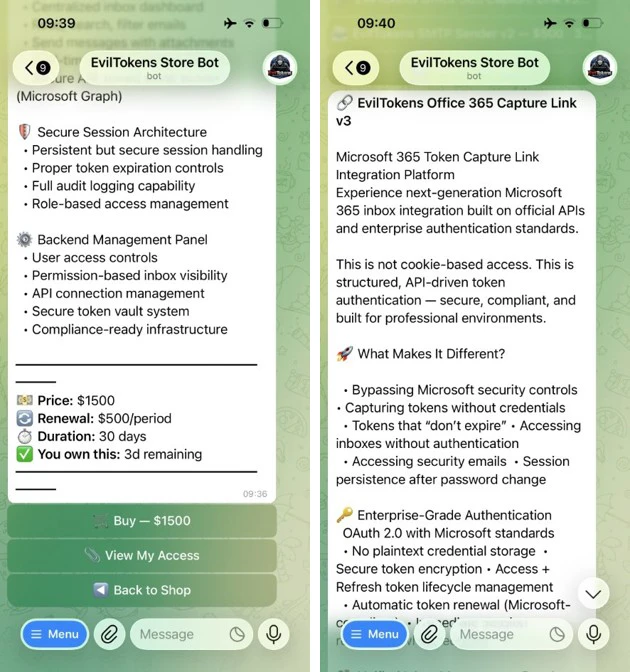
The threat actor tracked as Storm-2992 advertised and sold EvilTokens services to cybercriminals on the actor’s Telegram channels. Cybercriminals continue to gravitate towards apps like Telegram that provide anonymity, cross-platform access, file sharing, and channels for broadcasting announcements to large groups of followers. The threat actor uses Telegram to advertise their phish kit, announce updates, coordinate with their subscribers, and provide customer support.

EvilTokens phish kits are sold at $1,500 USD for initial purchase, with a monthly subscription fee of $500 for continued access to the kit and control panel. The kit provides additional products, including Antibot redirector, B2B Sender, Office 365 Capture Link, and a Simple Mail Transfer Protocol (SMTP) Sender. Each of these products has additional fees for 30 days of access.
Customer panel and campaign configuration
The EvilTokens panel provides the core components needed to support phishing campaigns, including pre‑built templates, attachment files for common lure formats, domain and hosting configuration, redirect logic, and victim tracking.
After signing in, EvilTokens subscribers are presented a dashboard with various options to choose from. First, subscribers are asked to choose a deployment method (Cloudflare Workers/Bunny or PHP Hosting) and then are asked to choose from a list of deploy options, including Capture Mode, Layout & Template, Code Display Style, Page Language, CAPTCHA, AI Mode, and Captured Text. These options allow subscribers to highly customize their deployment methods.

Subscribers are provided with multiple settings and additional guidance for managing captured tokens. Once tokens have been captured, EvilTokens offers its subscribers full access to the victim email account, as well as admin detection, token auto-refresh, and an auto-scan of inboxes using keyword alerts through Telegram.

The toolkit offers additional products, which are detailed under Essential Tools. Here, subscribers are given product information and are provided with a link to download or get the product as well as a video tutorial. Subscribers are even given the opportunity to receive cryptocurrency as a reward for referring the service to others.

The platform offers 44 different themes for customizing email templates and landing pages, including text and colors.

EvilTokens phishing emails
EvilTokens offers subscribers personalized lures, using AI to create targeted phishing emails aligned to the target’s role, including the use of various themes to increase the likelihood of user interaction. Themes used include document signing services, Microsoft cloud services, third-party services (cloud identity, file hosting, payment/invoicing), and other miscellaneous services like voicemail and eFax.
Additionally, researchers at Huntress noted email content like construction bid proposals, business partnership agreements, employee compensation/benefits, and password expiring notices in EvilTokens emails.
EvilTokens phishing sequence
The attack chain begins when a user interacts with a malicious attachment or URL embedded within a high-pressure lure (for example, “Action Required: Password Expiration”).

When a user clicks the malicious link or attachment, they are directed to a web page running a background automation script. This script interacts with the Microsoft identity provider in real time to generate a live device code. This code is then displayed on the user’s screen with a “Copy Code” button along with a “Continue” or “Continue with Microsoft” button that, when clicked, redirects to the official microsoft.com/devicelogin portal.
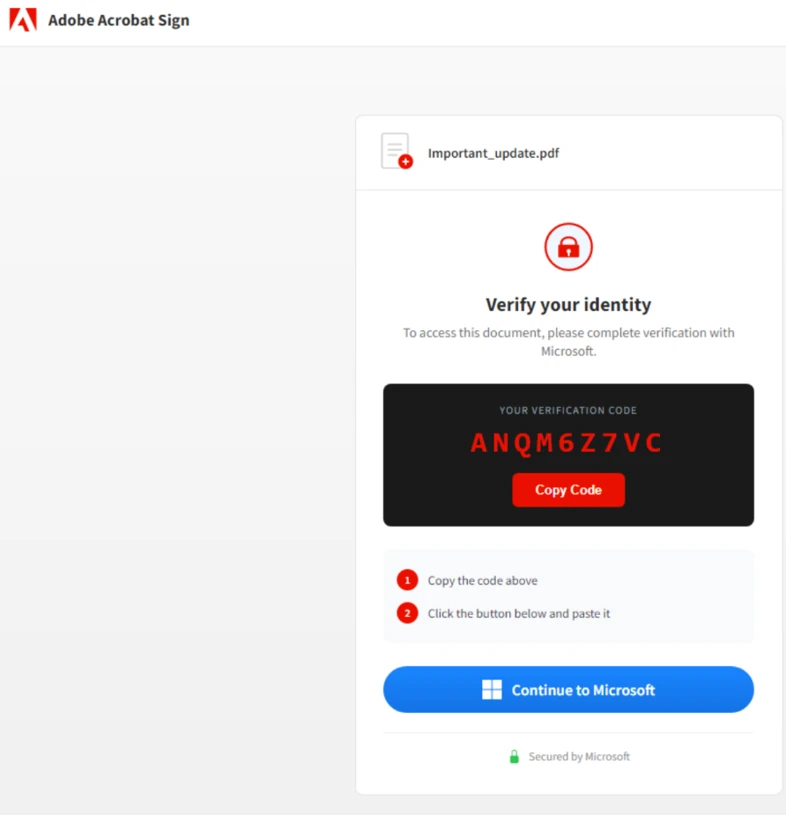
After presenting the code to the user and opening the legitimate microsoft.com/devicelogin URL, the script enters a polling state using the checkStatus() function to monitor the 15-minute window in real time. Every three to five seconds (setInterval), the script pings the threat actor’s /state endpoint. It sends the secret session identifier code to validate if the user has authenticated yet. While the targeted user is entering the code on the real Microsoft site, the loop returns a “pending” status.
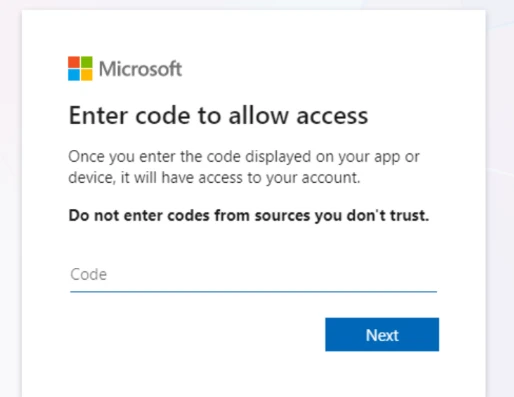
To minimize user effort and maximize the success rate, the threat actor’s script often automatically copies the generated device code to the user’s clipboard. Once the user reaches the official sign-in page, they paste the code. If the user does not have an active session, they are prompted to provide their password and MFA. If they are already signed in, simply pasting the code and confirming the request instantly authenticates the threat actor’s session in the backend.
The final stage varies depending on the threat actor’s specific objectives. In some instances, within 10 minutes of the breach, threat actors registered new devices to generate a Primary Refresh Token (PRT) for long-term persistence. In other scenarios, they waited several hours before creating malicious inbox rules or exfiltrating sensitive email data to avoid immediate detection.
EvilTokens adds the capability for threat actors to phish and take actions that they would not be capable of performing without EvilTokens tools assisting them, giving threat actors the ability to mass-phish users and perform other operations at their leisure.
Defense evasion
EvilTokens uses a multi-stage delivery pipeline designed to bypass traditional email gateways and endpoint security. Phishing pages delivered to the user vary in complexity and evasion techniques, adding a customization layer by the operator and which tools they use. Popular techniques include but are not limited to image links (images that link to URLs), multi-stage redirection schemes, and attachments containing multi-stage delivery.
Landing page evasions include fake CAPTCHA checks/verification services that require user interaction before displaying the phishing content. To further evade automated URL scanners and sandboxes, the threat actors will at times not link directly to the final phishing site. Instead, they use a series of redirects through compromised legitimate domains and high-reputation “serverless” platforms. We observed heavy reliance on abuse of Vercel (.vercel.app), Cloudflare Workers (.workers.dev), and AWS Lambda for hosting the redirect logic. By using these domains, the phishing traffic blends in with legitimate enterprise cloud traffic, evading simple domain-blocklist triggers.
Post-compromise account access
Once authentication tokens are obtained, threat actors can focus on post-compromise activity designed to maintain and expand access and extract data. This access can be used to send further emails internally to the organization and to external contacts, allowing the actor to send phishing emails for seemingly trusted contacts. In one observed incident, the attack progressed to email exfiltration and account persistence through inbox rules created using Microsoft Office. This involved filtering the compromised users and selecting targets:
- High-value target identification: Using the EvilTokens AI capability, the threat actor reviewed and filtered for high-value targets—specifically those in financial, executive, or administrative roles—within the pool of compromised users.
- Accelerated reconnaissance: After gaining access to Microsoft Graph for reconnaissance, the threat actor programmatically mapped internal organizational structures and identified sensitive permissions the moment a token was secured.
- Targeted financial exfiltration: The most invasive activity was reserved for users with financial authority. For these specific profiles, the threat actors performed deep-dive reconnaissance into email communications, searching for high-value targets and sensitive information like wire transfer details, pending invoices, and executive correspondence.
Mitigation and protection guidance
To harden networks against the device code phishing activity described above, defenders can implement the following:
- Only allow device code flow where necessary. Microsoft recommends blocking device code flow wherever possible. Where necessary, configure Microsoft Entra ID’s device code flow in your Conditional Access policies.
- Educate users about common phishing techniques. Sign-in prompts should clearly identify the application being authenticated to. As of 2021, Microsoft Azure interactions prompt the user to confirm (“Cancel” or “Continue”) that they are signing in to the app they expect, which is an option frequently missing from phishing sign-ins. Be cautious of any “[EXTERNAL]” messages containing suspicious links. Do not sign in to resources from unfamiliar senders. Learn how to protect yourself from phishing.
- Configure anti-phishing policies. Anti-phishing policies protect against phishing attacks by detecting spoofed senders, impersonation attempts, and other deceptive email techniques.
- Configure Safe Links in Defender for Office 365. Safe Links scanning protects your organization from malicious links that are used in phishing and other attacks. Safe Links can also enable high-confidence device code phishing alerts from Defender.
- If suspected device code phishing activity is identified, follow the guidance on responding to a compromised email account. Additionally, revoke the user’s refresh tokens by calling revokeSign-inSessions. Consider setting a Conditional Access Policy to force re-authentication for users. (Observations from recent campaigns indicate that standard session revocation often only invalidates refresh tokens, leaving existing access tokens active for up to an hour. Given the hands-on nature of this threat, they frequently exploit this window of opportunity; consequently, we recommend temporarily disabling the compromised account to ensure immediate containment, despite the potential for brief business disruption).
- Increase Advanced Phishing Threshold to 2 or 3.
- Enable Zero-hour auto purge (ZAP) in Microsoft Defender for Office 365 to quarantine sent mail in response to newly acquired threat intelligence and retroactively neutralize malicious phishing, spam, or malware messages that have already been delivered to mailboxes.
- Encourage users to use Microsoft Edge and other web browsers that support Microsoft Defender SmartScreen, which identifies and blocks malicious websites, including phishing sites, scam sites, and sites that host malware.
- Create alerting of suspicious inbox-rule creation to quickly identify and triage evidence of business email compromise (BEC) and phishing campaigns. This playbook helps defenders investigate any incident related to suspicious inbox manipulation rules configured by threat actors and take recommended actions to remediate the attack and protect networks.
Microsoft recommends the following best practices to further help improve organizational defenses against phishing and other credential theft attacks:
- Implement a sign-in risk policy to automate response to risky sign-ins. A sign-in risk represents the probability that a given authentication request is not authorized by the identity owner. A sign-in risk-based policy can be implemented by adding a sign-in risk condition to Conditional Access policies that evaluates the risk level of a specific user or group. Based on the risk level (high/medium/low), a policy can be configured to block access or force multifactor authentication.
- When a user is a high risk and Conditional Access evaluation is enabled, the user’s access is revoked, and they are forced to re-authenticate.
- For regular activity monitoring, use Risky sign-in reports, which surface attempted and successful user access activities where the legitimate owner might not have performed the sign-in.
- Require multifactor authentication (MFA). Implementation of MFA remains an essential pillar in identity security and is highly effective at stopping a variety of threats.
- Leverage phishing-resistant authentication methods such as FIDO Tokens, or Microsoft Authenticator with passkey. Avoid telephony-based MFA methods to avoid risks associated with SIM-jacking.
- Block legacy authentication with Microsoft Entra by using Conditional Access. Legacy authentication protocols do not have the ability to enforce MFA, as legacy MFA (per-user MFA prompts) is susceptible to abuse.
- Centralize your organization’s identity management into a single platform. If your organization is a hybrid environment, integrate your on-premises directories with your cloud directories. If your organization is using a third-party for identity management, ensure this data is being logged in a SIEM or connected to Microsoft Entra to fully monitor for malicious identity access from a centralized location. The added benefit of centralizing all identity data is to facilitate implementation of Single Sign On (SSO) and provide users with a more seamless authentication process, as well as configure Entra ID’s machine learning models to operate on all identity data, thus learning the difference between legitimate access and malicious access quicker and easier. It is recommended to synchronize all user accounts except administrative and high privileged ones when doing this to maintain a boundary between the on-premises environment and the cloud environment, in case of a breach.
- If there are indications such as alerts that a user’s refresh token is compromised, disable the device and revoke all existing refresh tokens. Disabling the device stops PRTs from working, and revoking the refresh tokens stops any refresh tokens that were issued using the PRT from working. Follow steps from Microsoft’s token theft playbook when responding to alerts related to compromised identities.
- Secure accounts with credential hygiene: practice the principle of least privilege and audit privileged account activity in your Entra ID environments to slow and stop the threat actor.
- Enable network protection and web protection to prevent applications or users from accessing malicious domains and other malicious content on the internet.
Microsoft Defender XDR detections
Microsoft Defender customers can refer to the list of applicable detections below. Microsoft Defender coordinates detection, prevention, investigation, and response across endpoints, identities, email, and apps to provide integrated protection against attacks like the threat discussed in this blog.
Customers with provisioned access can also use Microsoft Security Copilot in Microsoft Defender to investigate and respond to incidents, hunt for threats, and protect their organization with relevant threat intelligence.
Using Safe Links and Microsoft Entra ID Protection raises high-confidence device code phishing alerts from Defender.
| Tactic | Observed activity | Microsoft Defender coverage |
| Initial access | Device code authentication | Microsoft Defender for Identity – Anomalous OAuth device code authentication activity |
| Credential access | Token theft following device code authentication | Microsoft Defender for Identity – Anomalous token exchange following device code authentication Microsoft Defender XDR – User account compromise via OAuth device code phishing – Suspicious Azure authentication through possible device code phishing |
| Persistence | Device registration following anomalous device code authentication | Microsoft Defender for Identity – Suspicious Entra device join or registration Microsoft Defender XDR – Device registration after potential device code phishing |
| Discovery | Anomalous volume of Microsoft Graph API requests following device code flow authentication | Microsoft Defender XDR – Anomalous Microsoft Graph API activity after potential device code phishing – Anomalous Microsoft Graph API POST activity after potential device code phishing |
| Defense evasion | Malicious inbox rule created after anomalous device code authentication | Microsoft Defender XDR – Suspicious inbox rule created after potential device code phishing sign-in |
Microsoft Security Copilot
Microsoft Security Copilot is embedded in Microsoft Defender and provides security teams with AI-powered capabilities to summarize incidents, analyze files and scripts, summarize identities, use guided responses, and generate device summaries, hunting queries, and incident reports.
Customers can also deploy AI agents, including the following Microsoft Security Copilot agents, to perform security tasks efficiently:
- Threat Intelligence Briefing agent
- Phishing Triage agent
- Threat Hunting agent
- Dynamic Threat Detection agent
Security Copilot is also available as a standalone experience where customers can perform specific security-related tasks, such as incident investigation, user analysis, and vulnerability impact assessment. In addition, Security Copilot offers developer scenarios that allow customers to build, test, publish, and integrate AI agents and plugins to meet unique security needs.
Threat intelligence reports
Microsoft Defender XDR customers can use the following threat analytics reports in the Defender portal (requires license for at least one Defender XDR product) to get the most up-to-date information about the malicious activity and techniques discussed in this blog. These reports provide intelligence, protection information, and recommended actions to prevent, mitigate, or respond to associated threats found in customer environments.
Microsoft Security Copilot customers can also use either the Security Copilot standalone portal or in the embedded experience in the Microsoft Defender portal to get more information about this threat.
Hunting queries
Microsoft Defender XDR customers can use the following queries to detect possible phishing attempts. To explore up to 30 days’ worth of raw data to inspect events in your network and locate potential EvilTokens-related indicators for more than a week, go to the Advanced hunting page > Query tab, select the calendar dropdown menu to update your query to hunt for the Last 30 days.
If a query provides high value insights into possible malicious or otherwise anomalous behavior, you can create a custom detection rule based on that query and surface those insights as custom alerts. To do this, run the query in the Advanced hunting page and select Create detection rule.
Suspicious URL clicked
This query correlates Microsoft Defender for Office 365 signals and Microsoft Entra ID identity data to find the relevant endpoint event BrowerLaunchedToOpen in Microsoft Defender XDR. This event reflects relevant clicks on the malicious URL in the spear-phishing email recognized by Microsoft Defender for Office 365.
AlertInfo
| where ServiceSource =~ "Microsoft Defender for Office 365"
| join (
AlertEvidence
| where EntityType =="Url"
| project AlertId, RemoteUrl
)
on AlertId
| join (
AlertEvidence
| where EntityType =="MailMessage"
| project AlertId, NetworkMessageId
)
on AlertId
// Get the unique NetworkMessageId for the email containing the Url
| distinct RemoteUrl, NetworkMessageId
| join EmailEvents on NetworkMessageId
// Get the email RecipientEmailAddress and ObjectId from the email
| distinct RemoteUrl, NetworkMessageId, RecipientEmailAddress , RecipientObjectId
| join kind = inner IdentityInfo on $left.RecipientObjectId == $right.AccountObjectId
| distinct RemoteUrl, NetworkMessageId, RecipientEmailAddress , RecipientObjectId, OnPremSid
// Get the Url click event on the recipient device.
| join kind = inner
(DeviceEvents
| where ActionType == "BrowserLaunchedToOpenUrl"| where isnotempty(RemoteUrl)
| project UrlDeviceClickTime = Timestamp , UrlClickedByUserSid = RemoteUrl,
InitiatingProcessAccountSid, DeviceName, DeviceId, InitiatingProcessFileName
)
on $left.OnPremSid == $right.InitiatingProcessAccountSid and $left.RemoteUrl == $right.UrlClickedByUserSid
| distinct UrlDeviceClickTime, RemoteUrl, NetworkMessageId, RecipientEmailAddress, RecipientObjectId,
OnPremSid, UrlClickedByUserSid, DeviceName, DeviceId, InitiatingProcessFileName
| sort by UrlDeviceClickTime desc
Determine successfully delivered phishing emails to Inbox/Junk folder.
This query identifies threats that were successfully delivered to Inbox/Junk folder.
EmailEvents
| where isnotempty(ThreatTypes) and DeliveryLocation in~ ("Inbox/folder","Junk folder")
| extend Name = tostring(split(SenderFromAddress, '@', 0)[0]), UPNSuffix = tostring(split(SenderFromAddress, '@', 1)[0])
| extend Account_0_Name = Name
| extend Account_0_UPNSuffix = UPNSuffix
| extend IP_0_Address = SenderIPv4
| extend MailBox_0_MailboxPrimaryAddress = RecipientEmailAddress
Microsoft Sentinel
Microsoft Sentinel customers can use the following queries to detect phishing attempts. These queries can help customers remain vigilant and safeguard their organization from phishing attacks:
References
- Riding the Rails: Threat Actors Abuse Railway.com PaaS as Microsoft 365 Token Attack Infrastructure Huntress
Learn more
For the latest security research from the Microsoft Threat Intelligence community, check out the Microsoft Threat Intelligence Blog.
To get notified about new publications and to join discussions on social media, follow us on LinkedIn, X (formerly Twitter), and Bluesky.
To hear stories and insights from the Microsoft Threat Intelligence community about the ever-evolving threat landscape, listen to the Microsoft Threat Intelligence podcast.
The post Unmasking EvilTokens: Getting to the root of device code phishing appeared first on Microsoft Security Blog.