
[This is a Guest Diary by Adam Cann, an ISC intern as part of the SANS.edu BACS program]
Introduction
Most of what an internet-facing SSH honeypot records is noise. Endless password guessing, and bots that log in, immediately pull down a payload, and move on. On 27 June 2026 my honeypot caught something quieter, and to me more interesting. A bot logged in as root, ran a careful survey of the machine's hardware, and then disconnected without downloading or running anything at all. No malware, no persistence, no second stage.
At first glance that looks like a failed or pointless attack. It is not. The bot was doing something deliberate: grading the target before deciding whether to send a payload on it. This post walks through what it collected, why the pattern points to cryptomining, and why a session that drops nothing still deserves a defender's attention.
The Sensor and The Session
My honeypot is a DShield sensor built on a Raspberry Pi 4, running the Cowrie SSH honeypot on an internet-facing address. Cowrie presents a convincing fake Linux shell, accepts logins with weak passwords, and records every command an attacker runs along with connection metadata such as the source IP and the SSH client fingerprint.
The session itself was brief. A bot from 91.92.40.13 connected to the SSH service, logged in as root with the password 123123 on the first attempt, ran two commands, and disconnected after about eight seconds. Two details stood out right away: the SSH client identified itself as a Go program (SSH-2.0-Go) rather than a normal client, and the whole visit lasted only seconds. Both point to automation, not a person at a keyboard.
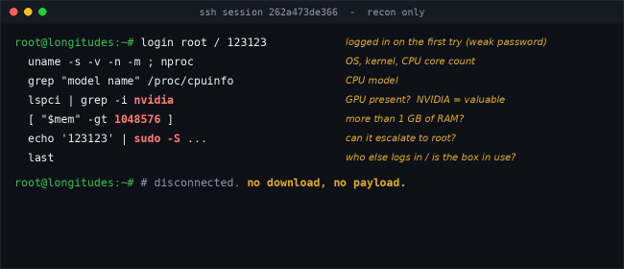
Figure 1. The recon session, condensed. The bot inventories the hardware and checks for root, then leaves without dropping a file.
What The Bot Collected
Instead of the usual download-and-run one-liner, this bot ran a hardware survey. It gathered the operating system and kernel version, the CPU architecture, the number of CPU cores, and the CPU model. It then used lspci to look for a graphics card, searching specifically for NVIDIA. It read system uptime, listed recent logins with last, and printed everything as labeled fields (UNAME, ARCH, CPUS, CPU_MODEL, GPU, LAST). That labeled format is exactly how an automated bot packages a victim's specifications so it can parse them and make a decision.
A second command then checked whether the machine has more than 1 GB of RAM, reading /proc/meminfo and comparing against 1,048,576 KB. It ran that check through sudo -S, feeding the same password back in to test whether it could elevate to full root privileges without a prompt.
The tell is the combination. A denial-of-service botnet does not care about your graphics card. Counting CPU cores, reading the CPU model, hunting specifically for an NVIDIA GPU, and gating on a minimum amount of RAM is the profile of cryptomining or resource-hijacking triage. Miners are only worth deploying on machines with enough compute, so this operator measures the machine first and, presumably, only delivers a miner to hosts that clear the bar. The sudo step tells the bot whether it can take full control before it commits.
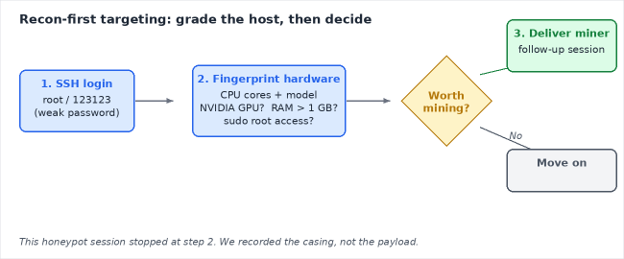
Figure 2. The recon-first model. The attacker grades the host, then decides whether a payload is worth delivering
Two Very Different Bots, One Weak Password
This is a good place to show why client fingerprinting matters. Earlier in the same month my honeypot logged a completely different SSH campaign: a loader that logs in, downloads an ELF binary from an attacker server using a curl, wget, and /dev/tcp fallback chain, and joins a denial-of-service botnet. It rotated through several source IPs and command-and-control servers, but its HASSH client fingerprint stayed constant, which let me tie the instances together as one campaign. The mining recon bot has a different client and a different HASSH, which tells me it is a separate actor, not the same campaign changing tactics.
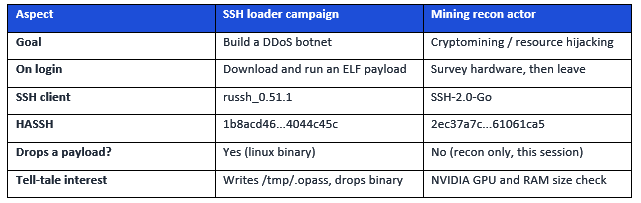
Table 1. Two distinct actors seen on the same honeypot, separated by their client fingerprints.
What Is The Damage?
The question this session answers is simple: when a login runs only discovery commands and leaves without dropping anything, is it harmless? The answer is no. A recon-only session is often the first half of a two-stage attack. The operator grades the host now and returns with a tailored payload later, or hands the target to a second tool. Treating no-payload sessions as background noise means missing the casing that precedes the break-in.
This matters because defenders and honeypot operators naturally prioritize sessions that drop files, since those are obviously malicious. Sessions that only look around are easy to dismiss. This example shows that discovery activity can be a valuable early warning, and that a client fingerprint like HASSH can connect quiet reconnaissance to a later, louder payload even when the attacker changes IP addresses.
Who benefits from knowing this? SOC analysts triaging SSH activity, honeypot and DShield sensor operators, and administrators of any internet-facing Linux or cloud host. Anyone running a system with a weak or default SSH password is a candidate for exactly this kind of grading, and the mitigations below are the same ones that stop the noisier attacks too.
How To Protect Against It
• Use strong passwords. The entire attack starts with a guessable root password. Long, unique credentials stop it at the front door.
• Disable root SSH login and prefer keys. Set PermitRootLogin no and use key-based authentication. This also defeats the sudo -S password-reuse trick.
• Rate-limit logins. fail2ban or equivalent blocks an address after repeated attempts.
• Limit exposure. Do not expose SSH to the whole internet. Restrict it to a VPN or known addresses where possible.
• Alert on bulk hardware discovery. A login that reads CPU model, hunts for an NVIDIA GPU, and checks /proc/meminfo against a size threshold is unusual and worth flagging. Pivot on the HASSH to find related sessions.
• Watch for the follow-up. If a host passes this grading, a later session may deliver a miner. Monitor for sustained CPU or GPU usage and unexpected connections to mining pools.
Indicators
Source IP: 91.92.40.13 (VirusTotal: 11 malicious, 5 suspicious; ASN 197170 TechTies Inc., 91.92.40.0/24, Netherlands)
SSH client: SSH-2.0-Go
HASSH: 2ec37a7cc8daf20b10e1ad6221061ca5
Credentials used: root / 123123
Behavior: bulk hardware survey (CPU cores and model, NVIDIA GPU search, uptime, last), a /proc/meminfo check for more than 1 GB RAM, and a sudo -S privilege test
Conclusion
The most memorable activity in a honeypot is not always the session that drops malware. This one dropped nothing, and that was the point. It logged in, priced out the hardware, checked whether it could get root, and left, almost certainly to decide whether the machine was worth mining on. For defenders, the lesson is to give recon-only sessions the same curiosity the attacker gave your hardware, and to use client fingerprints to connect the quiet grading to the loud payload that may follow.
[1] https://en.wikipedia.org/wiki/Fail2ban
[2] https://github.com/DShield-ISC/dshield
[3] https://www.sans.edu/cyber-security-programs/bachelors-degree/
-----------
Guy Bruneau IPSS Inc.
My GitHub Page
Twitter: GuyBruneau
gbruneau at isc dot sans dot edu