
Microsoft Threat Intelligence has observed a human-operated intrusion campaign that abuses Microsoft Teams external collaboration to impersonate IT or helpdesk personnel and socially engineer users into granting an interactive remote session. Once remote control is established via RMM tools, the threat actor uses PowerShell to download and silently install a malicious MSI package, which in turn stages a portable Node.js runtime and an obfuscated JavaScript implant that provides persistent command execution and command and control (C2).
Unlike commodity phishing that ends with an infostealer, this campaign follows a full hands-on-keyboard playbook. After the implant is deployed, the threat actor performs extensive host and Active Directory reconnaissance, periodically captures screenshots of the victim’s desktop, executes follow-on payloads through trusted Windows binaries, and pivots across the enterprise over Windows Remote Management (WinRM) toward high-value assets such as domain controllers. The intrusion relies heavily on legitimate tooling, including Microsoft Teams, remote support software, Windows Installer, Node.js, and native administrative protocols, allowing the activity to blend into expected enterprise operations at nearly every stage.
This intrusion pattern is especially high-impact because it hands an external operator credential-backed, interactive access to internal infrastructure. The reconnaissance and lateral movement patterns observed: domain enumeration, server discovery, and WinRM pivoting toward identity systems, are consistent with intrusion activity that can precede data theft, extortion, ransomware deployment, or other follow-on objectives, in which threat actors map the environment, escalate privileges, disable security controls, exfiltrate business-relevant data, and ultimately deploy ransomware across the organization.
In this blog, we share our analysis of this attack chain, from initial Microsoft Teams contact through internal lateral movement, along with mitigation and hunting guidance to help defenders detect and disrupt this user-initiated access pathway before it escalates into broader compromise.
Risk to enterprise environments
By abusing enterprise collaboration workflows instead of traditional email-based phishing, the threat actor initiates contact through Microsoft Teams in a way that appears consistent with routine IT support. Microsoft Teams applies multiple security controls at the point of first external contact, including external tenant labeling, Accept/Block prompts, message previews, and phishing indicators, but this attack chain depends on convincing the user to bypass those warnings and voluntarily grant remote access through legitimate support tools.
An approved external Teams interaction, followed by a remote session, can enable the threat actor to:
- Establish interactive, credential-backed system access through a legitimate remote support tool.
- Execute threat actor-controlled code (MSI loader and Node.js implant) using trusted installers and runtimes.
- Map the host and Active Directory environment through automated discovery
- Move laterally toward high-value infrastructure using WinRM.
- Capture on-screen activity and create opportunities for follow-on data access or other post-compromise actions.
Attack chain overview
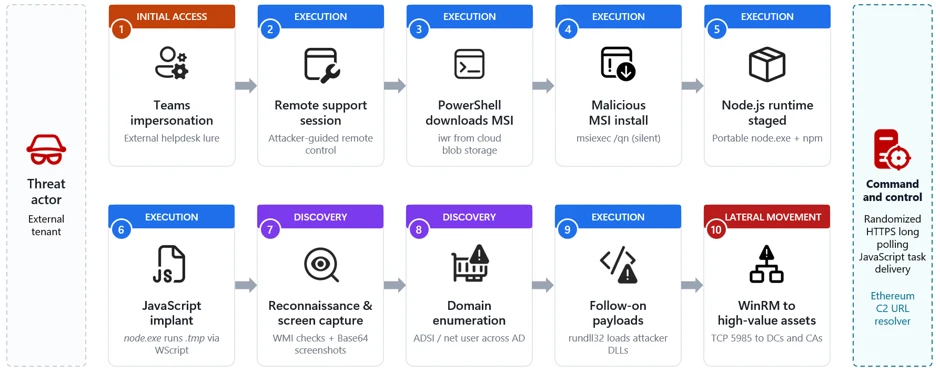
The campaign follows a multi-stage attack chain that progresses from social engineering through payload delivery, execution, reconnaissance, and ultimately lateral movement:
- Initial access via Teams (T1566.003): A threat actor operating from an external tenant initiates a Teams chat or call while impersonating IT/helpdesk staff and coaxes the user into handing over their device, for example, approving a “request control” prompt during a Teams screen-share, or opening Quick Assist and reading back the connection code.
- Remote session and MSI delivery: During the remote session, the threat actor runs PowerShell to download a malicious MSI from cloud storage and installs it silently with msiexec.
- Node.js runtime and implant staging: The MSI installs a script-based loader and a separate encrypted implant file under LocalAppData. If Node.js is not already available, the bootstrap downloads the legitimate portable Node.js runtime from the official distribution. The loader decrypts the implant at runtime, either in memory or into a temporary JavaScript file.
- Script-based bootstrap and Node.js execution:The MSI launches hidden bootstrap code through trusted Windows script hosts, including PowerShell, cmd.exe, and WScript. The bootstrap obtains a portable Node.js runtime and uses it to decrypt and execute the JavaScript implant from a user-writable directory.
- Command-and-control and operator tasking:The implant uses randomized HTTPS polling to receive JavaScript tasks from its C2 server. Observed operator-issued tasking performed host reconnaissance, security-product and virtualization discovery, and periodic desktop screen capture.
- Domain discovery: The operator enumerates domain accounts, servers, and users through native tools and Active Directory Service Interfaces (ADSI) queries.
- Follow-on payload execution: Additional payloads are executed through rundll32 loading threat actor-supplied DLLs.
- Lateral movement via WinRM:Operator-issued tasking executed through the Node.js backdoor initiates WinRM connections over TCP port 5985 to domain-joined systems, including domain controllers and certificate authorities.
Stage 1: Initial contact via Teams (T1566.003 Spearphishing via Service)
The intrusion begins with abuse of external collaboration features in Microsoft Teams, where a threat actor operating from a separate tenant initiates contact while impersonating internal IT or helpdesk personnel. This activity does not stem from a weakness in Microsoft Teams or its built-in protections; instead, the threat actor abuses legitimate collaboration features by persuading the user to override clearly presented security warnings, highlighting the broader challenge of defending against social engineering rather than technical exploitation.
Because interaction occurs within an enterprise collaboration platform rather than through traditional email, it could bypass the initial skepticism associated with unsolicited external communication. The lure varies, for example “Microsoft Security Update,” “Spam Filter Update,” “Account Verification,” or tasks required to stop deactivation of an account, but the objective is consistent: convince the user to ignore external-contact flags, launch a remote management session, and accept elevation. Voice phishing (vishing) is sometimes layered to increase trust or compliance, or so malicious instructions or URLs never enter the chat logs.
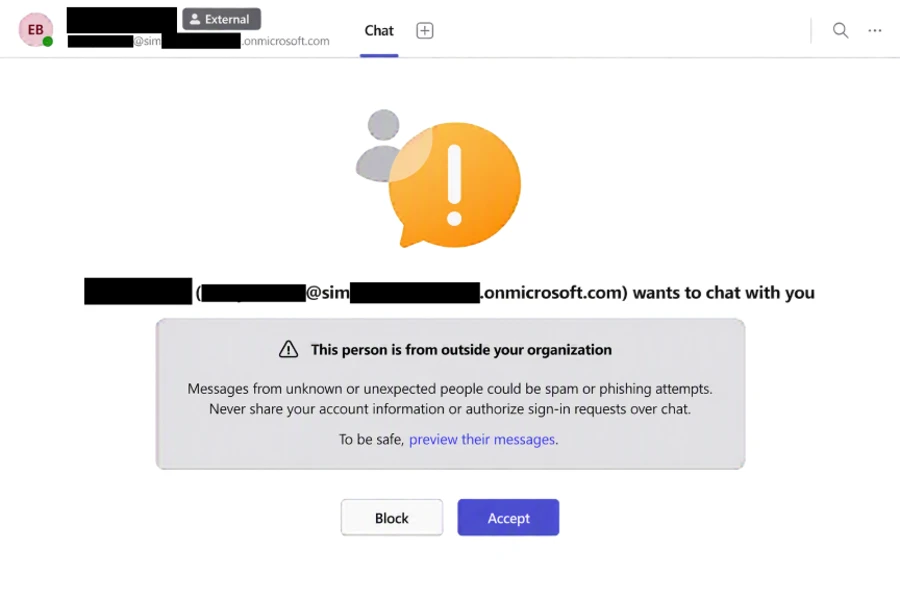
With user consent obtained through social engineering, the threat actor gains interactive control of the device using a remote support tool. From the user’s perspective, they are guided to open the remote-assistance application, enter a short key, and follow prompts to grant access.
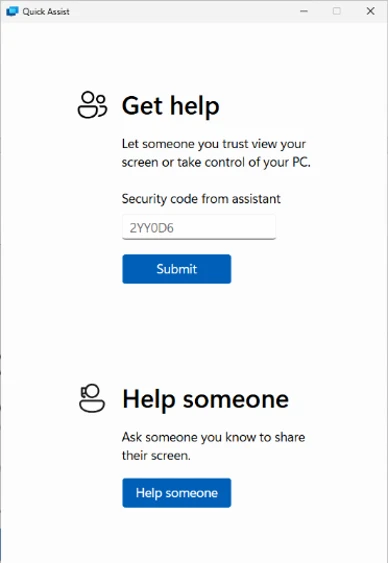
The urgency and interactivity are the signal: a remote-assist process tree followed immediately by cmd.exe or PowerShell on the same desktop. In vishing scenarios, the threat actor might talk the victim through the process to prevent logging of malicious instructions.
Stage 2: Remote session and malicious MSI delivery
Immediately after establishing control, the threat actor uses PowerShell within the remote session to download a malicious MSI package from threat actor-controlled cloud storage and installs it silently. The installer is disguised with benign, update-themed names such as “devfix” or “Hotfix,” reinforcing the helpdesk pretext.

The payload is hosted on a widely used cloud storage platform, allowing the download to blend in with legitimate traffic and benefit from a trusted domain reputation. The /qn switch suppresses all installer UI so the victim sees no indication that software is being installed.
Stage 3: MSI staging and Node.js runtime acquisition
Upon installation, the MSI retrieves a portable Node.js runtime directly from the official Node.js distribution and extracts it into a randomly named directory under the user’s local application data. Downloading a legitimate, signed runtime from a trusted source lets the threat actor run a full JavaScript execution environment without deploying custom binaries that might attract scrutiny.

The MSI installs a script-based loader and a separate encrypted implant file in the current user’s LocalAppData directory. The encrypted implant is packaged within the MSI rather than downloaded separately. At runtime, the loader decrypts the JavaScript implant either in memory or into a temporary JavaScript file. This separation of a legitimate runtime from the malicious script allows the initial backdoor to execute as interpreted JavaScript while additional native payloads can be delivered later through operator tasking.
Stage 4: Script-based bootstrap and encrypted implant execution
The MSI schedules a deferred, asynchronous custom action immediately after installing its files. The action starts hidden bootstrap code through PowerShell, cmd.exe, or WScript and then launches Node.js from LocalAppData. The loader decrypts a separate high-entropy data file and executes the resulting JavaScript either through standard input or by loading a temporary JavaScript file.

Endpoint activity shows Node.js, or a renamed copy whose original file metadata identifies it as Node.js, executing a staged script loader from LocalAppData. The loaders and encrypted payload files use nonstandard extensions such as .tmp, .ini, .dat, .bin, or .cfg. After decrypting the payload, the loader either provides JavaScript to Node.js through standard input or writes a temporary .js file and loads it into the running Node process.

By using a signed Node.js runtime, including renamed copies of the runtime, to execute nonstandard-extension loaders or JavaScript supplied through standard input, the threat actor can evade controls focused only on unsigned executables and conventional script extensions.
Stage 5: Per-user persistence
The analyzed MSI packages established per-user persistence using update-themed entries. Observed installers created either an HKEY_CURRENT_USER Run value or a shortcut in the current user’s Startup folder. Both mechanisms used the name EdgeUpdate and launched a Node.js loader from LocalAppData when the user signed in.
The Startup-folder implementation launched WScript with the staged JScript wrapper, portable Node.js runtime, and nonstandard-extension loader. The Run-key implementation invoked the portable Node.js runtime directly.
Stage 6: Command-and-control and operator tasking
Once running, the implant establishes communication with its C2 server and begins receiving JavaScript tasking. Observed threat actor issued tasks launched short-lived cmd.exe and PowerShell processes to perform a burst of host reconnaissance, hardware and locale details, installed antivirus products, and disk information.
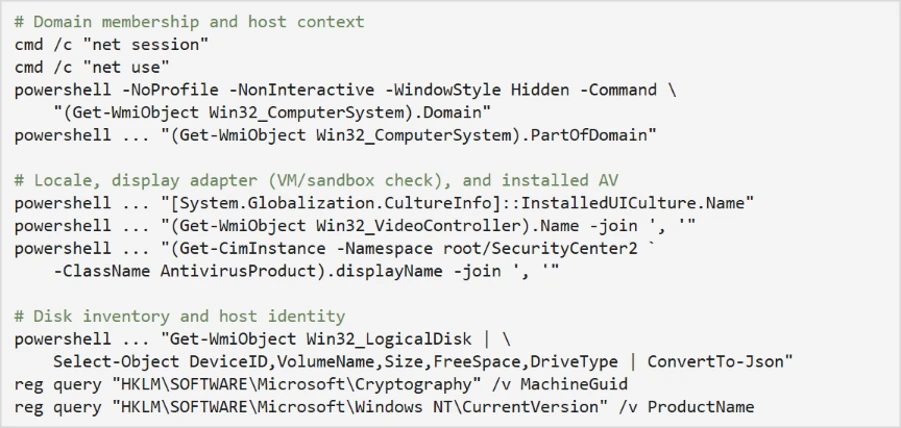
The querying of the display adapter name and installed antivirus is characteristic of sandbox and defense evasion checks. Generic virtual display adapters and analysis tooling are common tells of an automated analysis environment.
The recovered implant communicates through randomized HTTPS long-polling requests. Responses from the C2 server are treated as JavaScript source and executed dynamically with access to Node.js module loading, process execution, environment variables, buffers, and the file system.
Through JavaScript tasking delivered by the C2 server, operators repeatedly captured the victim’s screen, resized the image, encoded it as Base64, and wrote it to a temporary file before exfiltration. Screenshots are captured at varying scale factors to balance image quality against transfer size.
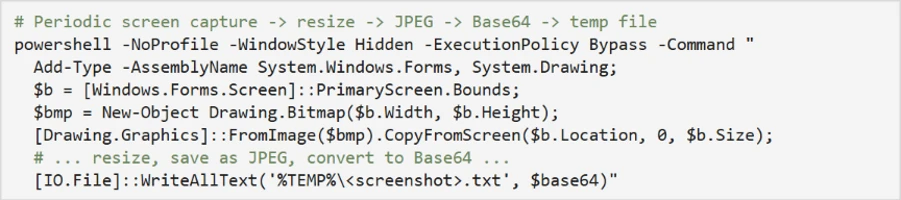
Dormant blockchain-based C2 discovery
The analyzed implants also contained dormant logic capable of querying an Ethereum smart contract for an updated C2 URL. This functionality was disabled in the recovered builds, which instead used a hard-coded fallback server. The contract stores only a URL string and does not contain or execute the malware payload.
Stage 7: Domain discovery and reconnaissance
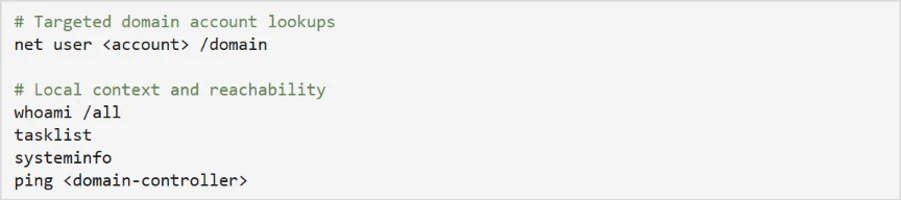
With a foothold validated, the operator uses C2-delivered tasking to expand reconnaissance into Active Directory. Native commands enumerate specific domain accounts, while ADSI searches identify domain-joined servers and collect user description attributes, which can contain operational notes, privileged-account context, or other sensitive information.
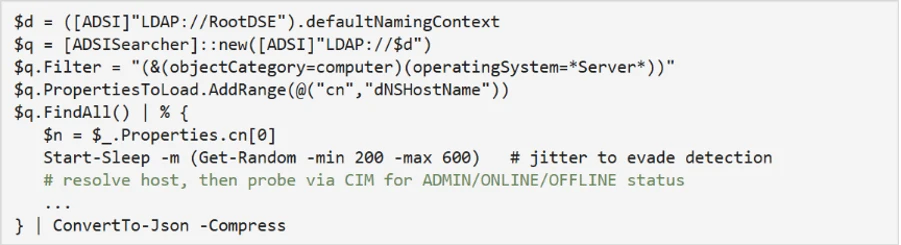
An ADSI-based sweep enumerates Windows Server computer objects, resolves their addresses, and probes each for administrative reachability, effectively building a live map of high-value targets:
A second ADSI query enumerates all user objects and their description attributes:

The use of randomized sleep jitter and CIM-based reachability checks indicates a deliberate, operator-driven effort to enumerate the domain quietly rather than through noisy, high-volume scanning.
Stage 8: Follow-on payload execution
Using commands delivered through the Node.js backdoor, the operator executes additional payloads through rundll32.exe, loading threat actor-supplied DLLs by invoking exported functions with a token argument. Using rundll32 to execute malicious DLL exports is a well-established defense-evasion and proxy-execution technique.

The DLLs are given short, innocuous names and are invoked with an exported function (open) and a per-execution token, consistent with modular loaders that gate execution behind a runtime-supplied key.
Stage 9: Lateral movement via WinRM toward high-value assets
Following local execution and discovery, operator-issued tasking executed through the Node.js backdoor initiated internal remote-management connections over WinRM on TCP port 5985 to a large set of domain-joined systems. The target list spans dozens of hosts across multiple regions and roles, including file servers, database and application servers, and, critically, domain controllers and certificate authorities.
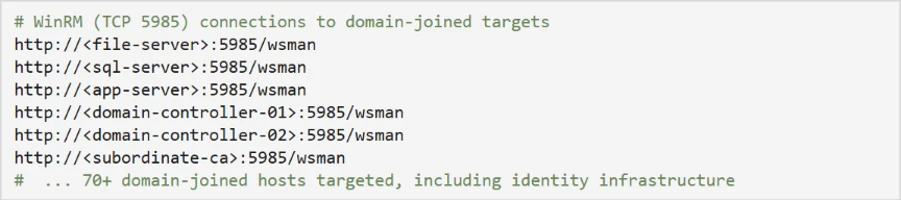
The use of WinRM from a non-administrative application context strongly suggests credential-backed lateral movement directed by an external operator. Targeting identity-centric infrastructure, domain controllers and certificate authorities, at this stage reflects a shift from initial foothold toward broader enterprise control, and is a hallmark of intrusions that precede large-scale data theft or ransomware deployment.
Mitigation and response recommendations
This campaign relies less on platform exploitation and more on persuading users to initiate trusted remote-access workflows within legitimate collaboration tools. Organizations should treat any unsolicited external support contact as inherently suspicious and implement layered defenses across the identity, endpoint, and collaboration layers.
- Reinforce user education. Establish internal helpdesk authentication phrases and train employees to recognize external-tenant indicators and to never grant remote access or run commands provided by an unsolicited contact.
- Verify unsolicited support contact. Treat any unsolicited external Microsoft Teams chat or call claiming to be IT or helpdesk as suspicious, and verify the request through a known internal channel before granting remote access. Restrict Teams external access to trusted domains only.
- Harden Microsoft Teams and email against social engineering. Use Microsoft Defender for Office 365 with Safe Links and Zero-hour auto purge (ZAP) so malicious messages and URLs are neutralized at time of click and removed after delivery.
- Microsoft Teams: Apply the Security best practices for Microsoft Teams, revisit your external collaboration policies, and make sure users see clear external sender notifications when engaging with cross-tenant contacts. Require device- or identity-based access checks before any remote support session is granted.
- Enforce phishing-resistant access controls. Require MFA and compliant or managed devices through Microsoft Entra Conditional Access to limit the value of credential-backed remote sessions established through social engineering.
- Deploy attack surface reduction rules. Enable ASR rules that block executable content from email and scripting interpreters, process creation from PowerShell/WScript/cmd, and execution of downloaded content to disrupt MSI- and script-based staging.
- Restrict administrative protocols. Limit WinRM (TCP 5985) to authorized management workstations and alert on WinRM initiated from user-context or non-administrative processes.
- Turn on network and web protection. Enable network protection and web protection in Microsoft Defender for Endpoint to block connections to threat actor infrastructure and cloud-hosted staging endpoints used for payload delivery and C2.
- Enable cloud-delivered protection. Turn on cloud-delivered protection in Microsoft Defender Antivirus to cover rapidly evolving threat actor tooling; cloud-based machine learning helps detect and block newly observed threats.
- Control remote support tooling. Limit or monitor remote monitoring and management (RMM) and interactive remote-support software, and control which remote-assistance tools are permitted in the environment.
- Investigate and rotate credentials. Organizations that find indicators of this campaign should assume the operator obtained network-level access through the compromised host and prioritize credential rotation for any credentials accessible from the affected machine, including domain admin accounts if the host was domain-joined.
Microsoft Defender XDR detections
Microsoft Defender XDR coordinates detection, prevention, investigation, and response across endpoints, identities, email, and apps. The representative alerts below can surface activity associated with this campaign. Alert titles are illustrative and may vary by environment and product version.
| Tactic | Observed activity | Microsoft Defender coverage |
| Initial access | External Teams chat or call from an IT/helpdesk persona operating in a separate tenant | Microsoft Defender for Cloud Applications / Office 365 – Microsoft Teams chat initiated by a suspicious external user – IT Support Teams Voice phishing following mail bombing activity – A user clicked through to a potentially malicious URL. – A potentially malicious URL click was detected. – Suspicious Teams Chat likely involved in remote management and dangerous commands Microsoft Defender for Endpoint – Possible initial access from an emerging threat |
| Execution | PowerShell downloads and silently installs an MSI | Microsoft Defender Antivirus – Trojan:PowerShell/PowExec.MX!MTB – Trojan:Win32/FakeAll!MTB – Trojan:JS/FakeAll.DA!MTB – Trojan:JS/FakeAll.DB!MTB Microsoft Defender for Endpoint – Possible initial access from an emerging threat |
| Execution | Portable Node.js runtime executes an obfuscated loader from LocalAppData; observed execution includes WScript, nonstandard script extensions, renamed Node.js copies, and standard-input execution. | Microsoft Defender Antivirus – Trojan:JS/SynkLoader.SA – Trojan:JS/EtherRatz.A!MTB – Trojan:JS/EtherRatz.B!MTB Microsoft Defender for Endpoint – Suspicious Node.js process behavior – Suspicious JavaScript process |
| Defense evasion | Silent msiexec install and rundll32 loading threat actor-supplied DLLs | Microsoft Defender Antivirus – Trojan:Win32/SynkLoader.SA Microsoft Defender for Endpoint – Low-reputation arbitrary code executed by signed executable – Suspicious process launch by Rundll32.exe |
| Discovery | WMI/ADSI host and Active Directory enumeration and periodic screen capture | Microsoft Defender for Endpoint – Suspicious screen capture activity – Suspicious LDAP query – Suspicious Active Directory enumeration – Possible hands-on-keyboard pre-ransom activity – Anomalous account lookups – Possible hands-on-keyboard pre-ransom activity |
| Lateral movement | WinRM (TCP 5985) pivot toward domain controllers and certificate authorities | Microsoft Defender for Endpoint – Suspicious WinRM activity was observed |
Microsoft Security Copilot
Security Copilot customers can use the standalone experience to create their own prompts or run prebuilt promptbooks to automate investigation and response tasks related to this threat. Useful promptbooks for this activity include Incident investigation, Microsoft User analysis, Threat actor profile, Threat intelligence 360 report, and Vulnerability impact assessment. Some promptbooks require access to Microsoft Defender XDR, Microsoft Sentinel, or related Microsoft security plugins.
For this campaign, Security Copilot can help analysts summarize affected devices where Node.js or a renamed Node.js runtime executed a staged loader from a user-writable path, reconstruct the Teams-to-remote-session-to-MSI delivery chain, and build containment and credential-rotation plans for affected domain-joined endpoints.
Threat intelligence reports
Microsoft customers can use Microsoft Defender XDR Threat Analytics and related Microsoft threat intelligence reporting to stay current on the malicious activity, indicators, detection coverage, and recommended response actions associated with this campaign.
For campaign-specific intelligence, see Threat Analytics: Teams-based helpdesk impersonation delivers MSI loader and Node.js implant for hands-on-keyboard intrusion (View report). These reports provide investigation context, protection guidance, and updated intelligence that security teams can use to prevent, mitigate, or respond to related activity in their environments.
Advanced hunting queries
Microsoft Defender XDR customers can run the following advanced hunting queries to locate related activity. Tune time windows, tool lists, and filters for your environment.
External Teams activity
Sender, Recipient, and ThreadId can be used for pivoting other useful information. CloudAppEvents is useful for searching first contact information.
CloudAppEvents
| where Timestamp > ago(7d)
// optional time filters between ([_startTime] .. [_endTime])
| where Application == "Microsoft Teams"
| where ActionType == "ChatCreated"
| where IsExternalUser == true
| extend ThreadCreatorUpn = tostring(RawEventData.Members[0].UPN)
    ,ThreadCreatorDisplayName = tostring(RawEventData.Members[0].DisplayName)
    ,ThreadCreatorOrganizationId = tostring(RawEventData.Members[0].OrganizationId)
    ,TRecipient1Upn = tostring(RawEventData.Members[1].UPN)
    ,Recipient1DisplayName = tostring(RawEventData.Members[1].DisplayName)
    ,Recipient1OrganizationId = tostring(RawEventData.Members[1].OrganizationId)
    ,Recipient2Upn = tostring(RawEventData.Members[2].UPN)
    ,Recipient2DisplayName = tostring(RawEventData.Members[2].DisplayName)
    ,Recipient2OrganizationId = tostring(RawEventData.Members[2].OrganizationId)
    ,ThreadId = tostring(RawEventData.ChatThreadId)
| summarize by ThreadCreatorUpn, ThreadCreatorDisplayName, ThreadCreatorOrganizationId,
    TRecipient1Upn, Recipient1DisplayName, Recipient1OrganizationId,
    Recipient2Upn, Recipient2DisplayName, Recipient2OrganizationId,
    ThreadId, tostring(IsExternalUser), tostring(IsImpersonated)
MessageEvents, CallActivityEvents, MessageUrlInfo, and others can be searched alone or in a union to correlate threads with messages and calls.
let _threadIds = pack_array(
      "19:[thread]",
      "19:[thread]",
      "19:[thread]");
union
    MessageEvents,
    CallActivityEvents,
    MessageUrlInfo
    | where ThreadId in (_threadIds)
       or TeamsMessageId has_any (_threadIds)
    | sort by ThreadId, TeamsMessageId asc
PowerShell writing an MSI to a user-writable path
DeviceFileEvents
| where Timestamp > ago(7d)
| where InitiatingProcessParentFileName =~ "explorer.exe"
| where InitiatingProcessFileName =~ "powershell.exe"
| where FileName endswith ".msi"
 where
    FolderPath contains @"\Downloads\"
    or FolderPath contains @"\AppData\"
    or FolderPath contains @"\Temp\"
node.exe executing a staged payload from user-writable paths
DeviceProcessEvents
| where Timestamp > ago(7d)
| where FileName =~ "node.exe"
| where ProcessCommandLine has @"\AppData\Local\" and ProcessCommandLine !contains ".js"
| where InitiatingProcessFileName =~ "wscript.exe"
| where InitiatingProcessCommandLine has_all (@"\AppData\Local\", "node.exe", ".js")
Screen capture via hidden PowerShell writing Base64 to a temp file
DeviceProcessEvents
| where Timestamp > ago(7d)
| where InitiatingProcessParentFileName =~ "node.exe" or InitiatingProcessFileName =~ "node.exe"
| where FileName in~ ("powershell.exe", "cmd.exe")
| where ProcessCommandLine has_all ("CopyFromScreen", "ToBase64String", "System.Drawing.Bitmap", "System.Drawing", "WriteAllText")
| project Timestamp, DeviceName, AccountName, ProcessCommandLine
| order by Timestamp desc
WinRM lateral movement from a non-administrative process
DeviceNetworkEvents
| where Timestamp > ago(7d)
| where InitiatingProcessFileName =~ "powershell.exe"
| where InitiatingProcessCommandLine endswith "-NoLogo -NoProfile -ExecutionPolicy Bypass"
| where RemoteUrl endswith ":5985/wsman"
MITRE ATT&CK Techniques observed
The following table maps the observed activity to MITRE ATT&CK techniques:
| Tactic | Technique ID | Technique | Observed activity |
| Initial Access | T1566.003 | Phishing: Spearphishing via Service | External Teams chat/call impersonating IT helpdesk |
| Execution | T1059.001 | Command and Scripting Interpreter: PowerShell | PowerShell used to download and install the MSI |
| Execution | T1059.007 | Command and Scripting Interpreter: JavaScript | Malicious JavaScript implant run via node.exe |
| Execution | T1218.007 | System Binary Proxy Execution: Msiexec | Silent MSI installation via msiexec /qn |
| Execution | T1218.011 | System Binary Proxy Execution: Rundll32 | Follow-on DLL payloads executed via rundll32 |
| Defense Evasion | T1036 | Masquerading | Update/helpdesk-themed MSI names (devfix, Hotfix) |
| Defense Evasion | T1497.001 | Virtualization/Sandbox Evasion: System Checks | Display adapter and antivirus product queries |
| Discovery | T1082 | System Information Discovery | systeminfo, MachineGuid, ProductName, disk inventory |
| Discovery | T1016 | System Network Configuration Discovery | net session, net use, domain membership checks |
| Discovery | T1087.002 | Account Discovery: Domain Account | net user /domain and ADSI user enumeration |
| Discovery | T1018 | Remote System Discovery | ADSI server enumeration with reachability probing |
| Discovery | T1518.001 | Security Software Discovery | Antivirus product enumeration via SecurityCenter2 |
| Collection | T1113 | Screen Capture | Periodic Base64-encoded desktop screenshots |
| Command and Control | T1071.001 | Application Layer Protocol: Web Protocols | Randomized HTTPS long-polling used for core C2; separate post-compromise tasking installed the ws package for an additional or optional capability. |
| Command and Control | T1105 | Ingress Tool Transfer | Portable Node.js runtime downloaded and JavaScript tasks received from C2; the initial loader and encrypted implant are extracted from the MSI. |
| Lateral Movement | T1021.006 | Remote Services: Windows Remote Management | WinRM (5985) pivoting to domain-joined systems |
Indicators of Compromise (IOCs)
The following indicator types were observed in this campaign. Environment-specific values (paths, hostnames, and account names) have been generalized; defenders should hunt for the corresponding behaviors and patterns in their own telemetry.
File indicators
| Indicator (SHA-256) | Description |
| 4cfdcae6dd1d6d98b870c8f0654d504f2bf10479a117dc297de789c249dc389d | Malicious MSI loader package (silent msiexec install) |
| a4d145a6347e47d40b3ca48af5c6dba01bf019d0110e31a44bb70fc77d1d1676 | Malicious MSI loader package |
| cc6d0f3f47afeba018173604e34f527e8413d3a54ffb35caed529bff49055ec5 | Malicious MSI loader package |
| 0d2fc28af246f62f27e49207d1f64e236ad9ea029412b27877d1ae6c098e86e3 | Second-stage DLL (rundll32-loaded module) |
| 69e10e0cb7bb2137ebea12971adb02c662cf5543a4f8c9530812bcbf7b183a23 | Second-stage DLL (rundll32-loaded module) |
| a135fe4df18c711097e69b4f27ea32a74a955160bf2fb12da841f21866d95d87 | Second-stage DLL (rundll32-loaded module) |
Payload delivery infrastructure
| Indicator | Type | Description |
| update1n5[.]blob.core.windows.net | Domain | Azure Blob Storage endpoint hosting the malicious MSI loader |
| update1n6[.]blob.core.windows.net | Domain | Azure Blob Storage endpoint hosting the malicious MSI loader |
| update1n7[.]blob.core.windows.net | Domain | Azure Blob Storage endpoint hosting the malicious MSI loader |
| update1n9[.]blob.core.windows.net | Domain | Azure Blob Storage endpoint hosting the malicious MSI loader |
| updatetmp[.]blob.core.windows.net | Domain | Azure Blob Storage endpoint hosting the malicious MSI loader |
Command-and-control infrastructure
| Indicator | Type | Description |
| synctimes[.]australiaeast[.]cloudapp[.]azure[.]com | Domain | Hardcoded fallback C2 and latest URL stored in the associated Ethereum contract |
| webwether[.]eastus[.]cloudapp[.]azure[.]com | Domain | Earlier URL stored in the Ethereum contract |
| dssdfvsdfvsdfvsdgbfbdvdzv[.]org | Domain | Earlier URL stored briefly in the Ethereum contract |
Learn more
For the latest security research from the Microsoft Threat Intelligence community, check out the Microsoft Threat Intelligence Blog.
To get notified about new publications and to join discussions on social media, follow us on LinkedIn, X (formerly Twitter), and Bluesky.
To hear stories and insights from the Microsoft Threat Intelligence community about the ever-evolving threat landscape, listen to the Microsoft Threat Intelligence podcast.
Review our documentation to learn more about our real-time protection capabilities and see how to enable them within your organization.
- Learn more about securing Copilot Studio agents with Microsoft Defender
- Evaluate your AI readiness with our latest Zero Trust for AI workshop.
- Microsoft 365 Copilot AI security documentation
- How Microsoft discovers and mitigates evolving attacks against AI guardrails
The post Impersonating IT support: how threat actors turn a remote session into enterprise-wide access appeared first on Microsoft Security Blog.