
Google has started rolling out a new way to recover access to your account if you’ve lost your phone or forgotten your password: a “selfie video” verification option.
After recording a short video of your face during setup, you can later submit another video during account recovery to prove you are who you claim to be and regain access.
On paper, this sounds like a user‑friendly solution to account lockouts. In practice, it introduces new security and privacy questions. It also raises concerns about deepfakes and creates another repository of sensitive biometric data that could become a target if compromised.
The idea is: you open your Google Account, go to Security & sign‑in, choose Selfie video, and follow guided prompts to record a short video with your face and basic movements. Google stores this enrolment video and later compares new videos you submit during sign‑in or account recovery to confirm your identity.
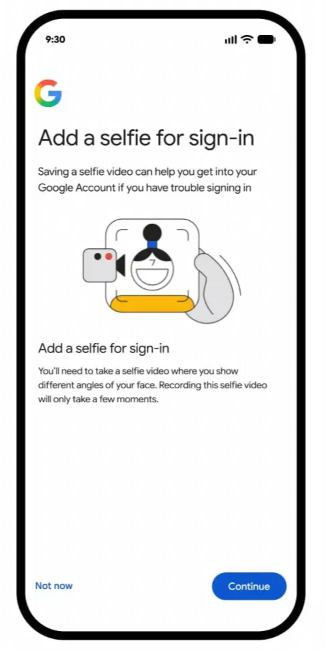
While this may sound like a good idea, it’s a textbook example of trading long‑term security and privacy for short‑term convenience.
Google also offers several privacy reassurances. According to Google’s statements cited in coverage, the videos are encrypted at rest, stored “securely,” and can be deleted via your security settings. You can opt out of letting them be used to improve Google’s verification systems, and Google says they are not shared with third parties. The feature is marketed as a fallback method, effectively turning your face into a spare key to your digital life.
Multiple objections
Security
Every face is unique, but facial recognition systems don’t compare photographs directly. Top‑tier facial recognition algorithms can exceed 99% accuracy in controlled, high‑quality conditions, according to evaluations by the US National Institute of Standards and Technology (NIST). That sounds impressive, but it still implies non‑zero false positives and false negatives, and performance drops as lighting, camera quality, and angle degrade.
Face recognition doesn’t store a literal photo. It stores a mathematical representation (embedding) of your facial features. At login or verification, the system computes a new embedding and compares it to the stored one, accepting if the similarity score is above a configured threshold. Any system used by Google has to allow for normal changes in appearance, including aging, weight changes, lighting, camera angle, glasses, or facial hair.
That alone makes using a face (or selfie video) as a standalone, high‑privilege credential, especially for account recovery, an inherently risky approach.
Modern deepfakes have become convincing enough that researchers are actively studying whether they can fool facial verification systems. One 2025 paper on AI and identity security found sophisticated deepfake attacks achieved success rates above 78% against some commercial facial verification systems in controlled tests. That doesn’t necessarily reflect Google’s implementation, but it shows how quickly this area is evolving.
Privacy
Personally, I do not want Google to have my face. Even though it probably already has plenty of photos of me.
Besides the potential risks of vulnerabilities and data breaches, Google already collects large amounts of behavioral data. Now it’s encouraging users to upload high‑fidelity video recordings of their faces and head movements as part of basic account management. Even if Google’s current privacy posture is reasonable (encryption at rest, deletion controls, no sharing), the mere existence of this data is a long‑term privacy risk.
Privacy policies and product uses also change over time. Today’s “not shared” could become tomorrow’s “used for fraud detection,” “used to improve verification systems,” or disclosed in response to lawful requests.
Google’s documentation, cited by some sources, says “users can also opt out of allowing the data to be used for additional purposes such as improving verification methods.” This implies that, unless you opt out, your data may be used to improve Google’s biometric verification systems. In other words, this isn’t just a one‑off security check. Your face could help train or refine the biometric systems Google uses in the future.
What users should do instead
If your Google Account offers selfie video sign‑in (mine doesn’t yet), my recommendation is simple: do not enable it, and if you’ve already tried it, delete your selfie video in your account’s security settings.
Safer options that keep control in your hands:
- Use a password manager and a long, unique password for your Google Account.
- Enable 2‑step verification with hardware security keys or passkeys rather than SMS codes.
- Keep backup codes printed or stored offline in a secure place.
- Regularly review your recovery email address and phone number, and remove anything you no longer control.
While these measures aren’t as flashy as “sign in with your face,” they are time‑tested, revocable, and far less attractive to deepfake operators and biometric data hunters.
Browse like no one’s watching.
Malwarebytes Privacy VPN encrypts your connection and never logs what you do, so the next story you read doesn’t have to feel personal. Try it free →