
CrashStealer is a new macOS infostealer that masquerades as Apple’s CrashReporter component, uses an Apple‑notarized installer to slip past Gatekeeper, tricks users into handing over their password, and then systematically loots browsers, password managers, crypto wallets, and Keychain secrets before exfiltrating them in AES‑encrypted bundles.
Researchers have been following the development of CrashStealer since May 2026. It impersonates Apple’s CrashReporter component by taking the name CrashReporter.app. It also creates a LaunchAgent named com.apple.crashreporter.helper and uses the legitimate tool’s icon and metadata to look as trustworthy as possible.
Gatekeeper, basically macOS’s bouncer at the door, checks whether an app looks safe before letting it run. By using a notarized installer—one that Apple has scanned and stamped as acceptable—Gatekeeper is more likely to let it through without raising alarms. Getting notarized doesn’t mean Apple intentionally approved the malware. It means the installer passed Apple’s automated checks, and the attackers abused that trust.
The notarized installer, called “Werkbit Setup” is distributed from a fake software site registered in late June and gated behind a meeting PIN (Personal Identification Number), suggesting a targeted, invitation‑only campaign.
When launched, the malware displays a fake macOS password prompt that users will expect to see when running a legitimate system operation requiring administrator privileges. In reality, the malware uses that password to unlock the user’s Keychain, which stores passwords and other sensitive data in macOS’s encrypted password vault.
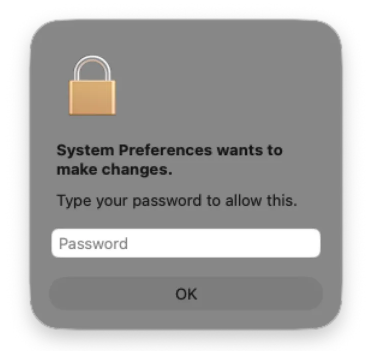
The malware then steals browser credentials and cookies, cryptocurrency wallet extensions, password manager data, and small files from common user directories. The stolen data is encrypted and sent to a command and control (C2) server.
CrashStealer is a reminder that macOS is firmly in the sights of credential‑stealing operations. Notarization and Gatekeeper reduce many classes of risk, but they do not remove the need for layered defenses, cautious user behavior, and ongoing threat monitoring.
How to stay safe
There are a few things you can do to protection yourself from CrashStealer and other infostealers.
- Be skeptical of “CrashReporter” downloads. Apple’s crash‑reporting tools ship with macOS, so you should never need to download a separate CrashReporter app from a third‑party site.
- Treat PIN‑gated installers with caution. If a meeting invite or collaboration tool requires you to download software from an unfamiliar domain and enter a private PIN to unlock the installer, verify the request with the organizer through a separate trusted channel.
- Treat a password request that appears immediately after launching a new or unfamiliar app—especially one claiming to be a system component—as a red flag.
- Use reputable security software that supports macOS. Keep it, and macOS itself, up to date.
- Separate your risk. Avoid keeping high‑value crypto wallets, password vaults, and everyday browsing credentials on the same machine and user profile wherever possible.
Malwarebytes detects CrashStealer as MacOS.Stealer.Crash.
We don’t just report on threats—we remove them
Cybersecurity risks should never spread beyond a headline. Keep threats off your devices by downloading Malwarebytes today.