Since early May 2026, Microsoft Threat Intelligence has observed Storm-2945, a sub-cluster of Midnight Blizzard, conducting widespread but targeted traffic manipulation attacks involving hospitality sector networks served by captive portals worldwide. Despite some tactic, technique, and procedure (TTP) similarities to the Forest Blizzard DNS hijacking operation that we publicly disclosed in April 2026, we attribute this campaign, which we call CaptiveCrunch, to Storm-2945. As reported by ReliaQuest on July 23, a portion of this activity leverages doppelganger domains mimicking Microsoft online services to conduct follow-on adversary-in-the-middle (AitM) phishing operations that abuse the device code authentication flow in Microsoft Entra ID. Microsoft Threat Intelligence has also identified active traffic manipulation attacks leading to the delivery of malware on impacted systems. Microsoft has observed Storm-2945 leveraging AI to support a significant portion of these operations.
Today, we are sharing our findings on these ongoing intrusions to raise awareness of this threat and enable customers to protect their devices, especially while traveling. We provide our assessment of Storm-2945’s relationship to Midnight Blizzard and analysis of the CaptiveCrunch campaign, detailing the malware and tradecraft used in these operations. We also provide mitigation, detection, and hunting guidance to help organizations identify and defend against Storm-2945 and related activity.
Microsoft Threat Intelligence would like to thank our partners at Anthropic and OpenAI for their collaboration and support during this investigation.
The CaptiveCrunch campaign
Since February 2026, Storm-2945 has conducted AI-augmented operations including targeted device code and OAuth code phishing campaigns leading to Entra device registration and subsequent data collection from Microsoft 365. Since early May 2026, Microsoft Threat Intelligence has observed Storm-2945 manipulating DNS and HTTP traffic from networks served by captive portals to redirect user traffic through actor-controlled infrastructure. Although our investigation into the initial compromise vector for the captive portal networks is ongoing, we have observed notable commonalities in the equipment and management systems used across multiple affected networks. These similarities suggest that the activity might not be limited to isolated compromises of individual venues and could reflect access to shared services within portions of the captive portal ecosystem.
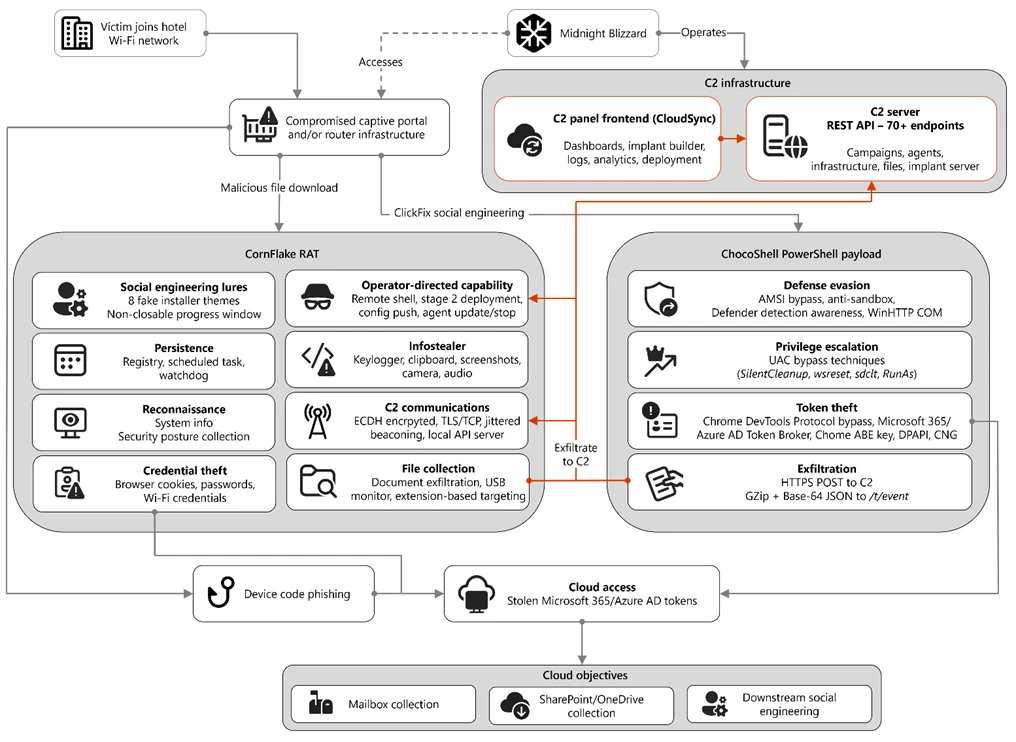
As part of the CaptiveCrunch campaign, Storm-2945 has leveraged their AitM position to redirect users through actor-controlled phishing infrastructure and has also delivered malware purporting to be browser or operating system updates in response to automated connectivity checks issued by users’ browsers. Multiple variants have been delivered, including fully-featured Windows remote access trojans (RAT) in compiled Golang, with functionality to conduct system enumeration, collect files and keystrokes, steal credentials and session tokens, conduct audio and video surveillance, monitor for removable media, and provide the threat actor a remote shell on infected systems.
The threat actor infrastructure leverages a variety of ClickFix techniques to elicit the user into downloading and executing the malware:
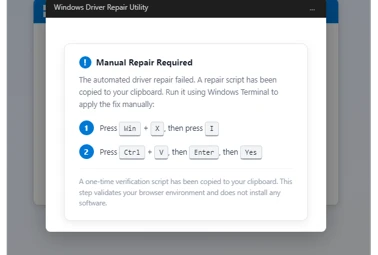
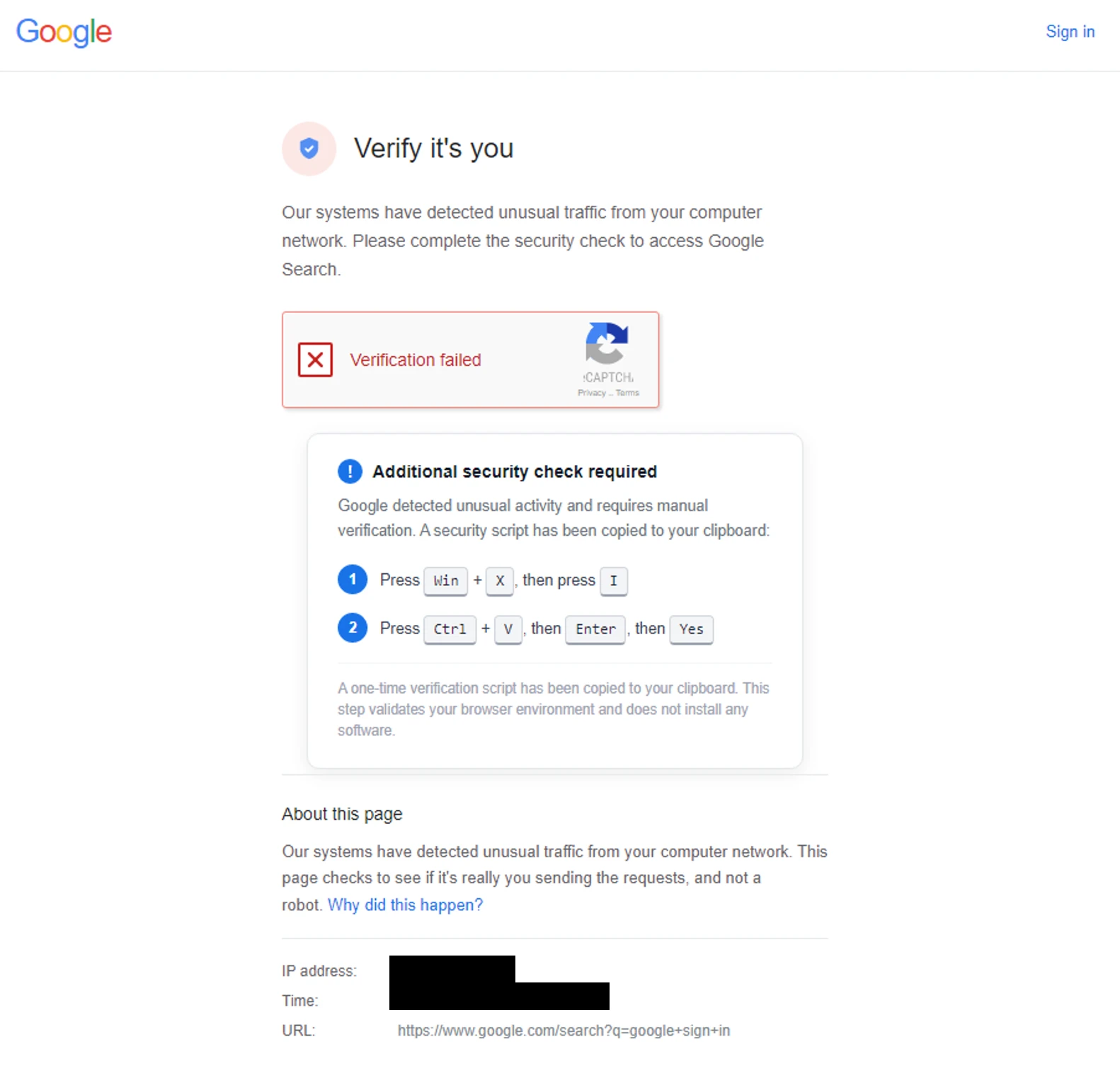
In addition to variants of malware targeting Windows systems, Microsoft Threat Intelligence is also aware of indications that the threat actor might be targeting Android devices with similar techniques as the ClickFix landings also include instructions for Android devices to download and install an APK file.
To date, Microsoft has identified widespread compromise of Wi-Fi networks at hospitality-related organizations and other networks serviced by captive portal equipment in several countries. ReliaQuest has identified this activity not only at hotels, but also conference centers and other shared venues, and assesses that the goal of this activity is to access the accounts of corporate travelers.
Storm-2945 and Midnight Blizzard
Microsoft Threat Intelligence assesses that Storm-2945 is an operational sub-cluster of Midnight Blizzard based on distinctive technical and operational overlaps. These include technical similarities to Storm-2372, a Midnight Blizzard initial access operations sub-cluster, also notable for their device code and OAuth code phishing operations tracked throughout 2025, Microsoft Graph-based email exfiltration, social engineering delivered via commercial messaging apps, and significant similarities in victimology.
Midnight Blizzard is a Russia-based threat actor attributed by the US and UK governments to the Foreign Intelligence Service of the Russian Federation, also known as the SVR. This threat actor is known to primarily target governments, diplomatic entities, non-governmental organizations (NGOs), and information technology (IT) service providers, primarily in the US and Europe. Midnight Blizzard is consistent and persistent in their operational targeting, and their objectives rarely change. Their focus is to collect intelligence through longstanding and dedicated espionage in support of Russian foreign policy interests.
Midnight Blizzard operations often involve compromise of valid accounts and, in some highly targeted cases, advanced techniques to compromise authentication mechanisms within an organization to expand access and evade detection. They utilize diverse initial access methods, and Midnight Blizzard is also adept at identifying and abusing OAuth applications to move laterally across cloud environments and for post-compromise activity, such as email collection.
CaptiveCrunch tradecraft and tooling
CornFlake: Remote access and infostealer implant
CornFlake is a full-featured Windows RAT written in Go that serves as Storm-2945’s primary persistent implant. Microsoft has observed the threat actor rapidly iterating on this malware layer, which features customizable capabilities from the social engineering user interface and data collection capabilities to anti-detection and evasion techniques.
On initial execution, CornFlake operates in dropper mode: it displays a convincing fake progress window designed to occupy the victim’s attention while the binary copies itself to %APPDATA%\svchost32\svchost32.exe and establishes persistence.
Fake window options configurable by the threat actor at build time:
- winupdate — A Windows Update screen displaying “Working on updates… Don’t turn off your computer”
- defender — A Windows Security virus scan
- directx — A DirectX End-User Runtime Web Installer
- vcredist — A Microsoft Visual C++ 2015-2022 Redistributable installer
- sysopt — A disk optimization utility
- netfix — A Windows Network Diagnostics tool
- browser — A browser update prompt
- pdfview — A document viewer installer

CornFlake registers as a Windows service named svchost32 with the display name “Cloud Sync Service” and description “Synchronizes files with the cloud storage provider”, deliberately mimicking the legitimate svchost.exe process. It establishes redundant persistence mechanisms: Windows service registrations, Registry Run keys, named scheduled tasks, and a persistence watchdog routine that runs continuously to restore any persistence mechanism that is removed by defenders or endpoint protection.
For command and control (C2), CornFlake performs an Elliptic Curve Diffie-Hellman (ECDH) P-256 ephemeral key exchange with the C2 server, derives a session key via SHA-256, and communicates over a custom JSON protocol framed within the encrypted channel. This provides an encrypted channel to the C2 server, with each C2 session using a unique ephemeral key, making decryption of captured traffic impossible without the session-specific private key. The runtime configuration file sync.dat supports hot reconfiguration of C2 servers, watched directories, file targeting patterns, and Transport Layer Security (TLS) settings without requiring redeployment.
Once established on a victim system, CornFlake provides the operator with a comprehensive collection toolkit, gated by configuration flags that allow selective activation post-deployment:
| Capability | Description |
| Keylogging | Raw input API-based keylogger capturing all keystrokes, including password fields |
| Clipboard monitoring | Captures clipboard changes with SHA-256 deduplication and records the active window title at time of capture |
| Screenshot capture | Idle-triggered and on-demand screenshots with configurable idle threshold |
| Audio surveillance | Windows Audio Session API (WASAPI)-based microphone capture, encoded as WAV files |
| Video surveillance | Media Foundation-based webcam capture, encoded as JPEG |
| Browser credential theft | ChromeKatz-derived module supporting live cookie extraction from process memory (Chromium browsers) and stored password extraction from on-disk databases, including Chrome App-Bound Encryption (ABE) bypass and Firefox NSS/SDR decryption |
| File exfiltration | Targets files based on file extensions with real-time file system monitoring and an upload throttle (1,000 files or 500 MB per cycle). File extensions are categorized as Documents, Archives, Images, Code, Data, Emails, and Keys |
| USB drive monitoring | Detects and scans removable media when inserted |
| Security posture sweep | Collects 18 categories of host intelligence including installed software, antivirus (AV)/endpoint detection and response (EDR) products, Defender exclusions, User Account Control (UAC) level, Remote Desktop Protocol (RDP) history, Office most recently used (MRU) files, and credential hints |
| Remote shell | Arbitrary command execution via cmd.exe or PowerShell (with -NoP flag to suppress profile-based detection) |
CornFlake also exposes a localhost HTTP API server (/upload, /reload, /status) that transforms the RAT into a modular platform: companion or next-stage payloads such as ChocoShell could task file exfiltration, trigger configuration hot reloads or check C2 connectivity using the pre-established secure C2 channel for communication.
ChocoShell: PowerShell infostealer
ChocoShell is the campaign’s Powershell-based infostealer, delivered and executed entirely in-memory. Its primary objective is the high-volume theft of browser session cookies, saved passwords, Microsoft 365 Single Sign-On (SSO) tokens, and Wi-Fi credentials from compromised systems. Where CornFlake provides the operator with a persistent, long-running foothold on the device, ChocoShell is designed to extract the most operationally valuable credentials, giving the operator access to victim cloud environments.
The ChocoShell script was authored with full developer comments that reveal the operator’s intent behind each code decision, including explicit references to Microsoft detection signatures and the reasoning behind specific evasion choices. The consistent coding standard and descriptive commentary suggest the author might have leveraged AI-assisted code generation.
Defense evasion. Upon execution, ChocoShell beacons to a hardcoded C2 server at 213.145.86[.]112 and implements several evasion techniques in sequence. It disables the Antimalware Scan Interface (AMSI) via .NET reflection to prevent ScriptBlock scanning and evades Microsoft behavioral detection that triggers on suspicious PowerShell web request cmdlets. A timing-based sandbox detection check is also employed as a virtual machine (VM) detection mechanism, silently exiting without performing any collection if detected.
C2 communication. ChocoShell communicates with its C2 server using HTTPS with URI paths designed to blend in with legitimate web traffic. Beacons use /t/pixel.gif?m=<status>, mimicking an image tracking pixel. Additional tooling is fetched from /cdn/chunks/polyfill-7e2b.min.js, disguised as a JavaScript polyfill file. This downloaded module is Base64-decoded and executed in memory via [ScriptBlock]::Create(), providing browser encryption key extraction capabilities, SYSTEM token impersonation, and Defender signature locking. Exfiltrated data is sent by POST to /t/event as GZip-compressed, Base64-wrapped JSON.
Privilege escalation. ChocoShell requires administrative privileges for its most impactful capabilities: SYSTEM token impersonation for Chrome ABE decryption, Volume Shadow Copy Service (VSS) shadow copy creation, Defender signature locking. It implements three silent UAC bypass techniques with ordered fallback:
- SilentCleanup task hijack: Writes a malicious command to HKCU\Environment\windir, then triggers the built-in SilentCleanup scheduled task, which resolves %windir% from the user’s environment, executing the threat actor’s command at elevated privilege. The registry value is cleaned up after two seconds to avoid cloud detection.
- wsreset.exe COM hijack: Creates a COM handler key in HKCU\Software\Classes and launches the auto-elevating Windows Store reset tool.
- sdclt.exe folder hijack: Hijacks HKCU\Software\Classes\Folder\shell\open\command and launches the Windows Backup utility with the /KickOffElev flag.
If none of the silent bypasses succeed (for example, the user is not a local administrator), ChocoShell falls back to a visible UAC prompt via Start-Process -Verb RunAs. Notably, the script also contains a variant designed to execute within the WinGet Desired State Configuration (DSC) host process (ConfigurationRemotingServer), suggesting an attack vector through malicious WinGet DSC configuration used in Windows machine provisioning.
Credential and session theft. Once running with elevated permissions, ChocoShell locks Defender signature updates and systematically harvests data from multiple sources. For Chromium-based browsers (Chrome, Edge, Brave, Opera, Opera GX, Vivaldi), it extracts the master encryption key from the browser’s Local State file, handling both the modern ABE scheme (Chrome v127+) and the legacy data protection API (DPAPI)-only scheme. ABE decryption requires SYSTEM-level DPAPI access, which the malware obtains by impersonating a SYSTEM process token borrowed from winlogon.exe, wininit.exe, or services.exe. Locked browser SQLite databases are accessed through three strategies: shared file access, Volume Shadow Service snapshots, and direct copy as a fallback.
As a parallel collection path, ChocoShell launches Chrome, Edge, and Brave with the –remote-debugging-port flag and issues Network.getAllCookies through the Chrome DevTools Protocol (CDP). This completely bypasses ABE, enabling the browser to perform its own internal decryption and returns plaintext cookie values. To handle privilege issues (SYSTEM-launched browsers inherit the wrong token), the malware creates transient scheduled tasks with TASK_LOGON_INTERACTIVE_TOKEN to launch the browser under the signed-in user’s session. After extraction, the browser is stopped and relaunched with –restore-last-session to avoid alerting the user.
For Firefox family browsers (Firefox, Waterfox, LibreWolf, Floorp, Zen), the malware copies unencrypted cookies.sqlite databases from each profile. Additionally, ChocoShell collects Microsoft 365 and Azure Active Directory (AD) access tokens, refresh tokens, and Web Account Manager (WAM) tokens from .tbres files in the Token Broker cache. Collection of these tokens represents a significant threat to enterprise environments, as threat actors could replay SSO sessions without browser cookies. Additionally, Wi-Fi credentials are harvested via netsh wlan show profile with key=clear.
Exfiltration and cleanup. All collected data is aggregated into a JSON structure, GZip-compressed, Base64-encoded, and sent by POST to the C2’s /t/event endpoint. After exfiltration, all collected data variables are nulled, garbage collection is forced, VSS shadow copies are deleted via Windows Management Instrumentation (WMI), temporary elevation scripts are removed, and all UAC bypass registry keys (already cleaned during escalation) are verified removed.
FruitStone: Operator C2 panel
FruitStone is the web-based C2 panel that Storm-2945 operators use to manage the entire CaptiveCrunch campaign infrastructure. Implemented as a single-page application (HTML and JavaScript) serving as the front-end of the C2 server with all functionality exposed without authentication, FruitStone provides a centralized dashboard for managing compromised endpoints, building and deploying new campaign payloads, and reviewing all collected data (such as screenshots, keystrokes, browser credentials).
Operational cover. The panel is branded as “CloudSync Console” with a footer reading “Acuity Systems, Inc. — Cloud Infrastructure Portal v3.2.1,” designed to appear as legitimate enterprise cloud management software if the panel URL is discovered by defenders or hosting providers. This masquerading extends to the CornFlake agent’s service name (Cloud Sync Service) and description (“Synchronizes files with the cloud storage provider”), creating a consistent cover story across the toolchain.
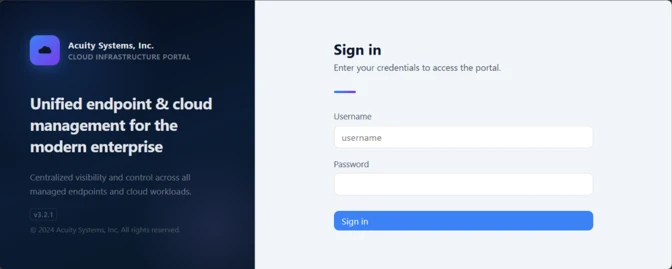
Session management and multi-operator support. FruitStone uses JSON Web Token (JWT)-based authentication, session revocation, and rate limiting with IP blocking to prevent brute force attacks against the panel sign in. Multiple operators could be provisioned with individual accounts, and all active sessions are visible with IP address, user-agent, and creation time to enable operational security awareness across the operators.
Agent management. The panel displays all registered CornFlake agents in a dashboard with real-time status updates via Server-Sent Events (SSE). Each agent card shows comprehensive system information including hostname, username, OS version, CPU, RAM, disk usage, screen resolution, timezone, domain membership, and camera/microphone presence, all collected during the CornFlake posture sweep. Agents are grouped by country and subnet, with geographic distribution visualized on a map.
Operators could interact with individual agents through:
- Remote shell — Interactive cmd.exe or PowerShell command execution with command history
- File system browser — Live directory traversal and arbitrary file download from compromised hosts
- Collection tasking — On-demand screenshot, process list, keylog buffer flush, clipboard dump, security posture survey, ChromeKatz cookie/password extraction, camera capture, and audio recording
- Configuration push — Live runtime reconfiguration of C2 servers, watch paths, and C2 beacon timing
- Agent update — In-place implant update by pushing a new CornFlake build to a running agent
- Agent kill — Remote termination of the CornFlake implant
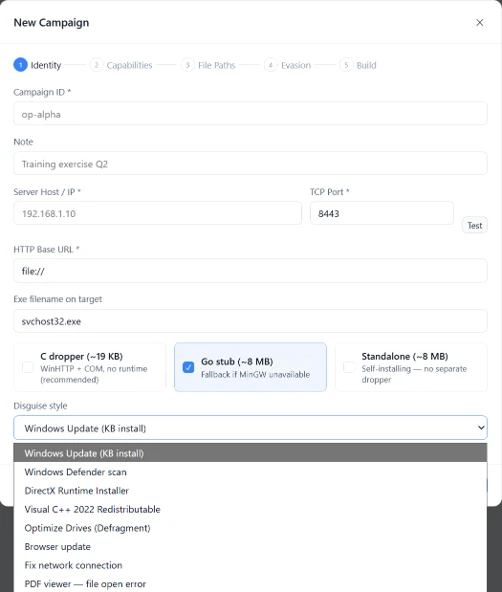
Campaign builder. A step-by-step wizard enables operators to configure and build new CornFlake payloads directly from the panel:
- Identity — Campaign ID, C2 host and port, HTTP base URL, executable file name (svchost32.exe by default), and dropper type (C dropper at ~19 KB, Go stub at ~8 MB, or standalone self-installer)
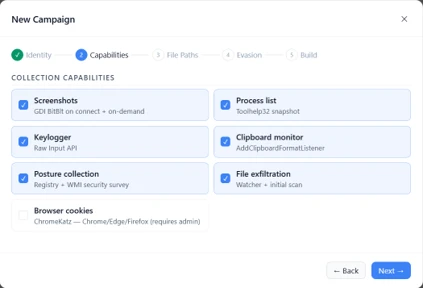
- Capabilities — Toggle individual collection modules: screenshots, process enumeration, keylogging, clipboard monitoring, posture survey, file exfiltration, and ChromeKatz browser credential theft
- File Paths — Configure targeted directories and file extensions by category (documents, archives, images, code, data, emails, encryption keys)

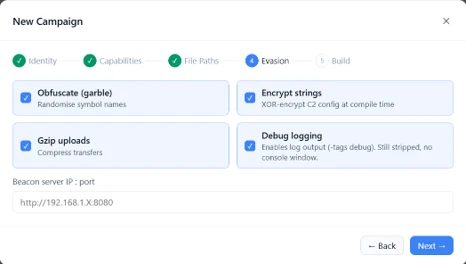
- Evasion — Enable garble symbol randomization (for GoLang payloads), XOR string encoding, GZip upload compression, and debug mode
Infrastructure management. FruitStone provides management interfaces for three layers of supporting infrastructure:
- Proxy relays — Multi-proxy C2 relay architecture with TLS certificate tracking (fingerprint, expiry), health checks, connection counts, bytes forwarded, and rotation capabilities that push updated server lists to all online agents
- Beacon profiles — Configurable timing profiles controlling agent sleep intervals, reconnection delays, TLS Server Name Indication (SNI) spoofing (like teams.microsoft.com), and DNS fallback domains
- Staging servers — External payload hosting infrastructure with push-to-deploy, file listing, and health monitoring

Device code abuse for cloud access
Since July 16, Microsoft has observed a portion of CaptiveCrunch landing pages redirecting users to device code authentication flow experiences. In these cases, users served these landings might be instructed to enter a device code into a legitimate Microsoft sign-in page, a technique commonly referred to as device code phishing.
Device code authentication is a legitimate OAuth workflow designed for devices that cannot support a traditional sign-in experience. However, threat actors could abuse this flow by initiating an authentication request on behalf of a user then convincing the user to enter an actor-controlled device code into a legitimate Microsoft authentication page. When successful, the victim authenticates the threat actor’s session rather than their own.
This activity is consistent with previously reported device code phishing operations conducted by Midnight Blizzard since August 2024. The observed technique does not appear fundamentally novel; however, integrating device code phishing into captive portal and traffic manipulation operations might increase the likelihood that users perceive the authentication request as legitimate. For additional details on Midnight Blizzard-related device code phishing techniques, see: Storm-2372 conducts device code phishing campaign. To understand other threat actors’ use of device code phishing and associated mitigations, see Inside an AI‑enabled device code phishing campaign.
How to protect against CaptiveCrunch activity
Minimize trust in hospitality and guest networks
When traveling, users should treat hotel, conference, airport, and other guest wireless networks as untrustworthy.
- Prefer private connectivity (including mobile hotspots, satellite, and eSIM-based cellular data connections) over public Wi‑Fi whenever practical.
- For enterprise-managed devices, organizations can choose to prevent Wi-Fi connections to networks that have not been provisioned via Mobile Device Management (MDM). See: https://learn.microsoft.com/windows/client-management/mdm/policy-csp-wifi#allowmanualwificonfiguration
- Consider using enterprise-managed travel routers or hotspot devices that establish encrypted tunnels back to trusted corporate infrastructure before accessing sensitive resources.
- Avoid downloading software updates, certificates, browser updates, network troubleshooting tools, or security utilities presented through captive portals or other unexpected web prompts.
- Verify update requests through trusted operating system mechanisms rather than pop-up messages or website prompts.
Strengthen identity and access controls
Organizations should assume that public and hospitality network infrastructure might not be trustworthy and should adopt controls that limit exposure to traffic manipulation, credential theft, and device code phishing.
- Educate users to recognize ClickFix-style prompts, fake verification checks, and paste-and-run instructions as malicious, especially when they invoke command interpreters or script hosts such as cmd.exe, PowerShell, rundll32.exe, or mshta.exe.
- Use passwordless solutions like passkeys and implement multifactor authentication (MFA).
- Use the Microsoft Authenticator app for passkeys and MFA, and complement MFA with conditional access policies, where sign-in requests are evaluated using additional identity-driven signals.
- Conditional access policies can also be scoped to strengthen privileged accounts with phishing resistant MFA.
- Your passkey and MFA policy can be further secured by only allowing MFA and passkey registrations from trusted locations and devices.
- Only allow device code flow where necessary. Microsoft recommends blocking device code flow wherever possible. Where necessary, configure Microsoft Entra ID’s device code flow in your Conditional Access policies.
- Implement a sign-in risk policy to automate response to risky sign-ins. A sign-in risk represents the probability that a given authentication request is not authorized by the identity owner. A sign-in risk-based policy can be implemented by adding a sign-in risk condition to Conditional Access policies that evaluates the risk level of a specific user or group. Based on the risk level (high/medium/low), a policy can be configured to block access or force MFA.
- When a user is a high risk and Conditional access evaluation is enabled, the user’s access is revoked, and they are forced to re-authenticate.
- For regular activity monitoring, use Risky sign-in reports, which surface attempted and successful user access activities where the legitimate owner might not have performed the sign-in.
- Use a Security Service Edge (SSE) solution like Global Secure Access to secure access to any app or resource using network, identity, and endpoint access controls.
Reduce exposure during captive portal registration
Organizations should review what information employees provide to hospitality providers when connecting to guest networks.
- Do not reuse corporate credentials on hotel, conference, or guest-network registration pages.
- Where possible, organizations should evaluate whether venue-provided wireless is required for corporate events and conferences.
- Organizations should minimize unnecessary disclosure of employee identities, organizational affiliations, and travel details when booking accommodations or registering for guest network access, consistent with corporate policy and applicable local requirements.
Microsoft Defender detections and hunting guidance
Microsoft Defender customers can refer to the list of applicable detections below. Microsoft Defender coordinates detection, prevention, investigation, and response across endpoints, identities, email, apps to provide integrated protection against attacks like the threat discussed in this blog.
Microsoft Defender for Endpoint detects Storm-2945 activity under the detection Suspicious activity linked to a Russian state-sponsored threat actor has been detected. However, these alerts might be triggered by unrelated threat actor activity. The following chart lists Microsoft Defender detections specific to the TTPs utilized by Storm-2945 in this attack.
| Tactic | Observed activity | Microsoft Defender coverage |
| Initial access | File download via captive portal redirection | Microsoft Defender for Endpoint – Suspicious downloaded file |
| Initial access | ClickFix technique, fake browser or OS update, initial file download | Microsoft Defender for Endpoint – Possible initial access from an emerging threat – Possible ClickFix activity |
| Persistence | CornFlake registers a Windows service, a Registry Run key, a scheduled task | Microsoft Defender for Endpoint – Suspicious Scheduled Task Process Launched – Suspicious scheduled task – Suspicious file added to run key – Suspicious service registration Microsoft Entra ID Protection – Microsoft Entra threat intelligence – Verified threat actor IP |
| Stealth/Defense evasion | ChocoShell disables AMSI | Microsoft Defender for Endpoint – Possible Antimalware Scan Interface (AMSI) tampering |
| Credential access | ChocoShell’s theft of browser session cookies, saved passwords, Microsoft 365 SSO tokens, and Wi-Fi credentials. Device code abuse. | Microsoft Defender for Endpoint – Possible theft of passwords and other sensitive web browser information – Suspicious DPAPI activity Microsoft Defender For Identity – Anomalous OAuth device code authentication activity Microsoft Defender XDR – User account compromise via OAuth device code phishing – Malicious sign in from an IP address associated with recognized attacker infrastructure – Suspicious Azure authentication through possible device code phishing |
| Collection | CornFlake monitoring and logging | Microsoft Defender for Endpoint – Activity that might lead to information stealer |
| Privilege escalation | ChocoShell UAC bypass techniques | Microsoft Defender for Endpoint – UAC bypass was detected – Possible Component Object Model (COM) hijacking |
Microsoft Security Copilot
Microsoft Security Copilot is embedded in Microsoft Defender and provides security teams with AI-powered capabilities to summarize incidents, analyze files and scripts, summarize identities, use guided responses, and generate device summaries, hunting queries, and incident reports.
Customers can also deploy AI agents, including the following Microsoft Security Copilot agents, to perform security tasks efficiently:
- Threat Intelligence Briefing agent
- Phishing Triage agent
- Threat Hunting agent
- Dynamic Threat Detection agent
Security Copilot is also available as a standalone experience where customers can perform specific security-related tasks, such as incident investigation, user analysis, and vulnerability impact assessment. In addition, Security Copilot offers developer scenarios that allow customers to build, test, publish, and integrate AI agents and plugins to meet unique security needs.
Threat intelligence reports
Microsoft Defender XDR customers can use the following threat analytics reports in the Defender portal (requires license for at least one Defender XDR product) to get the most up-to-date information about the threat actor, malicious activity, and techniques discussed in this blog. These reports provide the intelligence, protection information, and recommended actions to prevent, mitigate, or respond to associated threats found in customer environments.
Microsoft Security Copilot customers can also use the Microsoft Security Copilot integration in Microsoft Defender Threat Intelligence, either in the Security Copilot standalone portal or in the embedded experience in the Microsoft Defender portal to get more information about this threat actor.
Hunting queries
Microsoft Defender XDR
Microsoft Defender XDR customers can run the following advanced hunting queries to find related activity in their networks:
Detect file creation after Wi-Fi connectivity test on devices
The following query checks for a file creation on a device within two minutes of the device performing built‑in Network Connectivity Status Indicator (NCSI) test, which occurs when network connectivity is established to a Wi-Fi network with a captive portal. This activity might indicate an attacker’s initial access file presence on a device.
Please note that not all files discovered through this query might be malicious or related to this threat activity.
let ncsi_endpoints = dynamic(["msftconnecttest.com","edge-http.microsoft.com","msftncsi.com","captive.apple.com","clients1.google.com",
    "clients3.google.com","clients4.google.com","clients6.google.com","connectivitycheck.gstatic.com","connectivitycheck.android.com",
    "android.clients.google.com","www.gstatic.com","detectportal.firefox.com","detectportal.brave-http-only.com","cloudflareportal.com",
    "cloudflarecp.com","cloudflareok.com","connectivity-check.warp-svc","connectivity.cloudflareclient.com","spectrum.s3.amazonaws.com",
    "nmcheck.gnome.org"]);
let NCSIEvents = DeviceNetworkEvents
    | where Timestamp > ago(7d)
    | where RemoteUrl has_any (ncsi_endpoints)
    | project NCSI_Timestamp = Timestamp, DeviceId, DeviceName, RemoteUrl, NCSI_ReportId = ReportId, NCSI_InitiatingProcessFileName = InitiatingProcessFileName, NCSI_InitiatingProcessCommandLine = InitiatingProcessCommandLine, NCSI_AccountName = InitiatingProcessAccountName;
let FileDownloadEvents = DeviceFileEvents
    | where Timestamp > ago(7d)
    | where ActionType == "FileCreated"
    | where FileName has_any (".exe",".msi",".zip",".rar",".7z")
    | project Download_Timestamp = Timestamp, DeviceId, FileName, FolderPath, Download_ReportId = ReportId, Download_InitiatingProcessFileName = InitiatingProcessFileName, Download_InitiatingProcessCommandLine = InitiatingProcessCommandLine, Download_AccountName = InitiatingProcessAccountName;
NCSIEvents
| join kind=inner (
    FileDownloadEvents
) on DeviceId
| where Download_Timestamp >= NCSI_Timestamp and Download_Timestamp <= NCSI_Timestamp + 2m
| project
    NCSI_Timestamp,
    Download_Timestamp,
    DeviceName,
    DeviceId,
    RemoteUrl,
    FileName,
    FolderPath,
    InitiatingProcessFileName = Download_InitiatingProcessFileName,
    InitiatingProcessCommandLine = Download_InitiatingProcessCommandLine,
    AccountName = Download_AccountName,
    NCSI_ReportId,
    Download_ReportId
Detect connectivity to Storm-2945 infrastructure
The following query checks for connectivity to Storm-2945 infrastructure observed in this attack activity.
let target_domains = dynamic(["ms365-device.com", "ms365-live.com", "m365-owa.com", "owa-ms365.com"]);
let target_ips = dynamic(["31.57.243.154", "38.146.28.75", "38.146.28.132", "104.194.159.150", "107.189.26.194", "213.145.86.112"]);
DeviceNetworkEvents
| where RemoteUrl has_any(target_domains) or RemoteIP in (target_ips)
| project
    Timestamp,
    DeviceName,
    DeviceId,
    RemoteUrl,
    RemoteIP,
    LocalIP,
    InitiatingProcessFileName,
    InitiatingProcessCommandLine,
    AccountName = InitiatingProcessAccountName,
    ReportId
Detect CornFlake RAT presence on affected systems
The following query checks for the presence of the CornFlake RAT binary.
DeviceProcessEvents
| where FolderPath == "%APPDATA%\\svchost32\\svchost32.exe"
   or FolderPath endswith @"\svchost32\svchost32.exe"
| project Timestamp, DeviceName, DeviceId, FileName, FolderPath, InitiatingProcessFileName, InitiatingProcessCommandLine, AccountName, ReportId
Detect CornFlake RAT Windows service registration
The following query checks for the CornFlake RAT Windows service registration.
DeviceRegistryEvents
| where RegistryKey has @"\SYSTEM\CurrentControlSet\Services\svchost32"
| where ActionType == "RegistryValueSet"
| where (RegistryValueName == "DisplayName" and RegistryValueData == "Cloud Sync Service")
    or (RegistryValueName == "Description" and RegistryValueData == "Synchronizes files with the cloud storage provider")
| project
    Timestamp,
    DeviceName,
    DeviceId,
    RegistryKey,
    RegistryValueName,
    RegistryValueData,
    ActionType,
    InitiatingProcessFileName,
    InitiatingProcessCommandLine,
    InitiatingProcessAccountName,
    ReportId
Microsoft Sentinel
Microsoft Sentinel customers can use the TI Mapping analytics (a series of analytics all prefixed with ‘TI map’) to automatically match the malicious domain indicators mentioned in this blog post with data in their workspace. If the TI Map analytics are not currently deployed, customers can install the Threat Intelligence solution from the Microsoft Sentinel Content Hub to have the analytics rule deployed in their Sentinel workspace.
Detect network IP and domain indicators of compromise using ASIM
The following query checks IP addresses and domain IOCs across data sources supported by ASIM network session parser:
//IP list and domain list- _Im_NetworkSession
let lookback = 30d;
let ioc_ip_addr = dynamic(["213.145.86.112"]);
let ioc_domains = dynamic(["213.145.86.112/t/pixel.gif", "213.145.86.112/cdn/chunks/polyfill-7e2b.min.js", "213.145.86.112/t/event"]);
_Im_NetworkSession(starttime=todatetime(ago(lookback)), endtime=now())
| where DstIpAddr in (ioc_ip_addr) or DstDomain has_any (ioc_domains)
| summarize imNWS_mintime=min(TimeGenerated), imNWS_maxtime=max(TimeGenerated),
  EventCount=count() by SrcIpAddr, DstIpAddr, DstDomain, Dvc, EventProduct, EventVendor
Detect web sessions IP and file hash indicators of compromise using ASIM
The following query checks IP addresses, domains, and file hash IOCs across data sources supported by ASIM web session parser:
//IP list - _Im_WebSession
let lookback = 30d;
let ioc_ip_addr = dynamic(["213.145.86.112"]);
let ioc_sha_hashes =dynamic([“918fa52ae45ed60ba7cc8bdc99c3cbe9ab92e0375ec31fc05d0d4513be11c593”, “be99857449d2856dd5a84e21c8a3d5e0e01456adb44062ddec5a6b4970d8d42c”]);
_Im_WebSession(starttime=todatetime(ago(lookback)), endtime=now())
| where DstIpAddr in (ioc_ip_addr) or FileSHA256 in (ioc_sha_hashes)
| summarize imWS_mintime=min(TimeGenerated), imWS_maxtime=max(TimeGenerated),
  EventCount=count() by SrcIpAddr, DstIpAddr, Url, Dvc, EventProduct, EventVendor
Detect domain and URL indicators of compromise using ASIM
The following query checks domain and URL IOCs across data sources supported by ASIM web session parser:
// file hash list - imFileEvent
// Domain list - _Im_WebSession
let ioc_domains = dynamic(["https://213.145.86.112/t/pixel.gif", "https://213.145.86.112/cdn/chunks/polyfill-7e2b.min.js", "https://213.145.86.112/t/event"]);
_Im_WebSession (url_has_any = ioc_domains)
ChocoShell C2 communications
The following query detects ChocoShell communications with its C2 server using HTTPS with URI paths designed to blend in with legitimate web traffic. Beacons use /t/pixel.gif?m=<status>, mimicking an image tracking pixel.
let lookback = 30d;
let ioc_url_artifacts = dynamic(["/t/pixel.gif?m="]);
_Im_WebSession(starttime=todatetime(ago(lookback)), endtime=now())
| where DstDomain  in (ioc_url_artifacts)
| summarize imWS_mintime=min(TimeGenerated), imWS_maxtime=max(TimeGenerated),
  EventCount=count() by SrcIpAddr, DstIpAddr, Url, Dvc, EventProduct, EventVendor
Indicators of compromise
| Indicator | Type | Description | First seen |
| ms365-device[.]com | Domain | CaptiveCrunch DCF redirect | 2026-07-23 |
| ms365-live[.]com | Domain | CaptiveCrunch DCF redirect | 2026-05-14 |
| m365-owa[.]com | Domain | CaptiveCrunch AitM infrastructure | 2026-07-20 |
| owa-ms365[.]com | Domain | CaptiveCrunch AitM infrastructure | 2026-07-16 |
| 31.57.243[.]154 | IP address | CaptiveCrunch AitM infrastructure | 2026-07-16 |
| 38.146.28[.]75 | IP address | CaptiveCrunch AitM infrastructure | 2026-07-01 |
| 38.146.28[.]132 | IP address | CaptiveCrunch DNS Resolver | 2026-07-15 |
| 104.194.159[.]150 | IP address | CaptiveCrunch AitM infrastructure | 2026-04-28 |
| 107.189.26[.]194 | IP address | ChocoShell C2 / CaptiveCrunch DNS Resolver | 2026-02-27 |
| 213.145.86[.]112 | IP address | ChocoShell C2 | 2026-07-01 |
| 918fa52ae45ed60ba7cc8bdc99c3cbe9ab92e0375ec31fc05d0d4513be11c593 | File hash | CornFlake | 2026-07-03 |
| be99857449d2856dd5a84e21c8a3d5e0e01456adb44062ddec5a6b4970d8d42c | File hash | ChocoShell | 2026-07-10 |
References
- https://reliaquest.com/blog/threat-spotlight-dns-poisoning-tactics-expand-to-hospitality/
- https://www.volexity.com/blog/2025/02/13/multiple-russian-threat-actors-targeting-microsoft-device-code-authentication
Learn more
For the latest security research from the Microsoft Threat Intelligence community, check out the Microsoft Threat Intelligence Blog.
To get notified about new publications and to join discussions on social media, follow us on LinkedIn, X (formerly Twitter), and Bluesky.
To hear stories and insights from the Microsoft Threat Intelligence community about the ever-evolving threat landscape, listen to the Microsoft Threat Intelligence podcast.
The post CaptiveCrunch: Midnight Blizzard targets travelers worldwide for malware delivery and credential theft appeared first on Microsoft Security Blog.