
Call of Duty Mobile players should watch out for a phishing campaign disguised as a free Call of Duty Points giveaway.
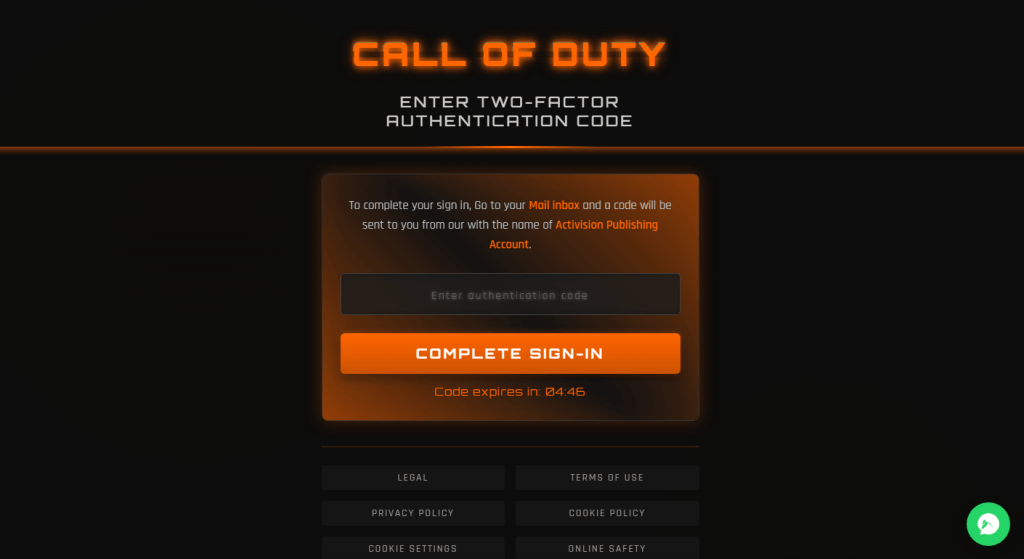
Victims are asked to log in with their email address and password to claim free Call of Duty Points (CP), the game’s premium currency. They’re then redirected to a second page asking for their two-factor authentication (2FA) code.
The site has no connection to Activision. Its only purpose is to steal the login details needed to take over accounts.
Why Call of Duty Mobile accounts are worth stealing
Call of Duty Mobile has been downloaded an estimated 489 million times worldwide and has generated around $1.8 billion in lifetime in-app purchases.
An Activision account can be valuable for more than just the in-game currency it contains. Many players link their Activision account to Xbox, PlayStation, or Battle.net, meaning a stolen login could expose:
- Stored payment methods
- Purchase history
- Other linked gaming accounts
How the scam works
The first page mimics the official Call of Duty Mobile site and offers 10,800 free points in exchange for an email address and password—not a redemption code, but a full account login. It also claims the reward will be “confirmed” within four to eight hours, buying time before anyone notices nothing has arrived.
There are warning signs, though. The page says “GET FREE POINT” instead of “GET FREE POINTS,” contains awkwardly worded instructions, and includes a live chat widget that appears to exist solely to make the site look more legitimate.

The redirect follows a common phishing technique known as a real-time credential relay. Instead of storing stolen usernames and passwords for later, the phishing site immediately submits them to the real Activision login page. That can trigger a genuine two-factor authentication (2FA) code, which the second page is designed to capture before it expires.
The victim ends up handing over everything needed to access their real account: their password and the one-time code that’s supposed to keep attackers out.
How to avoid this scam
- Check the address bar. Legitimate promotions don’t ask you to sign in through an unfamiliar website.
- Don’t let countdown timers rush you. They’re designed to make you act before you think.
- If you’re unsure whether a promotion is genuine, open the official Call of Duty Mobile app or visit Activision’s website yourself instead of following a link.
- Use tools that spot scams for you. Malwarebytes Scam Guard can help you check suspicious links, while Malwarebytes Browser Guard blocks many phishing sites before they load.
- If you play on your phone, Malwarebytes Mobile Security adds another layer of protection by helping block phishing sites and other mobile threats.
If you already entered your details
- Change your Activision password immediately.
- If you entered a 2FA code, assume someone may have accessed your account. Check your account activity and sign out of all devices.
- Review any linked payment methods for unauthorized purchases.
The simplest way to avoid phishing attacks like this is to reach websites yourself by typing the address into your browser or using the official app, rather than following links from messages, social media posts, or ads.
Scammers know more about you than you think.
Malwarebytes Mobile Security protects you from phishing, scam texts, malicious sites, and more. With real-time AI-powered Scam Guard built right in.