
On August 11th, 2026, we received a submission for an Unauthenticated Account Takeover vulnerability in TranslatePress, a WordPress plugin with more than 400,000 active installations. This vulnerability makes it possible for unauthenticated attackers to obtain an administrator’s password reset link, reset the account’s password, and log in as that administrator, resulting in complete site takeover. It is important to note that the password reset key is only leaked if the target administrator’s profile language is set to a published secondary language.
Props to momopon1415 who discovered and responsibly reported this vulnerability through the Wordfence Bug Bounty Program. This researcher earned a bounty of $975.00 for this discovery. Our mission is to secure WordPress through defense in depth, which is why we are investing in quality vulnerability research and collaborating with researchers of this caliber through our Bug Bounty Program. We are committed to making the WordPress ecosystem more secure through the detection and prevention of vulnerabilities, which is a critical element to the multi-layered approach to security.
Wordfence Premium, Wordfence Care, and Wordfence Response users received a firewall rule to protect against known exploits targeting this vulnerability in TranslatePress, hosted on WordPress.org, on August 13, 2026. Sites using the free version of Wordfence will receive the same protection 30 days later on September 12, 2026. This firewall rule is scoped to version 3.3.1 of the plugin with the translatepress-multilingual slug.
We provided full disclosure details to the Cozmoslabs team through our Wordfence Vulnerability Management Portal on August 12, 2026. The developer acknowledged the report on August 13, 2026, and released the fully patched version on the same day. We would like to commend the Cozmoslabs team for their prompt response and timely patch.
We urge users to update their sites to the latest patched version of TranslatePress, version 3.3.2 at the time of this publication, as soon as possible.
Vulnerability Summary from Wordfence Intelligence

Technical Analysis
TranslatePress is a popular WordPress plugin for building multilingual sites, allowing site owners to translate their content into one or more secondary languages. To support automatic translation, the plugin captures translatable strings as they are rendered and stores them in per-language dictionary tables in the database.
This vulnerability is the result of two behaviors that, when combined, expose an administrator’s password reset link to unauthenticated visitors.
The first is that the plugin translates outgoing emails. TranslatePress hooks into WordPress core’s wp_mail() function through the wp_mail_filter() function in the TRP_Translation_Render class, which switches to the recipient’s preferred language and passes the email’s subject and message through the plugin’s translation pipeline:
public function wp_mail_filter( $args ) {
    if ( ! is_array( $args ) ) {
        return $args;
    }

    if ( empty( $args['to'] ) ) {
        return $args;
    }

    global $TRP_LANGUAGE;

    $initial_language = $TRP_LANGUAGE;

    $recipient = $args['to'];

    // Normalize $recipient to a single email string (first recipient only - that's the main one)
    if ( is_array( $recipient ) ) {
        $first = reset( $recipient );
        $recipient = is_string( $first ) ? $first : '';
    }

    $recipient = (string) $recipient;

    // Keep only the first comma-separated entry if multiple are present in the string
    $recipient = trim( strtok( $recipient, ',' ) );

    $did_switch_language = false;

    if ( $recipient !== '' ) {
        $did_switch_language = trp_switch_to_preffered_language( $recipient );
    }

    $whitelisted_shortcodes = apply_filters(
        'trp_whitelisted_shortcodes_for_wp_mail',
        array( 'trp_language', 'language-include', 'language-exclude' )
    );

    if ( array_key_exists( 'subject', $args ) ) {
        $args['subject'] = $this->translate_page(
            trp_do_these_shortcodes( $args['subject'], $whitelisted_shortcodes )
        );
    }

    if ( array_key_exists( 'message', $args ) ) {
        $args['message'] = $this->translate_page(
            trp_do_these_shortcodes( $args['message'], $whitelisted_shortcodes )
        );
    }

    if ( $did_switch_language ) {
        trp_restore_language();
    } else {
        // No preferred-language switch happened, so restore only the request language.
        $TRP_LANGUAGE = $initial_language;
    }

    return $args;
}
When an administrator whose profile language is set to a published secondary language requests a password reset, the reset email is processed by this filter. With automatic string saving enabled, the contents of the email, including the full password reset URL containing the plaintext reset key and login parameters, are persisted as a translatable string in that secondary language’s dictionary table.
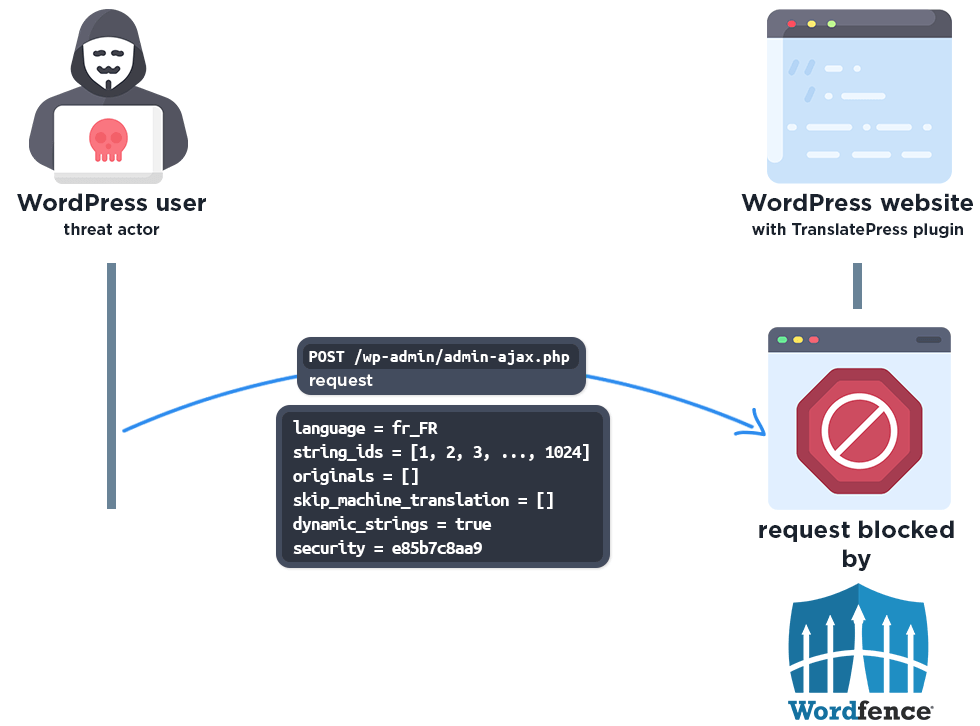
The second behavior is that the plugin exposes a public AJAX action, trp_get_translations_regular, which is handled by the get_translations() function in the TRP_Editor_Api_Regular_Strings class and returns the dictionary rows.
public function get_translations() {
	if ( defined( 'DOING_AJAX' ) && DOING_AJAX ) {
		check_ajax_referer( 'get_translations', 'security' );
		if ( isset( $_POST['action'] ) && $_POST['action'] === 'trp_get_translations_regular' && !empty( $_POST['language'] ) && in_array( $_POST['language'], $this->settings['translation-languages'] ) ) {
			$originals = (empty($_POST['originals']) )? array() : json_decode(stripslashes($_POST['originals'])); /* phpcs:ignore */ /* sanitized downstream */
			$skip_machine_translation = (empty($_POST['skip_machine_translation']) )? array() : json_decode(stripslashes($_POST['skip_machine_translation'])); /* phpcs:ignore */ /* sanitized downstream */
			$ids = (empty($_POST['string_ids']) )? array() : json_decode(stripslashes($_POST['string_ids'])); /* phpcs:ignore */ /* sanitized downstream */
			if ( is_array( $skip_machine_translation ) ) {
                if ( is_array( $ids ) || is_array( $originals ) ) {
                    $trp = TRP_Translate_Press::get_trp_instance();
                    if ( !$this->trp_query ) {
                        $this->trp_query = $trp->get_component( 'query' );
                    }
                    if ( !$this->translation_manager ) {
                        $this->translation_manager = $trp->get_component( 'translation_manager' );
                    }
                    $block_type   = $this->trp_query->get_constant_block_type_regular_string();
                    $dictionaries = $this->get_translation_for_strings( $ids, $originals, $block_type, $skip_machine_translation );

                    $localized_text = $this->translation_manager->string_groups();
                    $string_group   = __( 'Others', 'translatepress-multilingual' ); // this type is not registered in the string types because it will be overwritten by the content in data-trp-node-type
                    if ( isset( $_POST['dynamic_strings'] ) && $_POST['dynamic_strings'] === 'true' ) {
                        $string_group = $localized_text['dynamicstrings'];
                    }
                    $dictionary_by_original = trp_sort_dictionary_by_original( $dictionaries, 'regular', $string_group, sanitize_text_field( $_POST['language'] ) );

                    echo trp_safe_json_encode( $dictionary_by_original );//phpcs:ignore
                }
            }
		}
	}

	wp_die();
}
Because the handler accepts an attacker-supplied list of string IDs and returns the corresponding dictionary rows, an attacker can enumerate the secondary-language dictionary. If the administrator’s password reset URL is present in the dictionary, it is returned in plaintext, allowing the attacker to obtain and use the reset link.
By chaining these two behaviors, an unauthenticated attacker who knows an administrator’s username or email can first trigger a password reset for that administrator, then use the public AJAX action to read the reset URL out of the secondary-language dictionary. With the reset key, the attacker can set a new password for the administrator account and log in, taking full control of the site.
As with all account takeover vulnerabilities that result in administrator access, this can lead to complete site compromise. Once authenticated as an administrator, the attacker can create additional administrator accounts, install malicious plugins or themes containing backdoors, modify site content, or exfiltrate sensitive data.
Important Note
We would like to draw attention to the fact that the password reset URL is only leaked when the targeted administrator’s profile language is set to a published secondary language. If the administrator’s language is left as the site’s default language, their password reset email is never processed through the secondary-language translation pipeline, and the reset URL is therefore not persisted in a dictionary table that the public AJAX action can read.
The Importance of Two-Factor Authentication
While the most reliable way to protect your site against this vulnerability is to update to a patched version, this advisory is also a good reminder of why enabling two-factor authentication (2FA) on your administrator accounts is a valuable additional layer of defense. Vulnerabilities like this one allow an attacker to reset an administrator’s password, but a password alone is not enough to log in when 2FA is enabled. With two-factor authentication in place, an attacker who manages to change an administrator’s password would still be unable to access the account without the second authentication factor, such as a time-based one-time code from an authenticator app.
Wordfence includes built-in two-factor authentication, even in the free version, and we strongly recommend enabling it on all administrator accounts. Defense in depth means not relying on any single control: keeping your plugins updated, running a firewall, and enabling 2FA together give your site far stronger protection than any one measure on its own.
The Importance of Passwordless Login with Passkeys
Two-factor authentication is not the only way to strengthen your login security. Passkeys are a newer, even stronger option, and they are particularly relevant to a vulnerability like this one, which targets the traditional password-based login flow. A passkey is a passwordless credential based on the WebAuthn and FIDO2 standards, allowing a user to sign in using their device’s biometrics, such as a fingerprint or facial recognition, a device PIN, or a hardware security key, instead of a password.
Because a passkey is cryptographically bound to both the user’s device and the specific website it was created for, there is no shared secret that can be leaked, phished, or reset the way a password can. An attacker who obtains or resets a password gains far less, because the account is protected by a credential that never leaves the user’s device and cannot be reused on a different site. This makes passkeys inherently resistant to phishing and to the kind of credential-based attacks that account takeover vulnerabilities rely on. We covered the security advantages of passkeys in more detail in a dedicated article: WordPress Password Security: Why Passkeys Are More Secure.
As of version 9.0, Wordfence includes built-in support for passkeys, even in the free version, giving you another, even stronger option for securing your login. We recommend setting them up on your administrator accounts as a modern alternative to password-based authentication.
Wordfence Firewall
The following graphic demonstrates the steps to exploitation an attacker might take and at which point the Wordfence firewall would block an attacker from successfully exploiting the vulnerability.
Disclosure Timeline
Vendor / external action
Conclusion
In this blog post, we detailed an Unauthenticated Account Takeover vulnerability within the TranslatePress plugin affecting all versions up to, and including, 3.3.1. This vulnerability allows unauthenticated threat actors to obtain an administrator’s password reset link from a secondary-language translation dictionary and take over the administrator account, leading to complete site compromise. The vulnerability has been fully addressed in version 3.3.2 of the plugin.
We encourage WordPress users to verify that their sites are updated to the latest patched version of TranslatePress as soon as possible considering the critical nature of this vulnerability.
Wordfence Premium, Wordfence Care, and Wordfence Response users received a firewall rule to protect against known exploits targeting this vulnerability in TranslatePress, hosted on WordPress.org, on August 13, 2026. Sites using the free version of Wordfence will receive the same protection 30 days later on September 12, 2026.
If you know someone who uses this plugin on their site, we recommend sharing this advisory with them to ensure their site remains secure, as this vulnerability poses a significant risk.
The post 400,000 WordPress Sites Affected by Account Takeover Vulnerability in TranslatePress WordPress Plugin appeared first on Wordfence.